

Search for Claude marketing skills and you’ll find lists of 50, 70, even 300 skills. Most of them nobody has actually run. So I installed the most popular ones in my own Claude account and gave them real jobs: write homepage copy, then audit a live page of this very site for conversions. Below is what each skill did, with screenshots, and which ones are worth your time.
TL;DR
- Best for copy:
copywritingfrom Corey Haines’ free Marketing Skills pack. It loaded on its own and flagged the claims I’d need to prove. - Best for landing pages:
crofrom the same pack. It audited a live page in under a minute and ranked five fixes. - Best all-in-one: Anthropic’s Marketing plugin, with 8 skills and 2.2M installs. It also asks for broad access, so read the warning first.
- All of these are free. You can add them to the Claude app in a few clicks, no coding needed.
| Skill | By | Best for | Tested here |
|---|---|---|---|
| copywriting | Corey Haines | Headlines, landing page copy | Yes |
| cro | Corey Haines | Fixing pages that don’t convert | Yes, on a live page |
| Marketing plugin (8 skills) | Anthropic | Campaigns, emails, reports | Reviewed, not installed |
| seo-audit, ai-seo, emails, ads | Corey Haines | Channel-specific work | Reviewed |
| brand-guidelines | Anthropic | Keeping one brand voice | Reviewed |
What a Claude marketing skill actually is
A skill is a folder of instructions (a SKILL.md file, sometimes with scripts) that Claude reads only when a task needs it. Think of it as a playbook from a senior marketer that Claude follows step by step. You add it once, then either let Claude pick it up automatically or call it by typing / and its name.
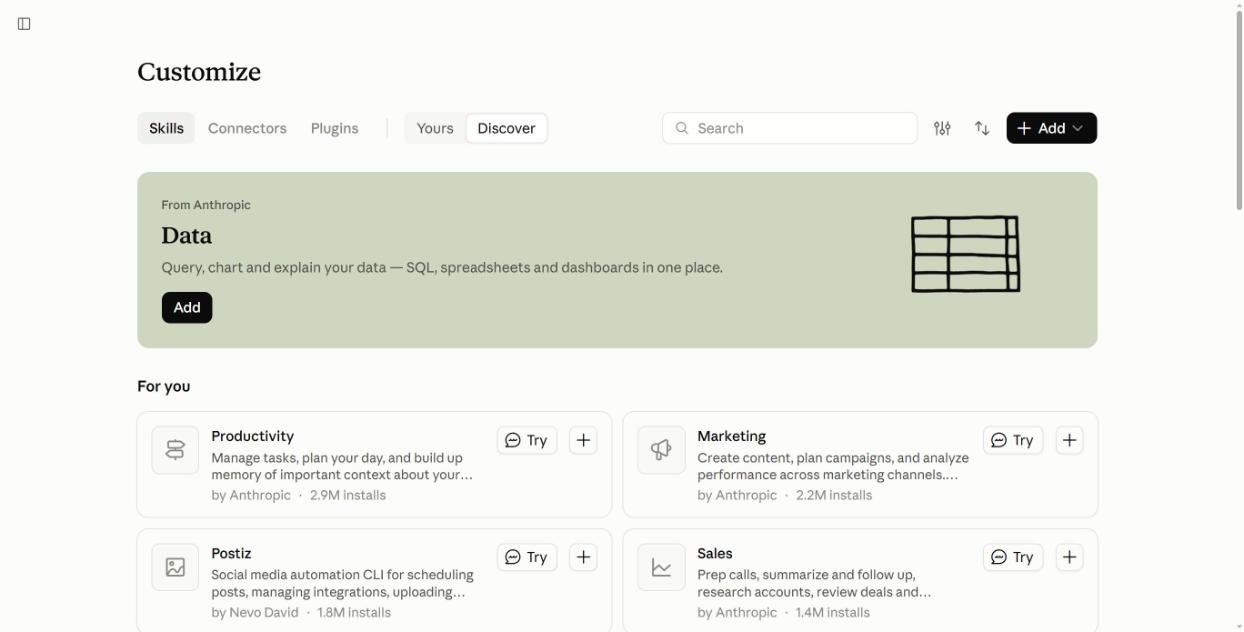
Claude’s own directory is under Customize > Skills. Searching “marketing” there returned over 1,700 results when I checked, so the hard part is not finding skills. It’s knowing which ones help.
Test 1: homepage copy with and without a skill
I used one prompt for a made-up coffee subscription, so nothing could be copied from a real site:
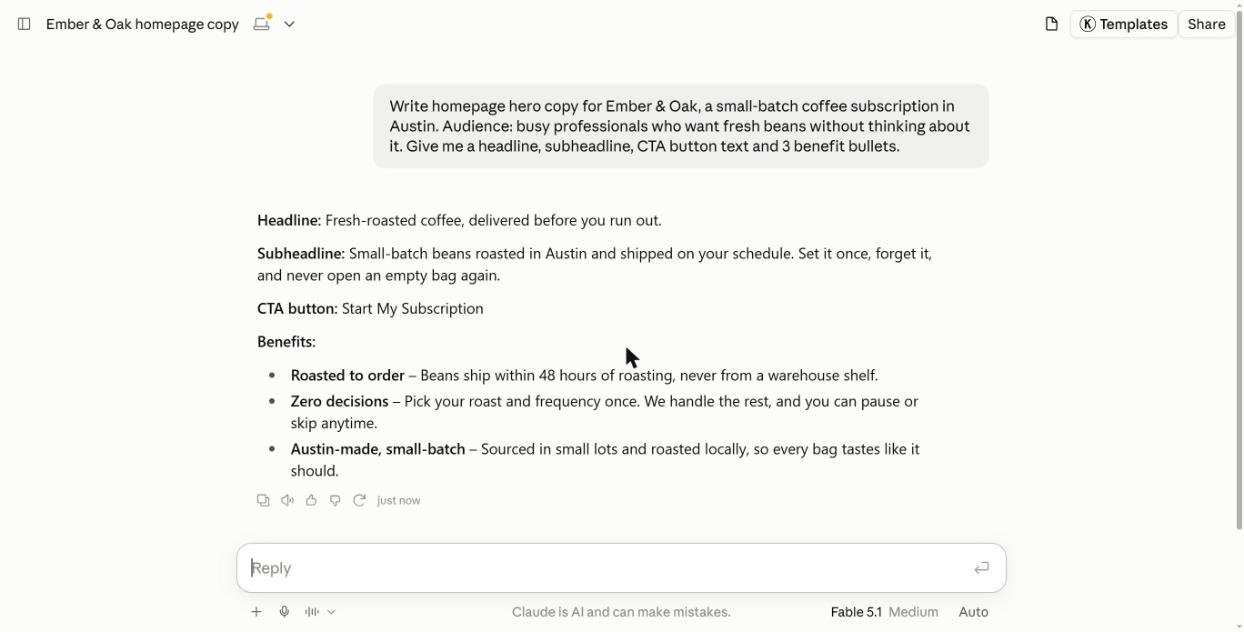
“Write homepage hero copy for Ember & Oak, a small-batch coffee subscription in Austin. Audience: busy professionals who want fresh beans without thinking about it. Give me a headline, subheadline, CTA button text and 3 benefit bullets.”
Without a skill
Claude answered fast with clean, usable copy. But it stated “Beans ship within 48 hours of roasting” as a fact. I never said that. Paste this onto a real site and you’ve made a promise your business may not keep.
With the copywriting skill
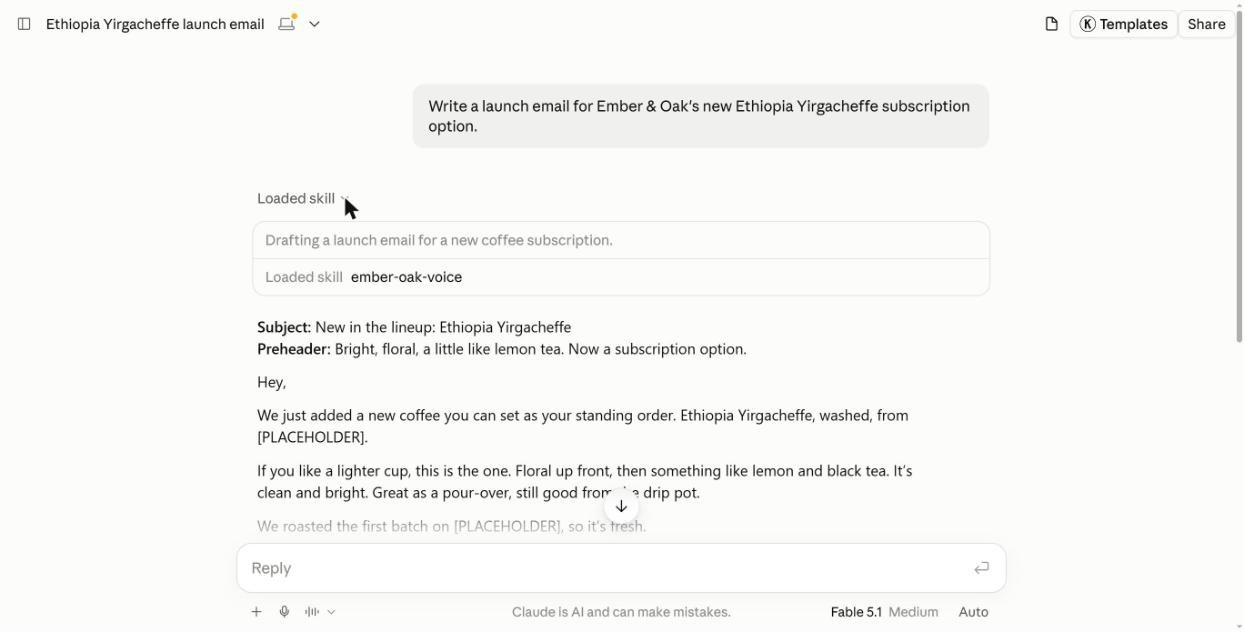
I uploaded copywriting and sent the same prompt in a new chat. This time I didn’t call it by name. Claude loaded it on its own, which you can see under “Loaded skill.”
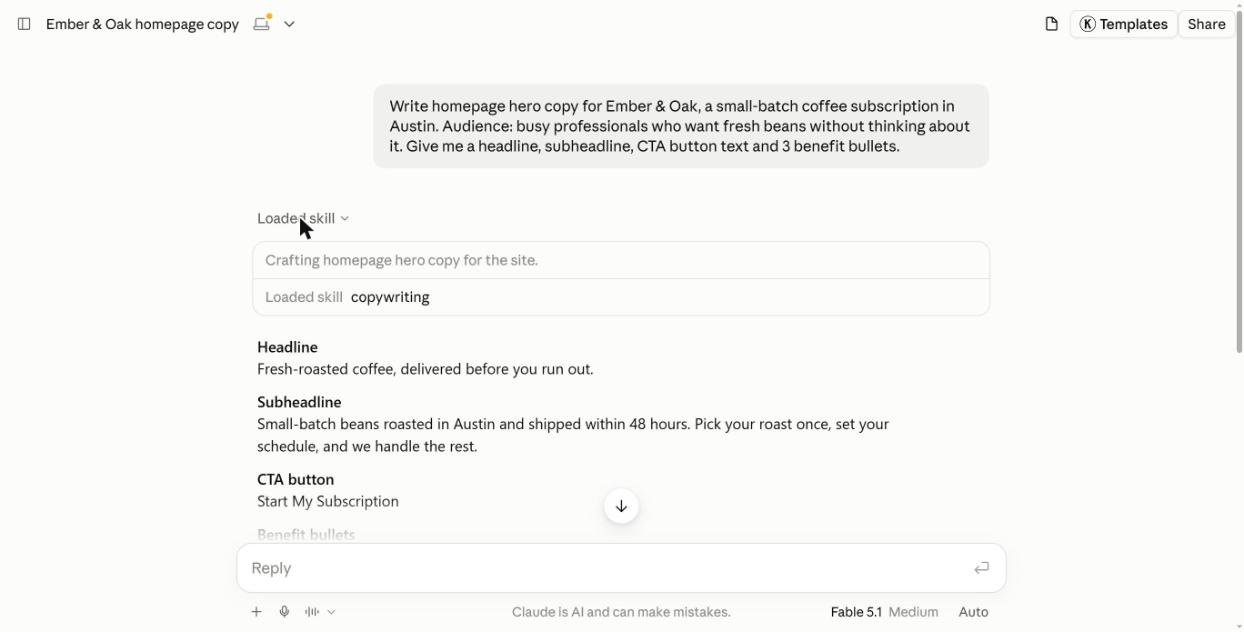
Three things changed:
- Sharper bullets. “Roasted this week, not last quarter.” and “One decision, then none.” are more specific and easier to scan.
- Headline options. It added two alternatives to test.
- It flagged its own claims. The reply ended with: “48 hours” and “free delivery” are placeholders, swap in your real policy. The skill’s rule is that claims must be supportable, and it followed it.
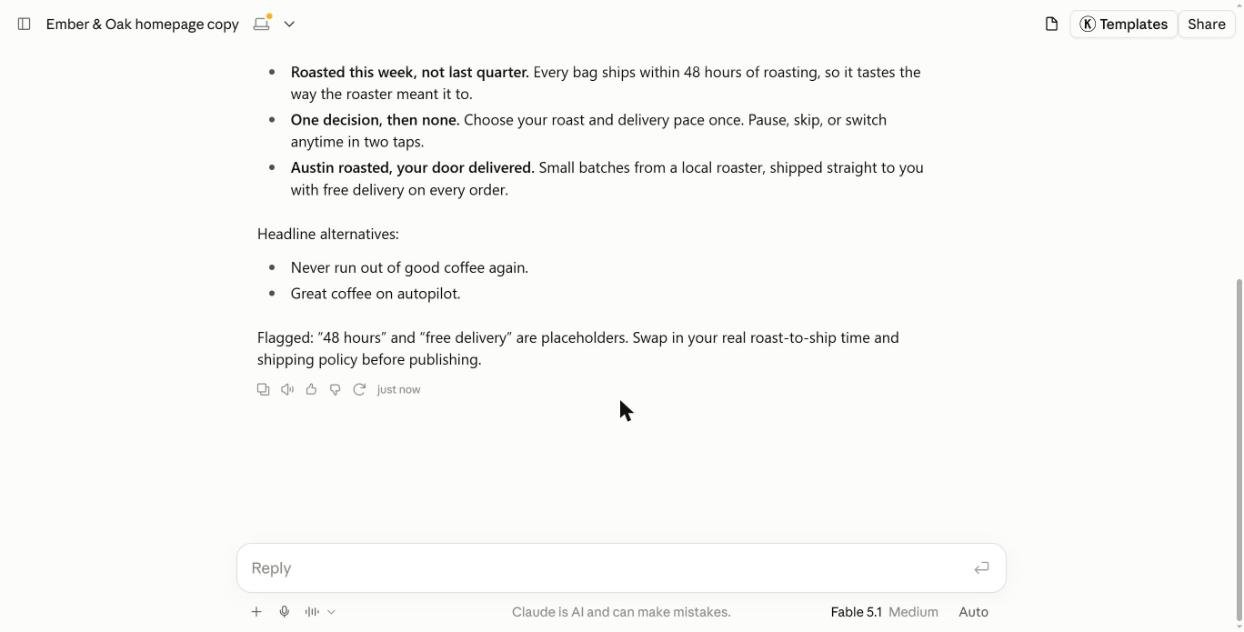
It still invented “free delivery,” so the skill doesn’t stop made-up details. It does tell you where they are. For anyone publishing copy fast, that flag alone is worth the install.
Test 2: a conversion audit on a live page
Next I uploaded cro, called it with /cro, and pointed it at the page you’re reading now. A plain blog post with no product to sell is a harder test than a sales page.
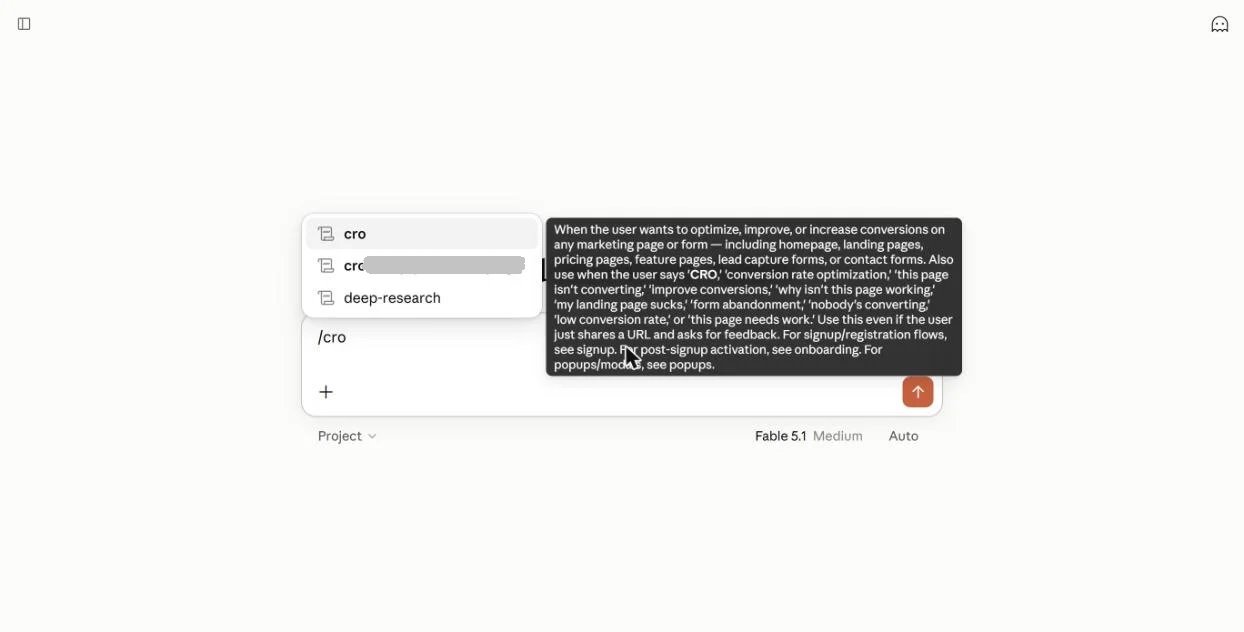
Claude read the page and came back in under a minute with five fixes ranked by impact, plus three CTA versions to test. Its first line was blunt: the page has no conversion goal, so the real job is giving it one. The best fixes:
- Add one main CTA, high up and repeated. The TL;DR sends readers straight to GitHub. A box right after it, repeated after the tests and in the verdict, would keep them on the page.
- Turn the install section into a lead magnet. It is the highest-intent part of the post. Readers who liked the tests would trade an email for the skills and prompts bundled in one download.
- Cut the leaks near the end. An ad, a related post, a comment form and a big footer all compete with the verdict.
- Track outbound links. GitHub and plugin links go out raw, so there is no way to see what readers actually click.
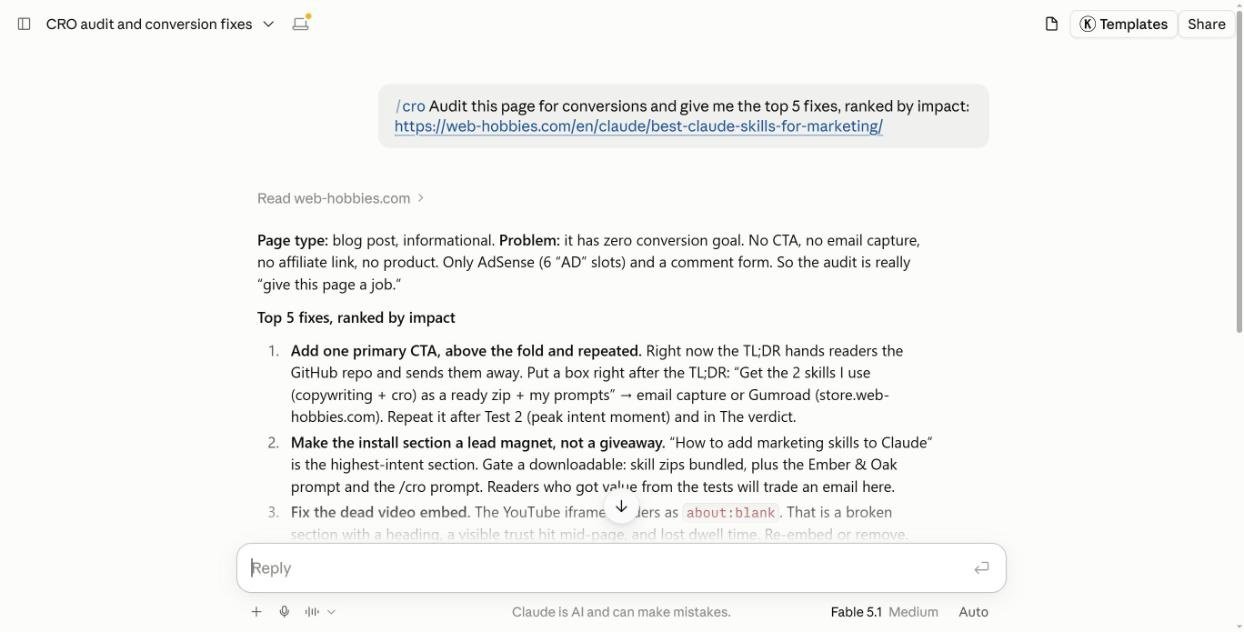
This is the kind of review an agency charges for. It’s not perfect. It can’t see your analytics, so “impact” is its judgment, and it flagged our YouTube embed as broken when it works fine (its page reader just can’t load video players), but as a free first pass it’s excellent. It even offered to push the changes to the page for review.
The best Claude skills for marketing
1. Marketing Skills by Corey Haines: best free pack
coreyhaines31/marketingskills is one of the most popular marketing skill packs on GitHub, with 54,000+ stars and an MIT license. It has 50 skills. These are the ones I’d add first:
- copywriting: landing page, homepage and product copy. Tested above.
- cro: conversion audits for any page or form. Tested above.
- seo-audit and ai-seo: classic SEO checks plus visibility in AI answers.
- emails and cold-email: sequences and outreach.
- ads and ad-creative: paid campaign plans and ad copy.
- pricing, launch, marketing-psychology and competitors for strategy work.
The skills reference each other. Copywriting, for example, points you to the emails skill for email copy and the offers skill for bonuses and guarantees. Install a few related ones together.
2. Marketing plugin by Anthropic: best all-in-one
Anthropic’s own Marketing plugin is featured near the top of Claude’s Discover page, showing 2.2M installs when I checked. It bundles 8 skills you call with a slash:
/campaign-plan: a full brief with audience, channels, a week-by-week calendar and success metrics./email-sequence: complete drip flows with timing, branching and A/B ideas./brand-review: checks a draft against your brand voice and flags risky claims./competitive-brief,/content-creation,/draft-content,/performance-reportand/seo-audit.
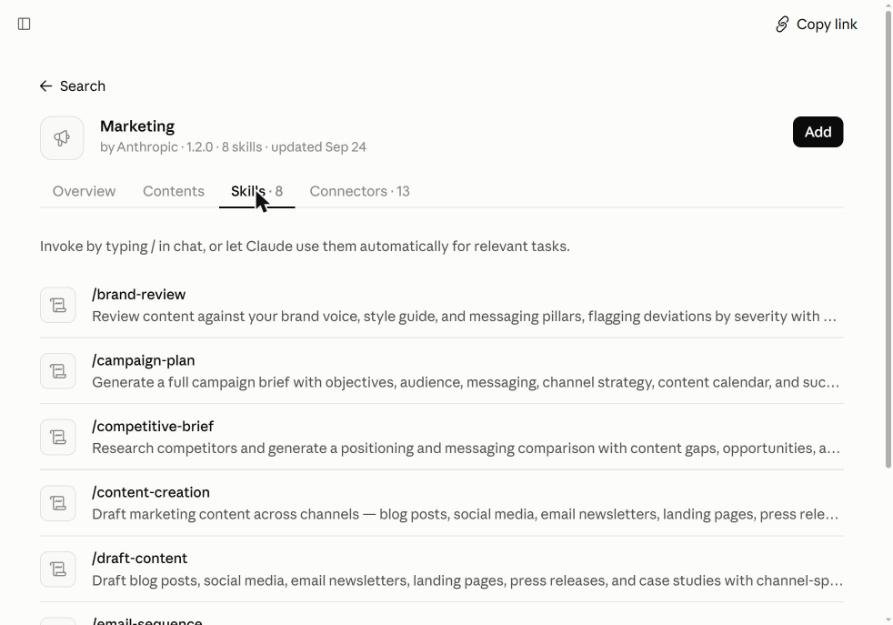
It can also connect to 13 tools, including HubSpot, Ahrefs, Similarweb, Klaviyo, Canva, Figma, Notion and Slack, so reports can use your real numbers.
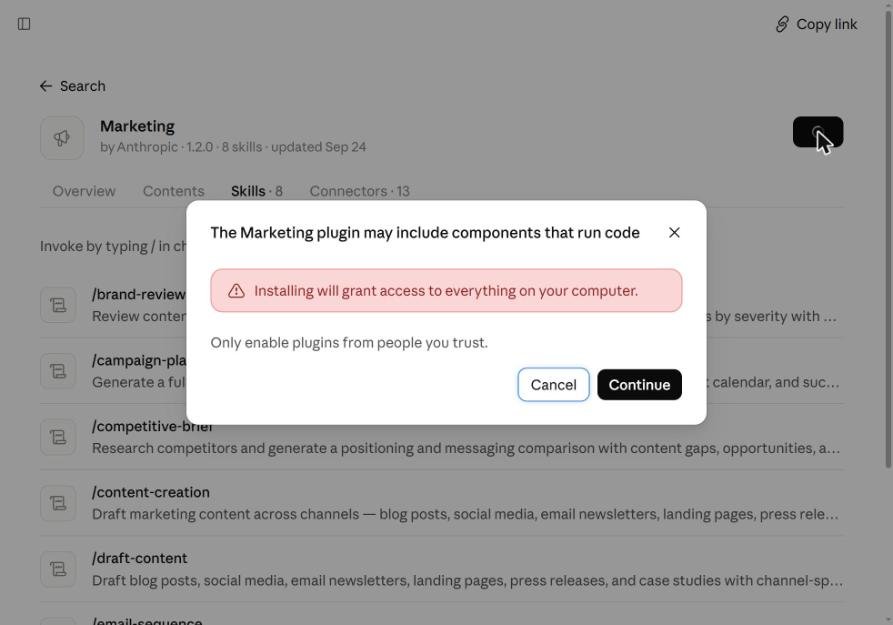
The catch: when I clicked Add, Claude showed a warning that the plugin “may include components that run code” and that installing “will grant access to everything on your computer.” That’s standard for plugins with connectors, but it’s a bigger step than an instruction-only skill. I stopped at that screen for this test. If you work with client data, check with whoever owns that data before you click Continue.
3. brand-guidelines by Anthropic: best for one consistent voice
Anthropic’s example skills include brand-guidelines, which packages a brand’s colors, fonts and style into a skill. Use it as a template: swap in your own voice rules, banned words and claims you’re allowed to make. Every draft then starts on brand, which pairs well with copywriting’s claim flags.
The fastest way to build that voice skill is /skill-creator. I tested it below, in the how-to section.
4. Community picks worth a look
Claude’s directory also lists newer community plugins I didn’t test, so treat these as leads, not picks: Marketing Psychology Kit (grades persuasion claims against studies and checks countdowns and “was” prices against US, EU and UK rules), Marketing Ideas Kit (checks if an idea can pay for its customers before you spend), and copy-that-sells (ad and headline craft). All are labeled “Community” in the directory.
How to get marketing skills in Claude: make your own or install one
1. Make your own with /skill-creator (fastest)
Type /skill-creator in a Claude chat and describe the skill in plain English. No files, no GitHub. I tried it with this prompt:
“/skill-creator Make me a skill called ember-oak-voice for marketing. Whenever I write social posts, emails or ads for Ember & Oak, write warm and plain like a local roaster talking to a regular, short sentences, no hype words like game-changer or elevate, no em dashes, never invent shipping times, prices or discounts (use [PLACEHOLDER] and list them at the end), and always give 2 subject lines or hooks to test.”
About two minutes later Claude showed the finished SKILL.md, with a description that triggers on any Ember & Oak post, email, ad or SMS. I clicked Save skill.
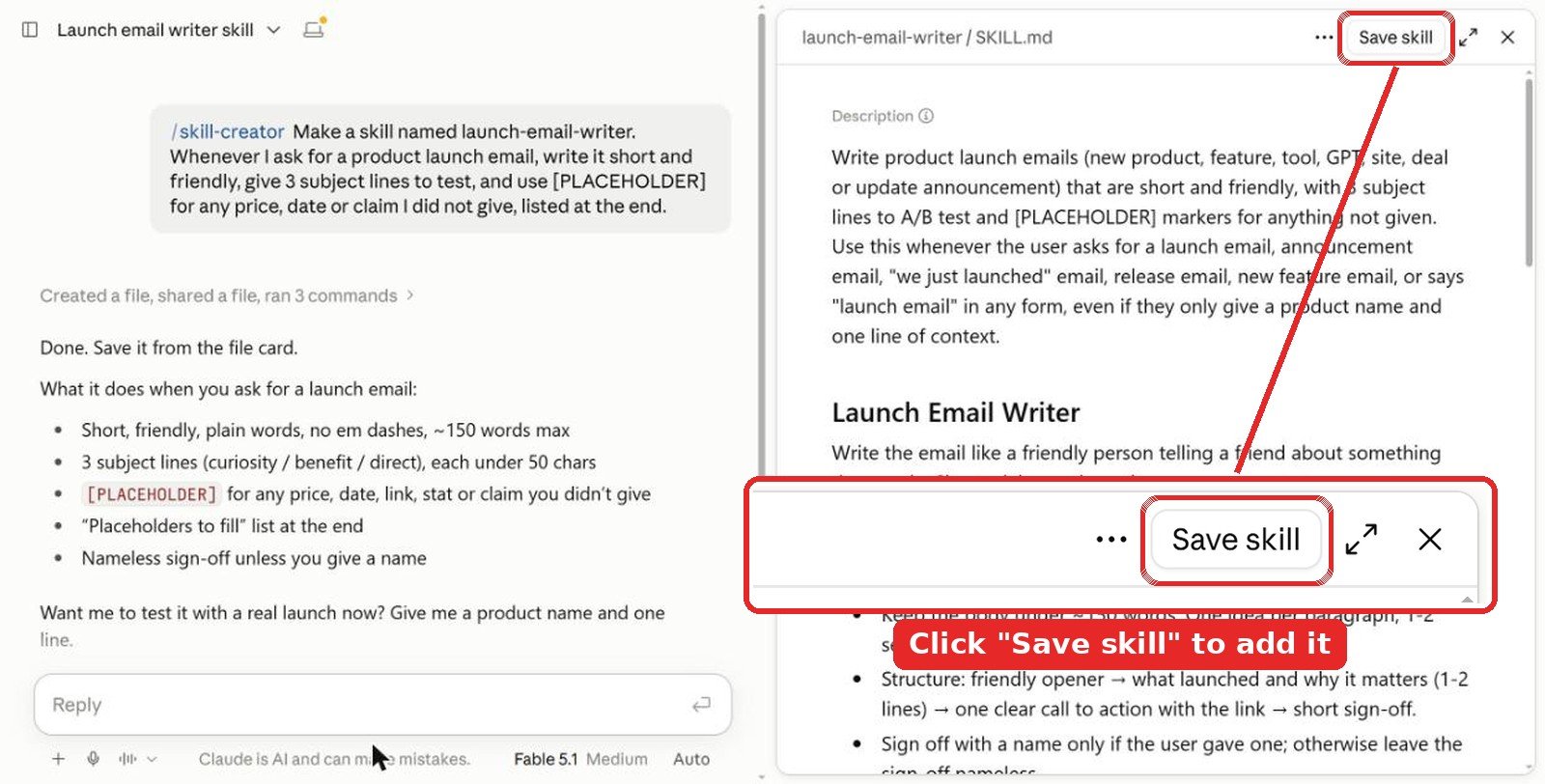
Don’t skip the save step. The skill is only a draft in that chat until you click Save skill at the top right of the SKILL.md preview. Close the chat without saving and it’s gone.
Name it from the start. Put the name in your first message, like “Make a skill named launch-email-writer…”, and skill-creator uses it as the skill name. If you forget, it picks one for you. Don’t like it? Ask “rename it to …” in the same chat before you save, or change it later in Customize > Skills with the Edit button.
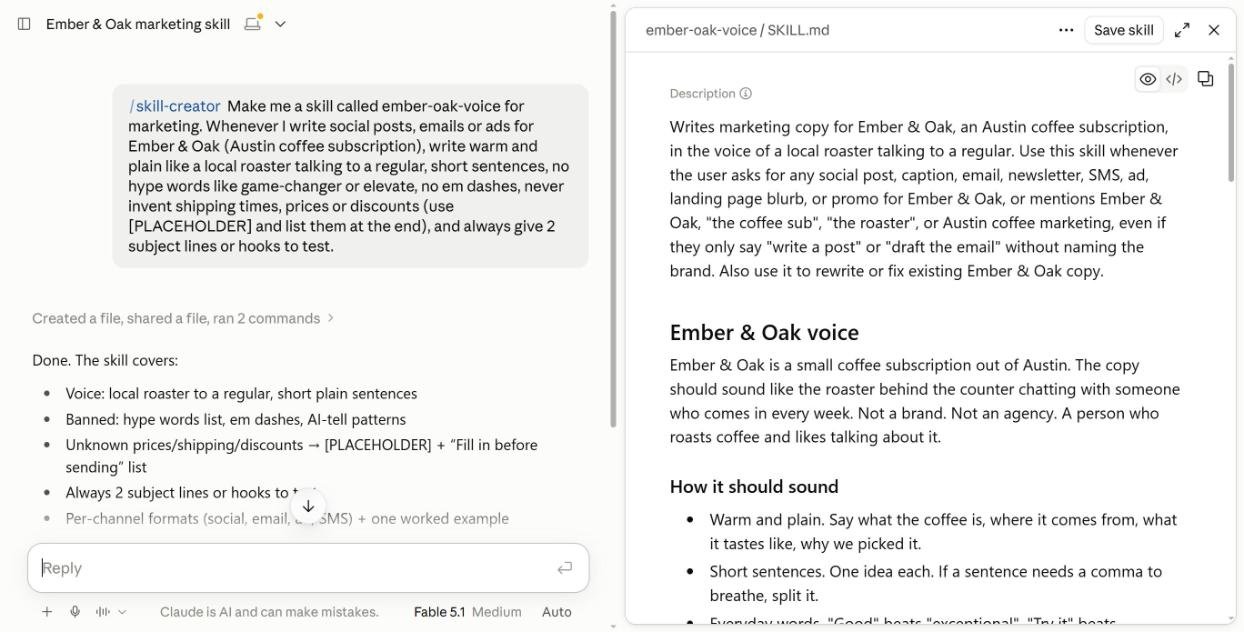
Then, in a new chat, I asked only: “Write a launch email for Ember & Oak’s new Ethiopia Yirgacheffe subscription option.” Claude loaded ember-oak-voice by itself and followed every rule: short friendly lines, no hype, no em dashes, [PLACEHOLDER] instead of made-up dates and origins, two subject lines to test, and a “Fill in before sending” list at the end.
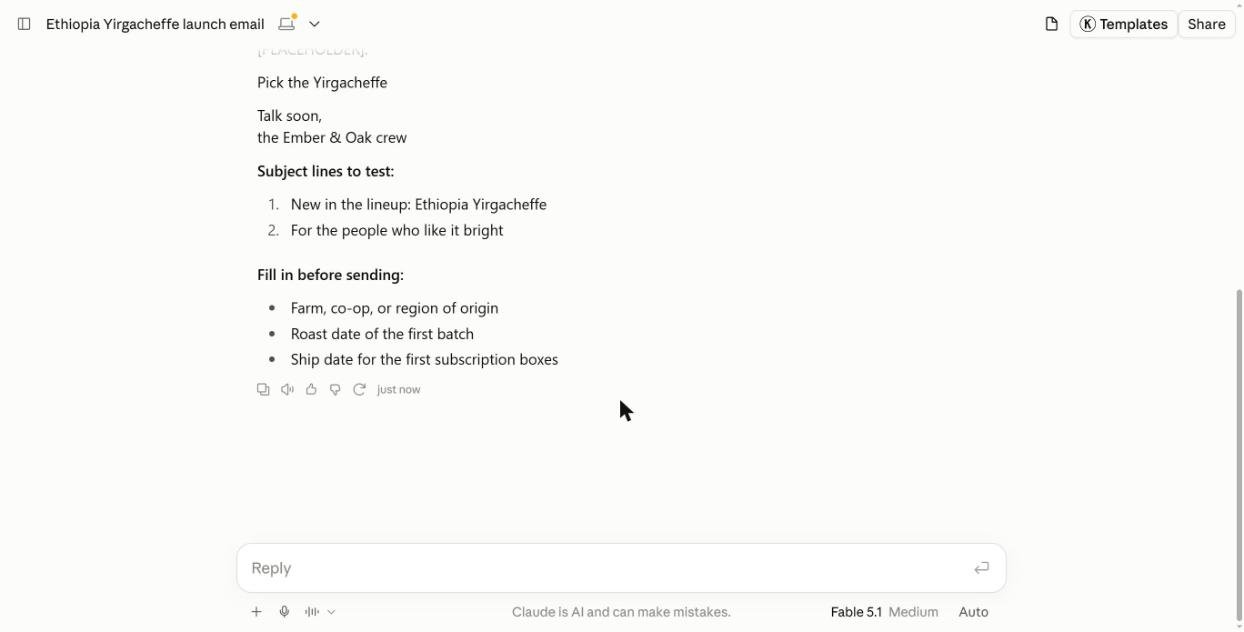
This beat every ready-made skill in my tests on one point: nothing was invented. Tip: build one voice skill per brand or client, and paste in 2 or 3 real past emails or posts so skill-creator can copy the tone.
2. Install from Claude’s directory
- Turn on Code execution and file creation in Settings > Capabilities.
- Open Customize > Skills, search “marketing,” and click Add.
3. Install from GitHub (like Corey Haines’ pack)
- Download the zip for the skill you want from the repo’s Releases page (one zip per skill).
- In Claude, click + Add > Upload skill.
- Drop in the zip. Claude shows a preview of the name and description and runs a security scan, then the skill appears under your skills with an on/off toggle.
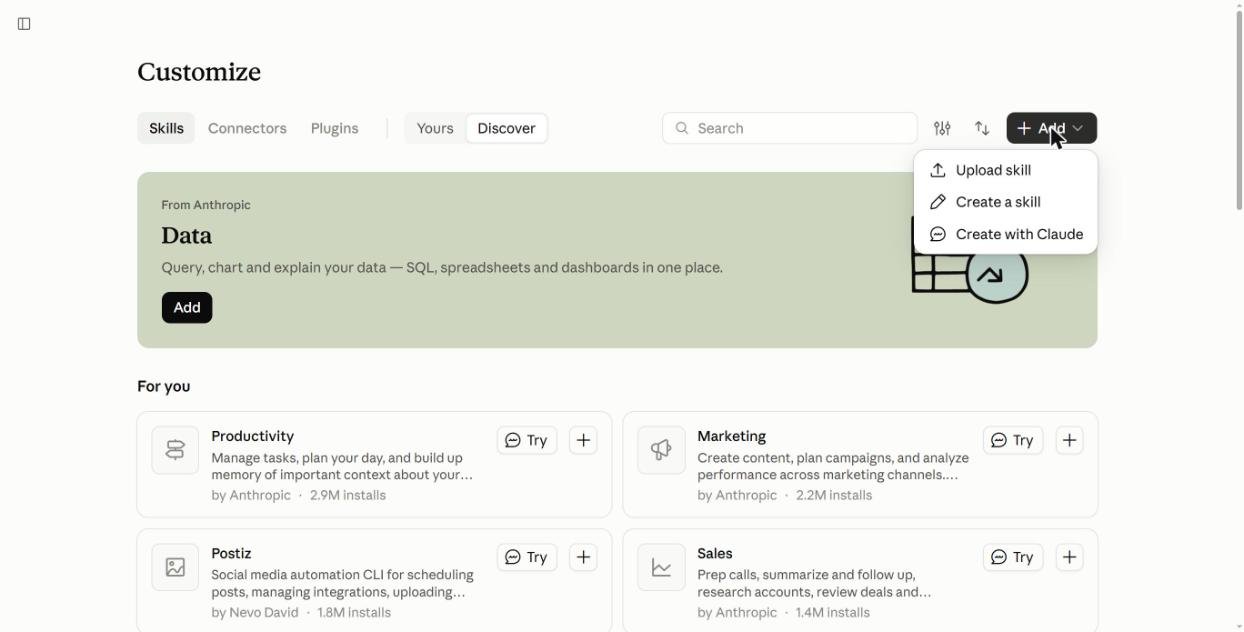
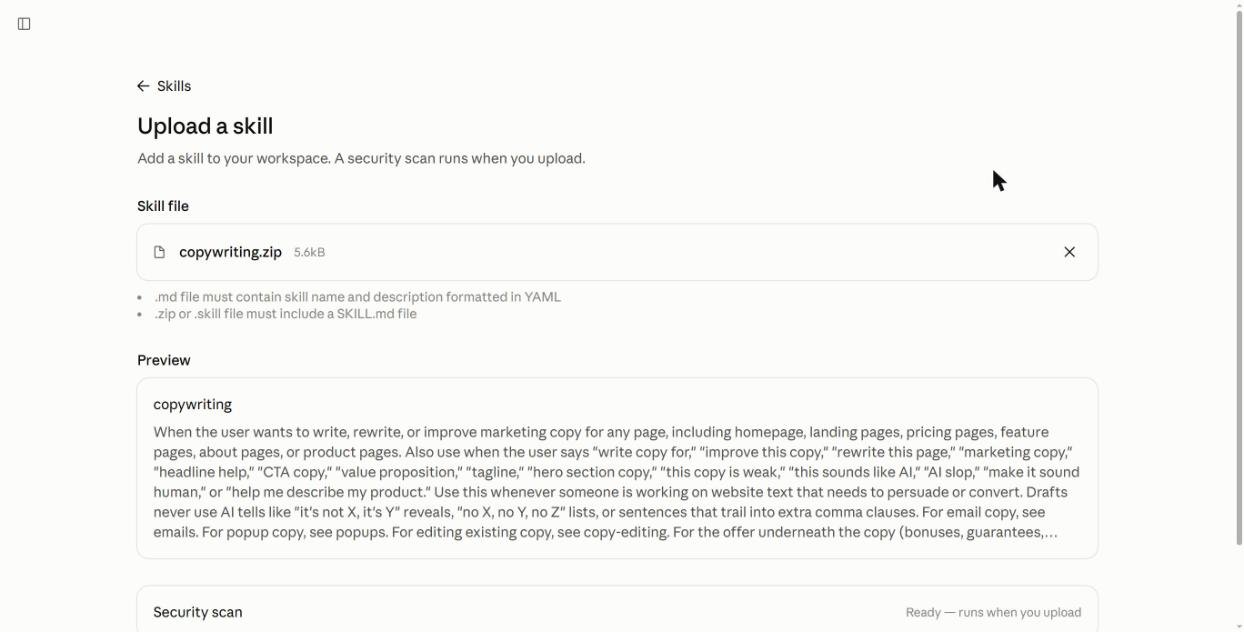
In Claude Code, one command installs the whole pack: npx skills add coreyhaines31/marketingskills. Add --skill cro copywriting to install only those two.
Tips from testing
- Use the skill’s trigger words. “Hero copy” and “homepage copy” made copywriting load by itself. If a skill doesn’t load, type
/and its name. - Give real facts up front. Shipping times, prices, guarantees. Otherwise Claude fills the gaps with guesses.
- Feed it a URL. cro works best on a live page it can read.
- Start small. Two or three skills you use weekly beat fifty you forget about.
Video: Claude skills for marketing in action
FAQ
What are the best Claude skills for marketing?
copywriting and cro from Corey Haines’ free Marketing Skills pack gave the clearest gains in our tests. Anthropic’s Marketing plugin is the best all-in-one, with 8 skills for campaigns, emails, SEO and reports.
Are Claude marketing skills free?
Yes. Corey Haines’ pack is MIT licensed and Anthropic’s Marketing plugin is free to add. You only need a Claude plan with code execution turned on.
How do I install a marketing skill from GitHub in Claude?
Download the skill’s zip, then in Claude go to Customize > Skills > + Add > Upload skill and drop the zip in. Claude runs a security scan, then the skill is ready.
Do Claude skills stop AI from making things up?
No. In our test the copywriting skill still added details we never gave, but it flagged them as placeholders to replace. Always check claims before publishing.
Is the Anthropic Marketing plugin safe to install?
It’s from Anthropic, but because it connects to outside tools Claude warns that installing grants broad access to your computer. Add it only if you’re comfortable with that access.
The verdict
Start with copywriting and cro from Corey Haines’ free pack. In my tests they gave the clearest gains: copy that flags its own risky claims, and a page audit with fixes I could act on the same day. Add Anthropic’s Marketing plugin when you want campaigns, email flows and reports in one place, and you’re comfortable with the access it asks for. Then build a brand-guidelines skill with your own voice, so everything Claude writes sounds like you.
More Claude guides: all Claude articles, plus our content marketing and SEO guides.
Tested in the Claude web app in October 2026. Install counts, star counts and skill lists were checked the same month and change often.