
Most lists of the best design skills for Claude just repeat GitHub star counts. I wanted to see what the skills actually change. So I gave Claude two real design briefs, a landing page hero and a print poster, and ran each one twice: once with no skill and once with Anthropic’s official design skill loaded. I also styled one report with theme-factory and built my own design-review skill with skill-creator. Here is what happened, with the real outputs.
TL;DR
- Best overall:
frontend-designby Anthropic. It turned a generic swim school hero into a top-down pool with lane ropes. It is also the most installed skill in Anthropic’s repo on skills.sh, at 988.6K installs when I checked. - Best for posters and art:
canvas-design. It writes a design philosophy first, then builds the piece. The result looked like a gallery print, not a flyer. - Best for fast, consistent styling:
theme-factory, with 10 ready color and font themes. - Biggest surprise: a 2-minute review skill I made with
/skill-creatorcaught a real contrast problem in the “better” design.
| Skill | By | Best for | Tested here |
|---|---|---|---|
| frontend-design | Anthropic | Landing pages, UI, web apps | Yes, with and without |
| canvas-design | Anthropic | Posters, art, static visuals | Yes, with and without |
| theme-factory | Anthropic | Colors and fonts for decks and docs | Yes |
| UI/UX Pro Max | nextlevelbuilder | Design systems in Claude Code | Reviewed |
| brand-guidelines | Anthropic | Keeping one brand look | Reviewed |
How I tested
A design skill is a SKILL.md file with instructions Claude reads before it starts a design task. To see what that file is worth, I kept everything else the same:
- Same prompt, word for word, in two fresh Claude sessions.
- Run A: no skill at all. Run B: Claude read the skill’s official SKILL.md from Anthropic’s skills repo first and followed it.
- I rendered every result at 1600px wide in a real browser (Chromium) and took the screenshots you see below. No edits.
The brands are made up on purpose, so nothing could be copied from a real site: Tidepool, a kids’ swim school in San Diego, and Low Tide Jazz, a free Friday jazz night at a library. I ran these tests in Claude sessions, not by clicking through the Claude app, and I did not add any new skills to my account for this article.
Test 1: a landing page hero, with and without frontend-design
The prompt:
“Build a landing page hero section for Tidepool, a small swim school in San Diego that teaches kids ages 3 to 10. It needs a headline, a subheadline, a ‘Book a trial lesson’ button, and a simple visual. Single HTML file.”
Without a skill
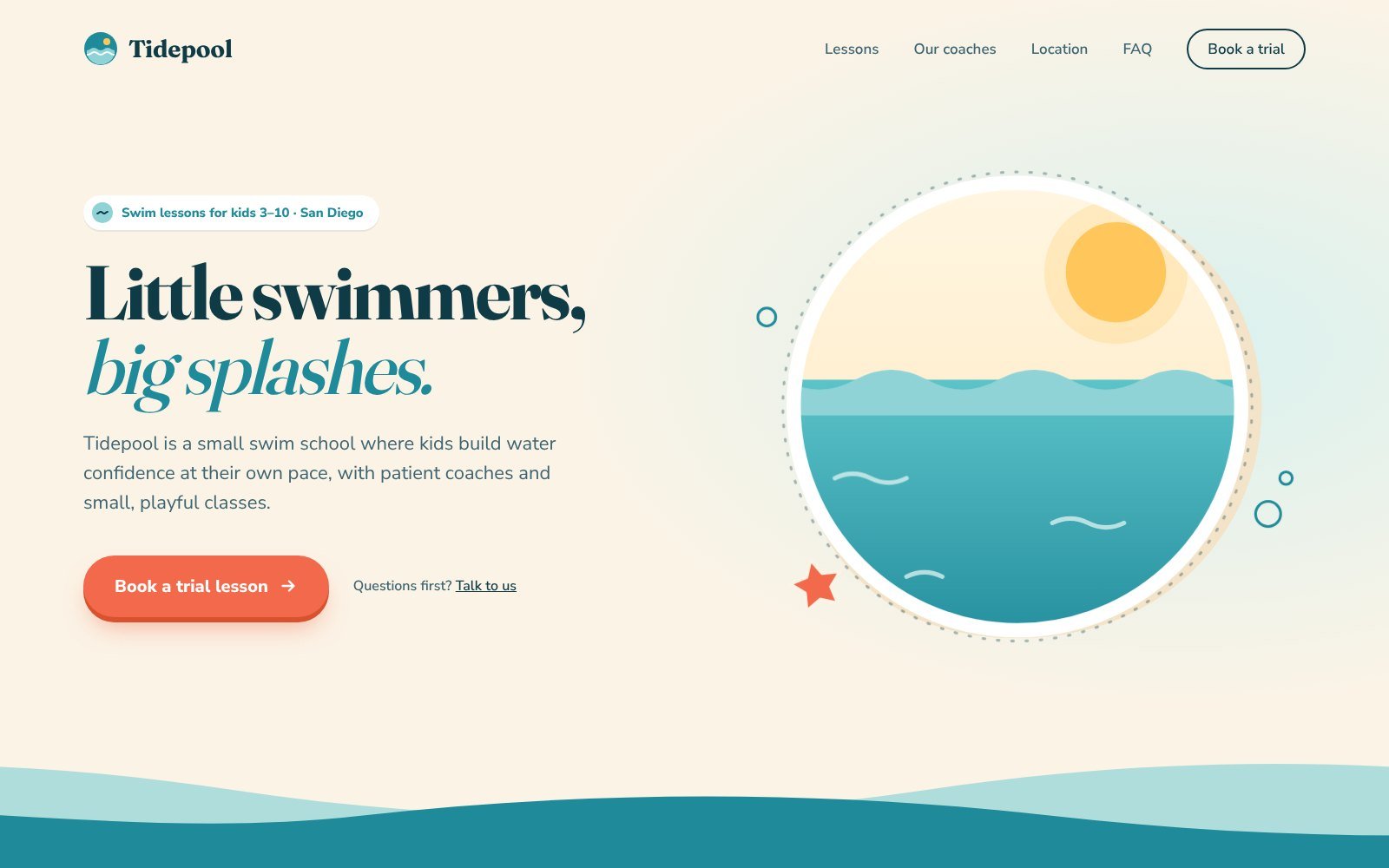
Claude made a clean, friendly page in under a minute. Nothing is wrong with it. But it is the page you have seen a thousand times: cream background, a serif headline with two words in teal italics, a coral button with an arrow, and a sun over waves in a circle.
With frontend-design
The skill makes Claude plan before it codes: a 4 to 6 color palette, fonts, a layout idea, then a check of that plan against the brief. Claude’s first plan used sky blue, sunny yellow, rounded kids’ fonts and bubbles. Its own review called that what any kids’ swim prompt would produce, and it threw the plan out.
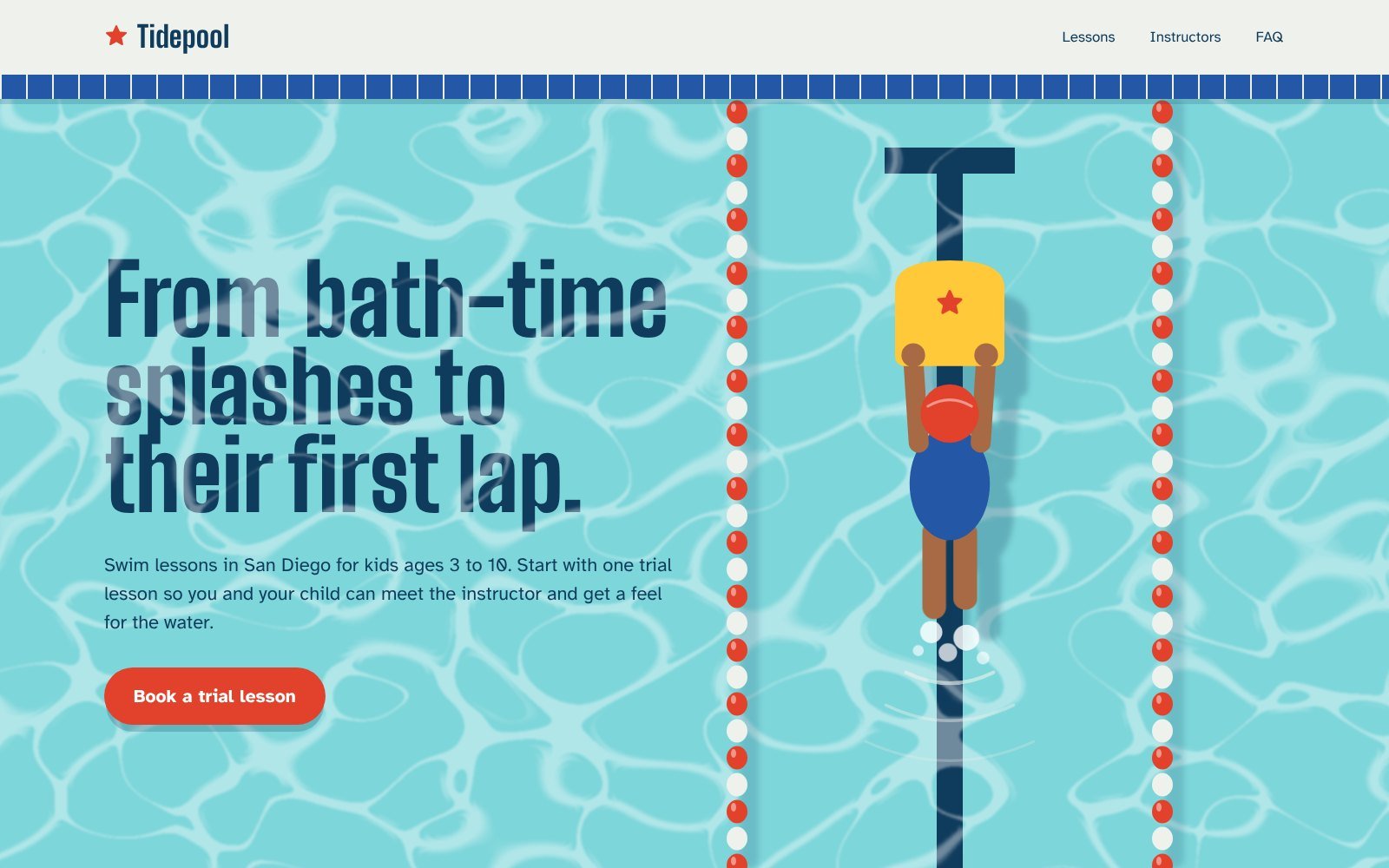
The final hero is a pool seen from above. The page columns are swim lanes split by red and white rope floats. A child on a yellow kickboard swims up her lane, and the headline, “From bath-time splashes to their first lap,” is set like lettering painted on the pool floor. Every color is named after a pool object, like “Rescue Tube Red” for the button.
It also checked its own work. It took screenshots, fixed a headline line break that left “From” alone, tested a 390px phone width, and added a reduced-motion rule. That run took about 4.5 minutes versus about 1 minute without the skill.
The honest catch: look closely at “splashes to.” The moving light pattern on the water washes out parts of the headline. I only caught how bad it was later, with the custom skill in the how-to section below. A bolder design is not always a more readable one.
Test 2: a print poster, with and without canvas-design
The prompt: “Make a poster for Low Tide Jazz, a free Friday night jazz series at a neighborhood library. Portrait, ready to print.” Both runs used placeholders like [Date] and [Address] instead of inventing facts.
Without a skill, Claude drew a nice night shore with a big moon and waves shaped like a music staff. It’s good. It also reads like a stock event flyer.
With canvas-design, Claude first wrote a short design manifesto. It named the movement “Slack Water,” the still moment before the tide turns. Then it drew about 64 dashed contour lines that thin out toward a brass “low-water datum” line, like a tide gauge chart, with large thin serif type below.
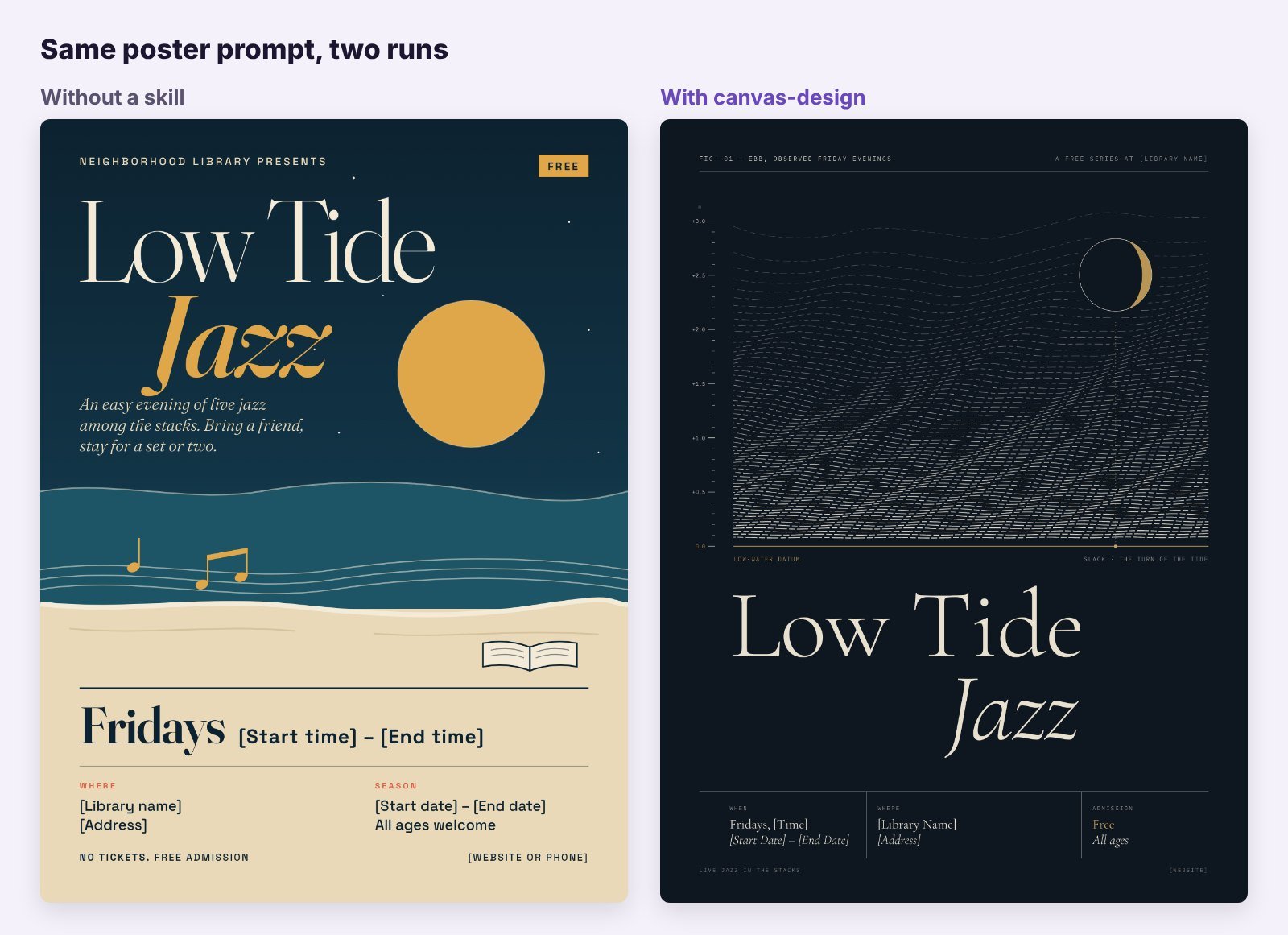
The skill version is the one I would frame. But it is art first and a flyer second. The event details sit in tiny, low-contrast labels that would be hard to read from across a room. For a real event, I would ask for bigger details in a second pass.
Test 3: one report, two theme-factory themes
theme-factory is a different kind of design skill. It doesn’t invent a look. It gives Claude 10 ready themes, each with a color palette and a font pair, like Ocean Depths, Botanical Garden and Midnight Galaxy. Normally it shows you a theme sheet and asks you to pick. I picked two and applied them to the same one-page parent report.
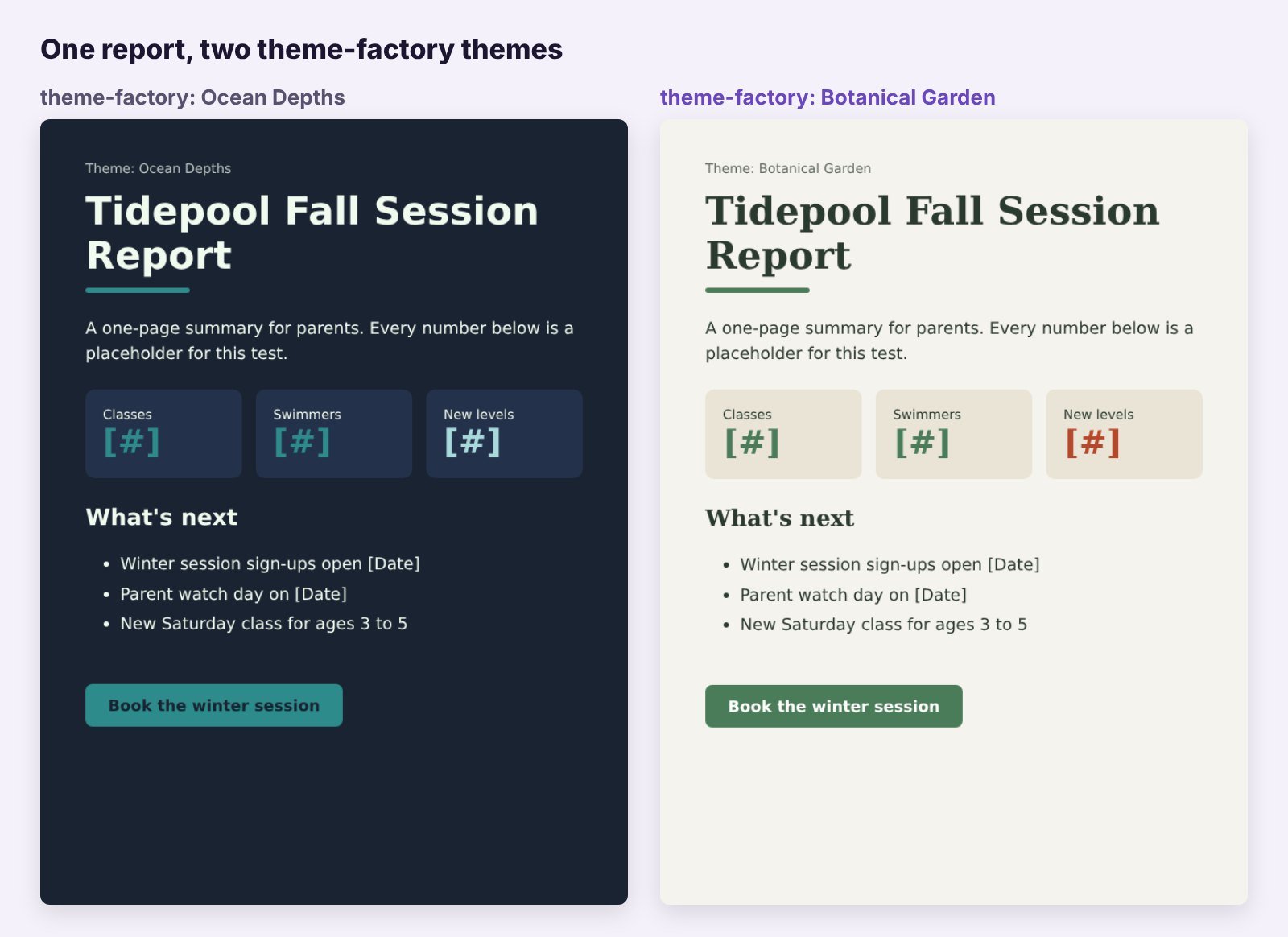
It works, and it is fast. It is also plain. The themes use DejaVu fonts, and the dark navy text on a teal button in Ocean Depths is a bit weak. Use it for decks, reports and docs where you want consistency, not wow.
The best design skills for Claude
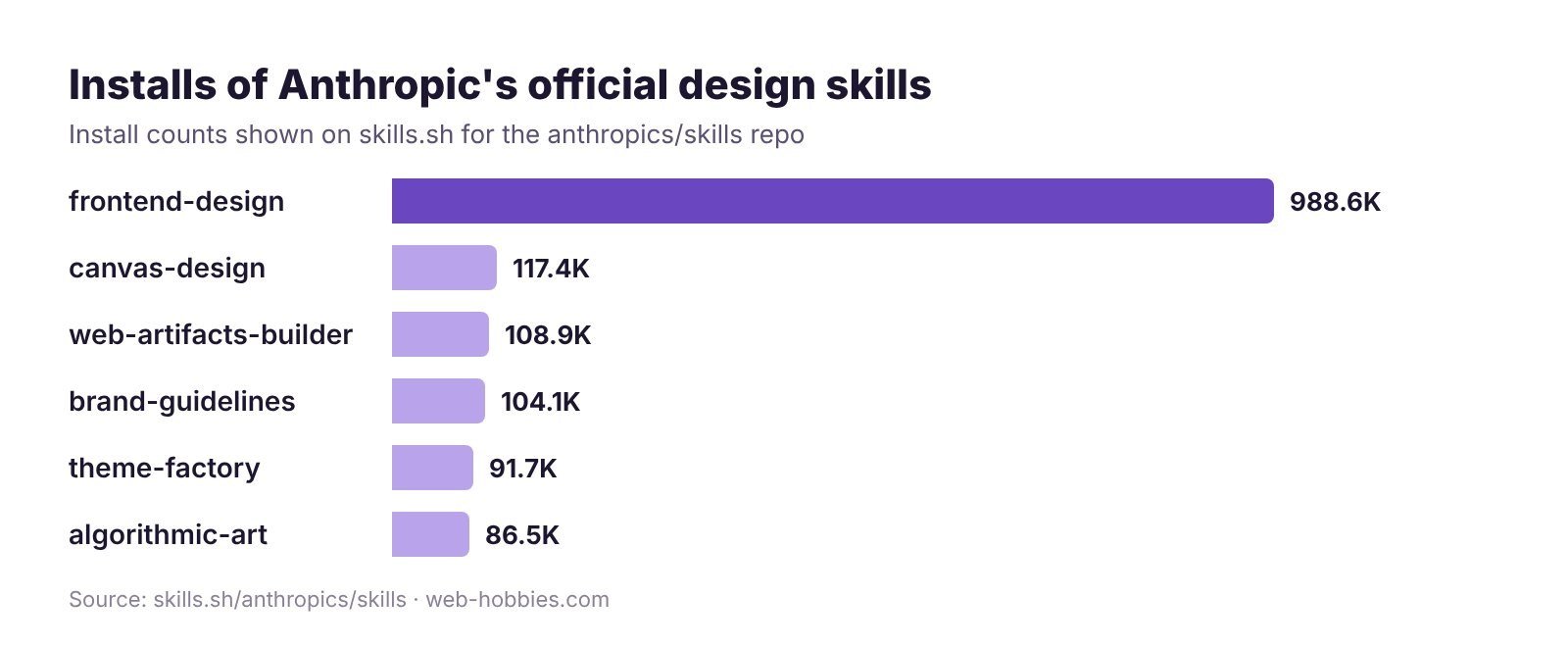
Install counts below come from skills.sh, which tracks installs of Anthropic’s public skills. frontend-design leads by a mile.
1. frontend-design: best overall
What it does: pushes Claude away from template looks. It tells Claude to ground choices in the subject, plan a palette and type scale, then review the plan for clichés before coding. It even lists the common tells of AI-made pages, like a cream background with a clay accent, one word in a headline set in color, and arrows on every button.
In my test: the clearest gain of any skill here. Test 1 above shows the jump.
Where to get it: built into Claude for paid plans, and in anthropics/skills. 988.6K installs on skills.sh when I checked.
Tip: give it real content. The skill builds its look from the subject, so “swim school for kids 3 to 10 in San Diego” beats “a business website.”
2. canvas-design: best for posters and visual art
What it does: a two-step process. Claude writes a design philosophy (an “art movement” in a few paragraphs), then expresses it as a PNG or PDF that is mostly visual with minimal text.
In my test: the most striking output of the day, with weaker legibility for practical details.
Where to get it: anthropics/skills, 117.4K installs.
Tip: say who must read what, and from how far. “Date and address readable from 3 meters” keeps the art from swallowing the info.
3. theme-factory: best for consistent decks and docs
What it does: 10 preset themes with hex colors and font pairs, plus custom themes on request. Works on slides, docs, reports and HTML pages.
In my test: quick and tidy, but generic. Check button contrast on dark themes.
Where to get it: anthropics/skills, 91.7K installs.
Tip: ask for a custom theme built from your logo colors.
4. UI/UX Pro Max: best for design systems in Claude Code
What it does: a big design reference Claude can search: 192 color palettes, 74 font pairings, UX guidelines, landing page patterns and chart types, for many tech stacks from React to SwiftUI.
In my test: I reviewed it but did not run it. It uses Python search scripts, so it fits Claude Code better than the chat app.
Where to get it: nextlevelbuilder/ui-ux-pro-max-skill, with over 135,000 GitHub stars when I checked.
Tip: pair it with frontend-design. One gives Claude options, the other gives it taste.
5. brand-guidelines: best template for your own brand
What it does: applies Anthropic’s own brand colors and fonts to any artifact. On its own, that is only useful if you work on Anthropic’s brand.
In my test: reviewed. Its value is the structure: copy it, swap in your colors, fonts and rules, and every design starts on brand.
Where to get it: anthropics/skills, 104.1K installs.
Also worth a look: web-artifacts-builder (multi-part React, Tailwind and shadcn/ui artifacts, 108.9K installs) and algorithmic-art (generative art with p5.js, 86.5K installs).
How to get design skills in Claude: make your own or install one
1. Make your own with /skill-creator (fastest)
Ready-made skills design. None of them review. So I made a design QA skill with /skill-creator, using this prompt:
“/skill-creator Make a skill named design-review-checklist. Whenever I share a screenshot, HTML file or link to a design and ask for a review, check it against a fixed list: text and button contrast, type scale and line length, spacing, one clear call to action, mobile layout, and generic AI tells like a one-word color accent in the headline, all-caps labels and arrows on buttons. Mark each item pass or fix, quote the exact element, and give a one-line fix. Never redesign the whole thing.”
The SKILL.md was ready in about two minutes. It had a description that triggers on words like review, critique, QA and “is this ready to ship,” an 8-point checklist with WCAG contrast targets (4.5:1 for text), a fixed table format, and a rule to never invent measurements.
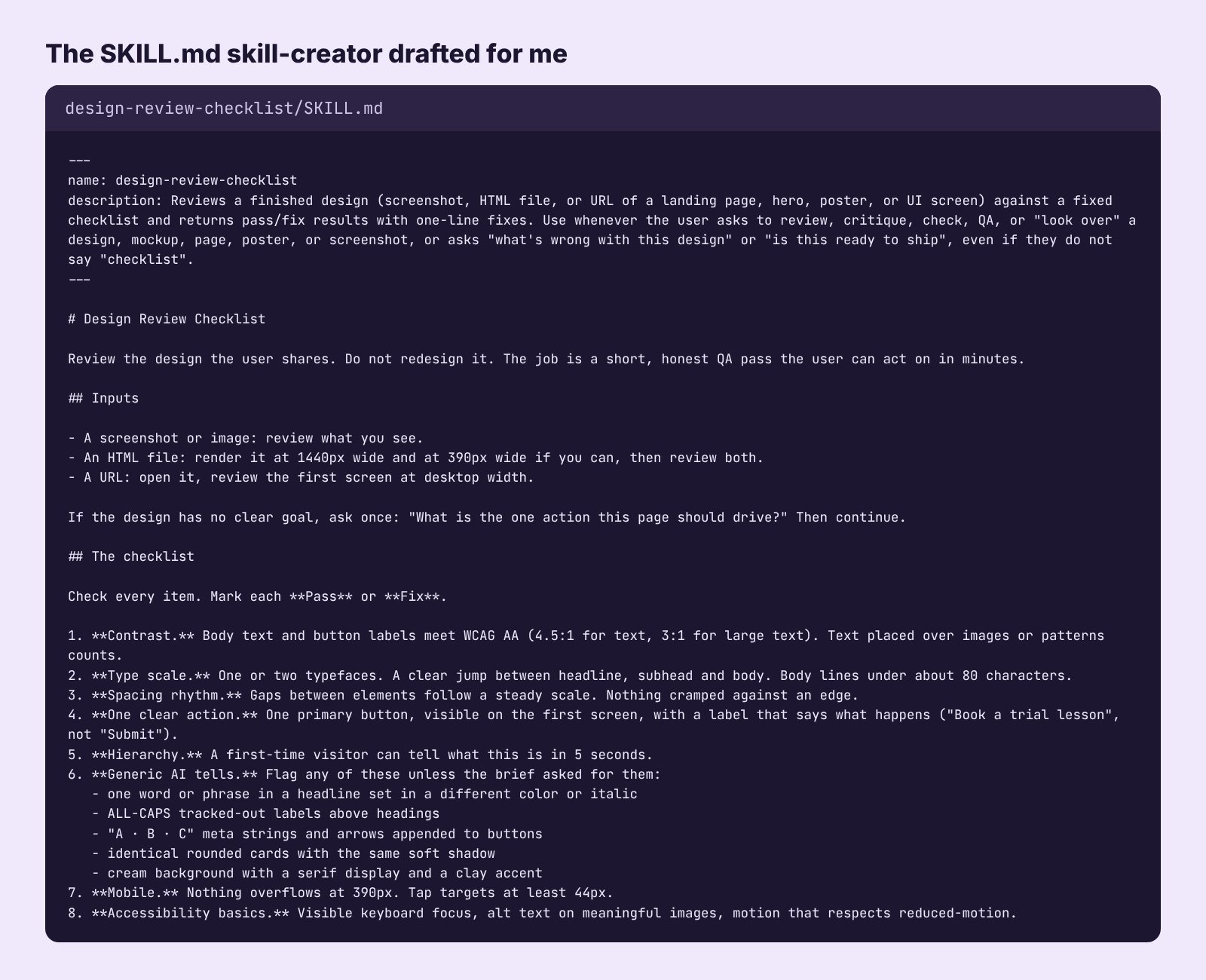
Then I ran it on both heroes from Test 1. It measured real contrast ratios from the code and the rendered pixels:
| Hero | Top problem found | One-line fix |
|---|---|---|
| Without a skill | AI tells: italic teal accent, arrow on the button, dotted label. Small label at 4.07:1 contrast. | Set the headline in one color, drop the arrow |
| With frontend-design | Light pattern drops parts of the headline to 2.27:1 contrast | Move the headline above the light layer |
That second row is why I’d build this skill first. The design skill made the page better. The review skill caught what the design skill missed.
Don’t skip the save step. The skill is only a draft in that chat until you click Save skill at the top right of the SKILL.md preview. Close the chat without saving and it’s gone.
Name it from the start. Put the name in your first message, like “Make a skill named design-review-checklist…”, and skill-creator uses it. If you forget, it picks one for you. You can ask “rename it to …” in the same chat before you save, or change it later in Customize > Skills with the Edit button.
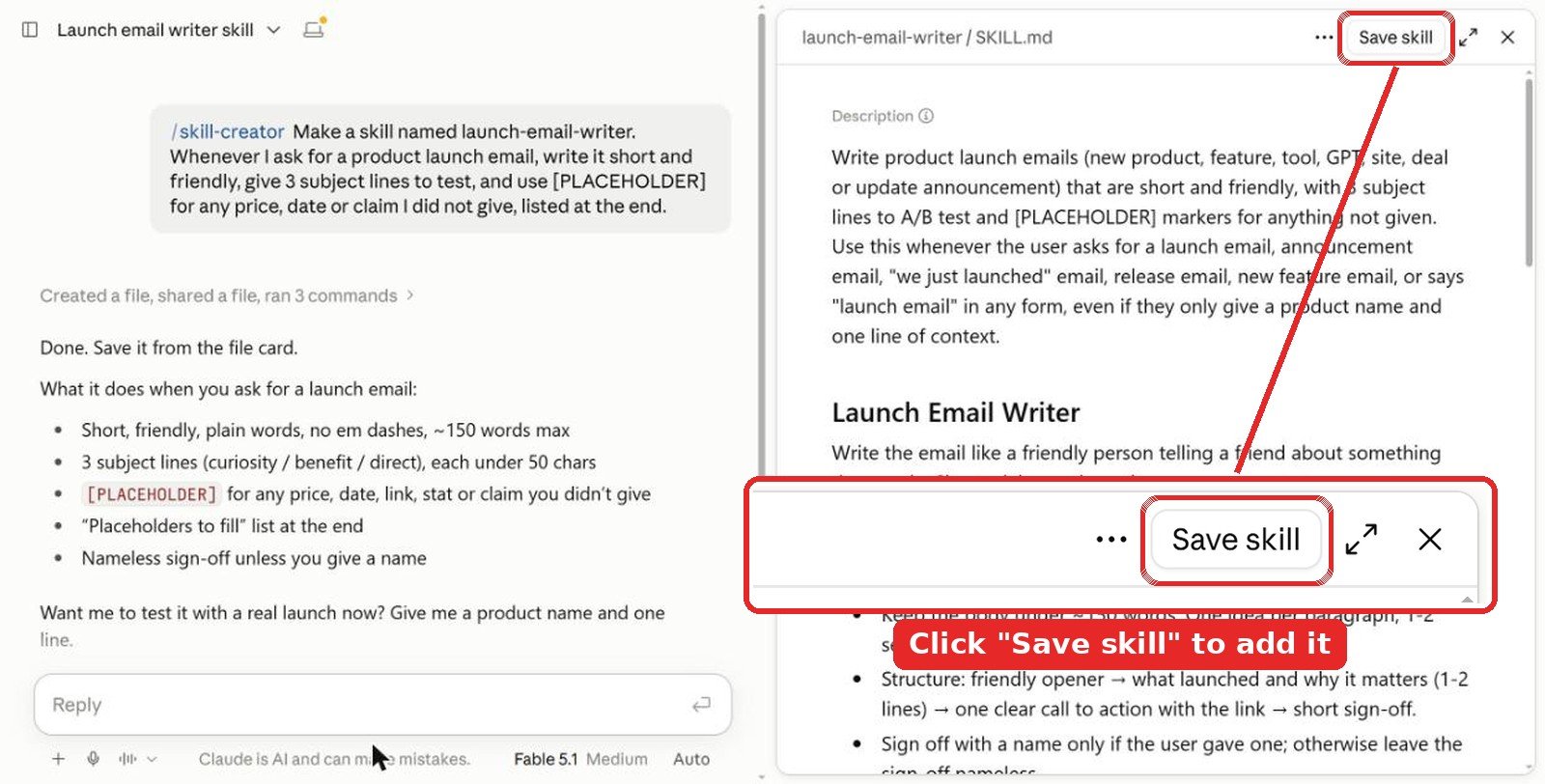
Tip: add your own brand rules to the checklist, like your minimum font size or banned colors, so every review checks them too.
2. Install in the Claude app
Anthropic’s example skills, including frontend-design, canvas-design, theme-factory and brand-guidelines, are already available on paid plans (Pro, Max, Team and Enterprise). Skills need code execution, so turn on Code execution and file creation first.
- Open Customize > Skills (some help pages still call this Settings > Capabilities).
- Find the design skill you want and switch it on.
- For a skill from GitHub, download its zip, then use + Add > Upload skill.
To use one, describe the task and let Claude pick it up, or type /frontend-design to call it by name.
3. Install in Claude Code
Add Anthropic’s repo as a plugin marketplace, then install the example skills pack:
/plugin marketplace add anthropics/skills
/plugin install example-skills@anthropic-agent-skills
For UI/UX Pro Max, the repo gives these two commands:
/plugin marketplace add nextlevelbuilder/ui-ux-pro-max-skill
/plugin install ui-ux-pro-max@ui-ux-pro-max-skill
Tips from testing
- Expect slower, better runs. frontend-design took 4 to 5 times longer because it plans, builds and self-checks.
- Feed it facts, not adjectives. Ages, city, audience and the one action you want. “Modern and clean” gives you the default.
- Always review the result. Bold designs break contrast more often. A checklist skill catches it in a minute.
- Use placeholders for facts. Both of my test runs used [Date] and [Address] when asked to. Ask for that every time.
Video: the frontend-design skill in action
FAQ
What is the best design skill for Claude?
frontend-design by Anthropic. In my side-by-side test it turned a generic landing page into a distinct design built from the subject, and it is the most installed of Anthropic’s design skills on skills.sh.
Are Claude design skills free?
Yes. Anthropic’s design skills are free and already available on paid Claude plans. Community skills like UI/UX Pro Max are free on GitHub. You need a plan with code execution turned on.
Can I make my own design skill with /skill-creator?
Yes. Type /skill-creator, name the skill in your first message and describe what it should check or do. Mine was ready in about two minutes. Click Save skill at the top right of the preview, or the draft is lost.
Which Claude skill is best for posters and graphics?
canvas-design. It writes a design philosophy first, then makes a PNG or PDF. Ask it to keep key details large, because it favors art over legibility.
Do design skills work in Claude Code too?
Yes. Add the anthropics/skills marketplace with /plugin marketplace add anthropics/skills, then install the example-skills pack. UI/UX Pro Max installs the same way from its own repo.
The verdict
If you add one design skill, make it frontend-design. It gave the biggest visible jump in my tests and it is free on paid plans. Add canvas-design for posters and art, and theme-factory when you just need a deck to look consistent. Then spend two minutes making a review skill with /skill-creator. In my test it caught the one real flaw the best design had.
More Claude guides: best Claude skills for web design, best Claude skills for marketing and all Claude articles. For design ideas beyond AI, see our graphic design and illustration section.
Tested in Claude in October 2026. Install counts and star counts were checked the same month and change often.