
Most lists of the best Claude skills for SEO just copy GitHub star counts. I wanted to see what a skill changes in real work. So I built a small, messy service page for a made-up Portland bike shop and gave Claude three real SEO jobs: an audit, schema markup, and an FAQ rewrite for AI search. I ran each job twice, once with no skill and once with a popular SEO skill loaded. Then I made my own keyword-brief skill with skill-creator and ran it on live Ahrefs data. Here is what happened.
TL;DR
- Best overall:
seo-auditfrom Corey Haines’ free marketingskills pack. Same top fixes as plain Claude, but with evidence for each and no false findings. - Biggest surprise: the
schemaskill knew that Google stopped showing FAQ rich results on May 7, 2026. Claude without the skill gave me the old rule. - Best all-in-one for Claude Code:
claude-seo, with 26 sub-skills and about 19,000 GitHub stars when I checked. - Best quick win: a keyword-brief skill I made with
/skill-creator. It pulled real search volume and refused to guess numbers.
| Skill | Best for | Works in | Tested here |
|---|---|---|---|
| seo-audit | Page and site audits | Claude app, Claude Code | Yes, with and without |
| ai-seo | Getting cited by AI answers | Claude app, Claude Code | Yes, with and without |
| schema | JSON-LD structured data | Claude app, Claude Code | Yes, with and without |
| claude-seo | Full audits with sub-agents | Claude Code | Reviewed |
| geo-seo-claude | AI search (GEO) audits | Claude Code | Reviewed |
| SE Ranking seo-skills | Briefs and gaps on SE Ranking data | Claude app, Claude Code | Reviewed |
How I tested
An SEO skill is a SKILL.md file of instructions Claude reads before the job. To test its value, I kept everything else the same:
- One test page: a services page for Spoke & Sprocket, a bike repair shop in Portland that I made up. Its flaws are real-world ones: a “Home” title tag, two H1s, prices inside an image, and “Open most days” as the only local info.
- Same prompt, word for word, in two fresh Claude sessions. Run A had no skill. Run B read the skill’s public SKILL.md first and followed it.
- Every prompt said “don’t invent facts, use placeholders like [price].” I wanted to see which runs kept that promise.
I ran these tests in Claude sessions, not by clicking through the Claude app, and I didn’t add any new skills to my account for this article. The skills I tested come from the marketingskills repo, which you can install yourself (steps below).
Test 1: an SEO audit, with and without seo-audit
The prompt: “Here’s my bike shop’s services page. Audit this page for SEO and tell me what to fix first.”
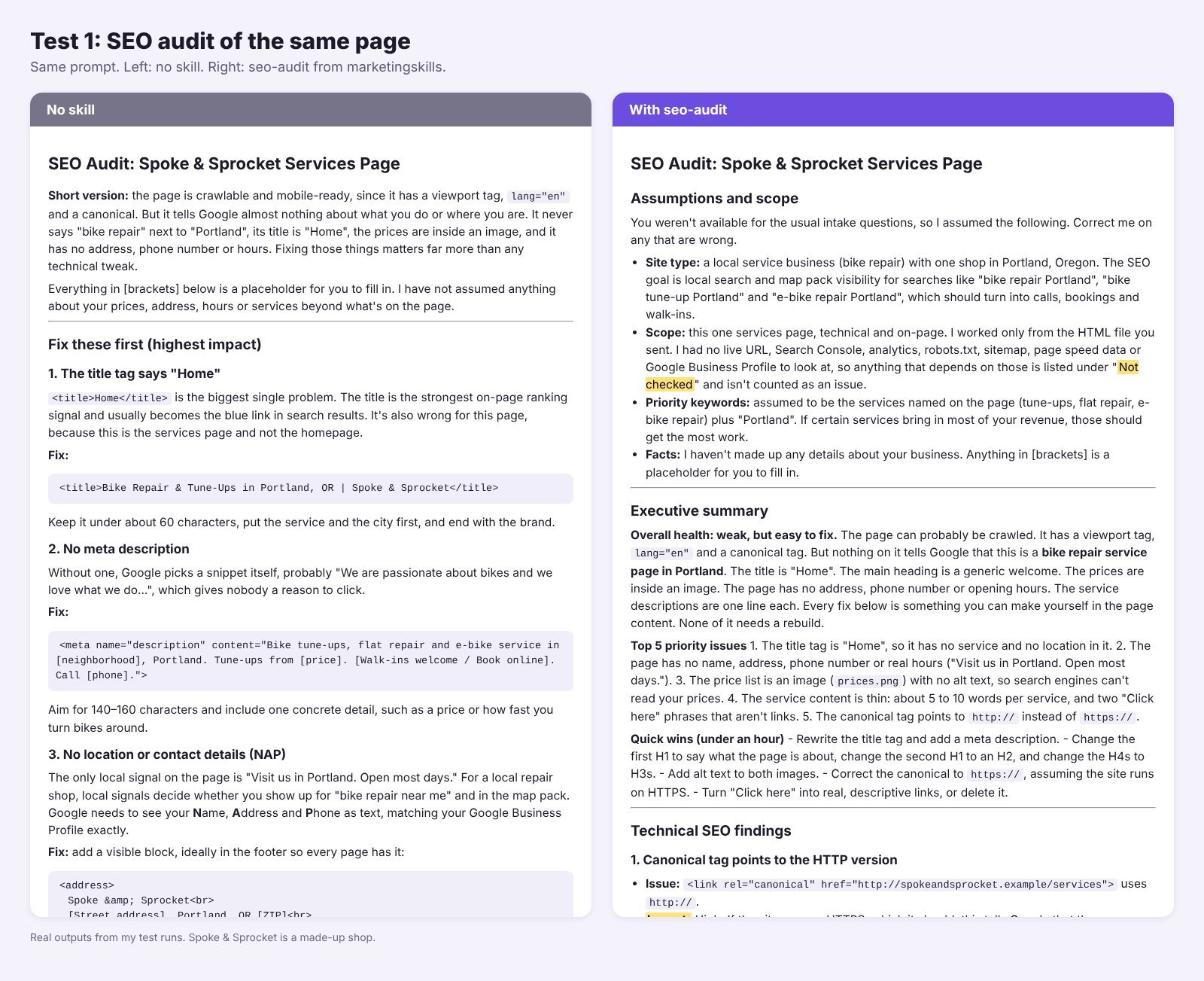
Without a skill, Claude did a good job in about 55 seconds. It listed 16 issues, put the “Home” title first, and wrote a better title and meta description. Most small sites would be fine with this.
With seo-audit, it took about 90 seconds and the report nearly doubled, from about 1,600 to 2,800 words. The top fixes were the same. Three things were different:
- Every issue had an Impact rating, the exact line number as evidence, a fix and a priority.
- It stated its assumptions first: a local business aiming for the map pack.
- It refused to call “no schema” a confirmed problem, because plugins like Rank Math often add schema with JavaScript that a raw HTML check can’t see. Schema, robots.txt and Core Web Vitals went under “Not checked.”
A false “no schema” finding sends people to add duplicate markup. The skill version is the one I’d send to a client.
Test 2: schema markup, and one outdated fact
The prompt: “Write the JSON-LD schema markup for my bike shop’s services page. Don’t invent facts.” Both runs made valid JSON (I checked with a parser) and both left out FAQ markup. Their reasons were different.
| Run | Why it skipped FAQ markup | Correct today? |
|---|---|---|
| No skill | “Since 2023 Google only shows FAQ rich results for well-known government and health sites.” | No, out of date |
| With schema skill | “Google stopped showing FAQ rich results on May 7, 2026.” | Yes |
I checked it. Google added a notice to its FAQ structured data docs saying FAQ rich results stopped appearing on May 7, 2026, as this report quotes. That is the real value of a skill that gets updated often.
The skill was also stricter. It marked up only what’s visible on the page. Both runs took about 50 seconds.
Test 3: an FAQ rewrite for AI answers, with and without ai-seo
The prompt: “I want ChatGPT, Perplexity and Google AI Overviews to quote us when people ask ‘how long does a bike tune-up take’ or ‘bike repair near me Portland.’ Rewrite the intro and the FAQ so AI answers can cite them.”
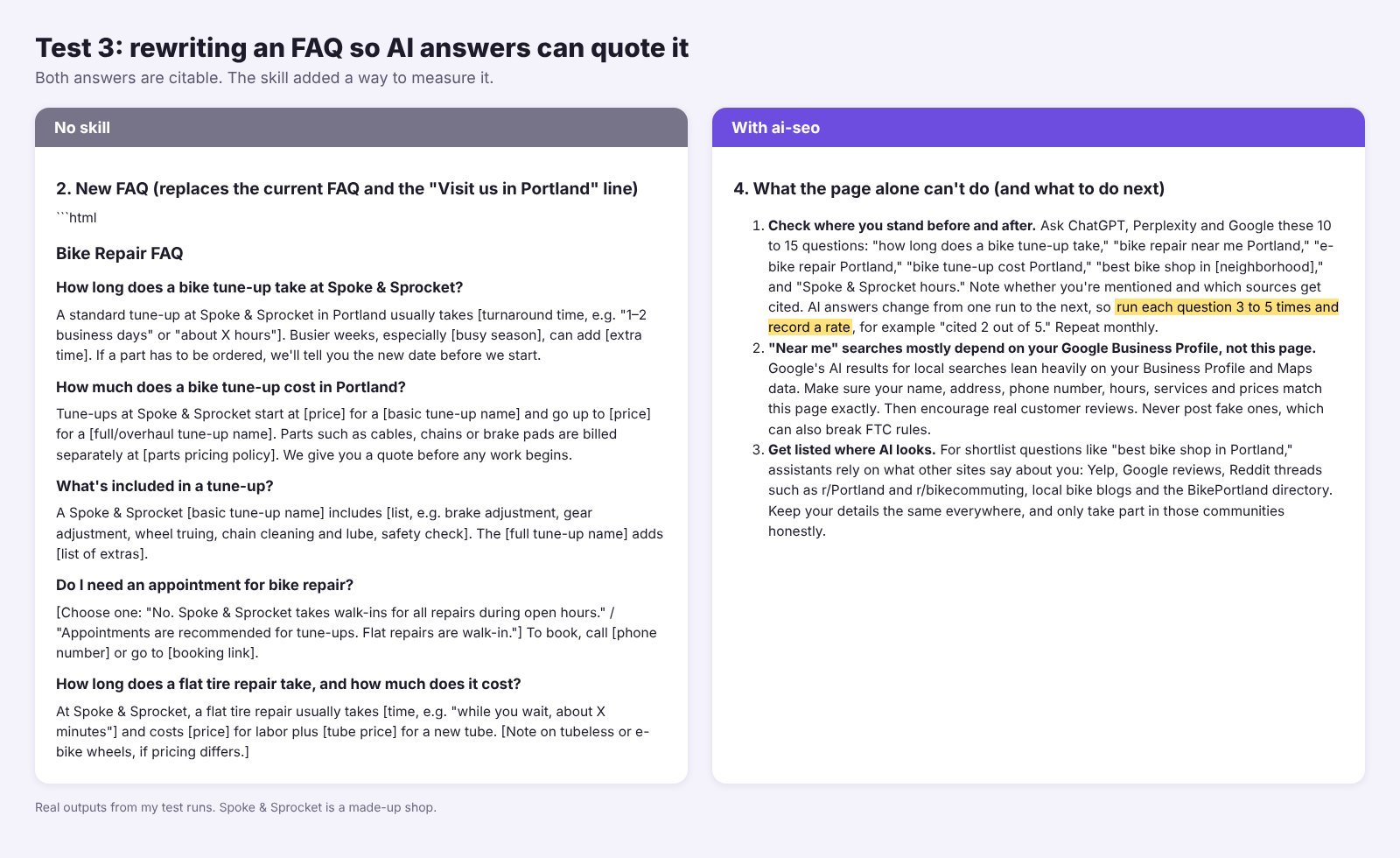
This was the closest match. Both runs wrote answer-first FAQs that name the shop and the city, so each answer makes sense when quoted alone.
The skill version turned copy into a plan. It kept each answer to 40 to 60 words and told the owner to ask ChatGPT, Perplexity and Google 10 to 15 real questions, run each one 3 to 5 times, and record a rate like “cited 2 out of 5,” because AI answers change between runs. It also split AI crawlers into search bots (OAI-SearchBot, PerplexityBot, Claude-SearchBot) and training bots like GPTBot, so you don’t block the ones that cite you.
My take: if you only need the rewrite, Claude doesn’t need this skill. If you want to know whether the rewrite worked, it does.
The best Claude skills for SEO
Star counts below are from the live GitHub pages when I checked. Some top-ranking lists still show much older numbers, like 4.1k stars for claude-seo.
1. seo-audit: best overall
What it does: a full audit framework. It works in a fixed order: crawlability, technical basics, on-page, content quality, then authority. It also covers Core Web Vitals, hreflang and local SEO.
In my test: the same top fixes as plain Claude, but with evidence for each issue and no false findings.
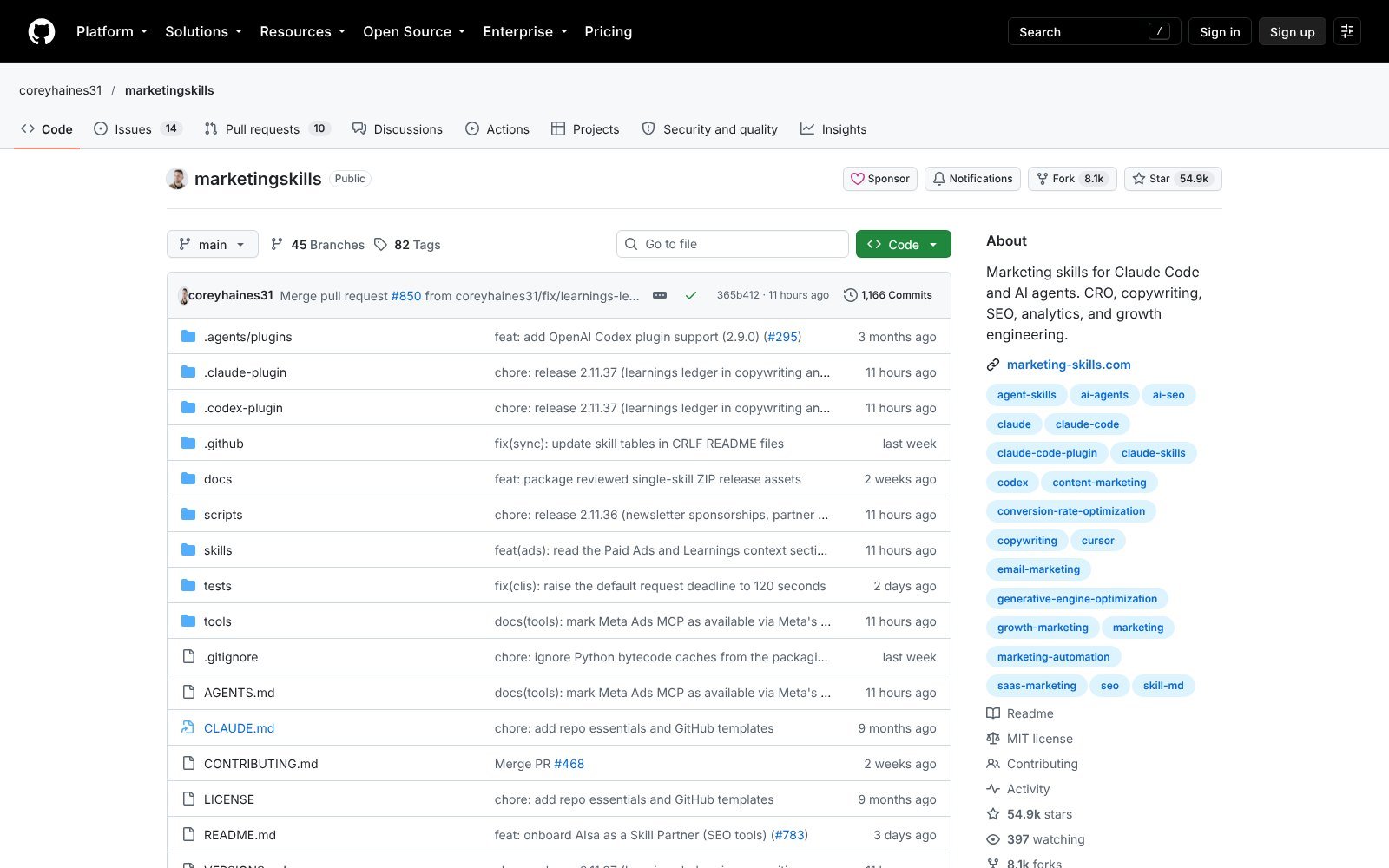
Where to get it: the marketingskills repo by Corey Haines. It’s free, MIT licensed, and the repo had 54.9k stars and 50 skills when I checked.
Tip: give it Search Console data or a live URL. On a single HTML file, a good part of the checklist lands in “Not checked.”
2. ai-seo: best for AI search and GEO
What it does: helps your pages get cited by ChatGPT, Perplexity, Gemini and AI Overviews, from page structure to AI bot access and tracking.
In my test: similar copy to plain Claude, plus a monitoring plan and a crawler check I didn’t ask for but needed.
Where to get it: marketingskills/ai-seo.
Tip: list the exact questions your buyers ask. The skill plans answers around them and the related searches AI runs in the background.
3. schema: best for structured data
What it does: writes and fixes JSON-LD. Its main rule is accuracy first: mark up only what’s on the page. It also tracks which rich results Google still shows.
In my test: the only run with current Google facts. Small skill, big save.
Where to get it: marketingskills/schema.
Tip: run the output through Google’s Rich Results Test before you publish.
4. claude-seo: best all-in-one for Claude Code
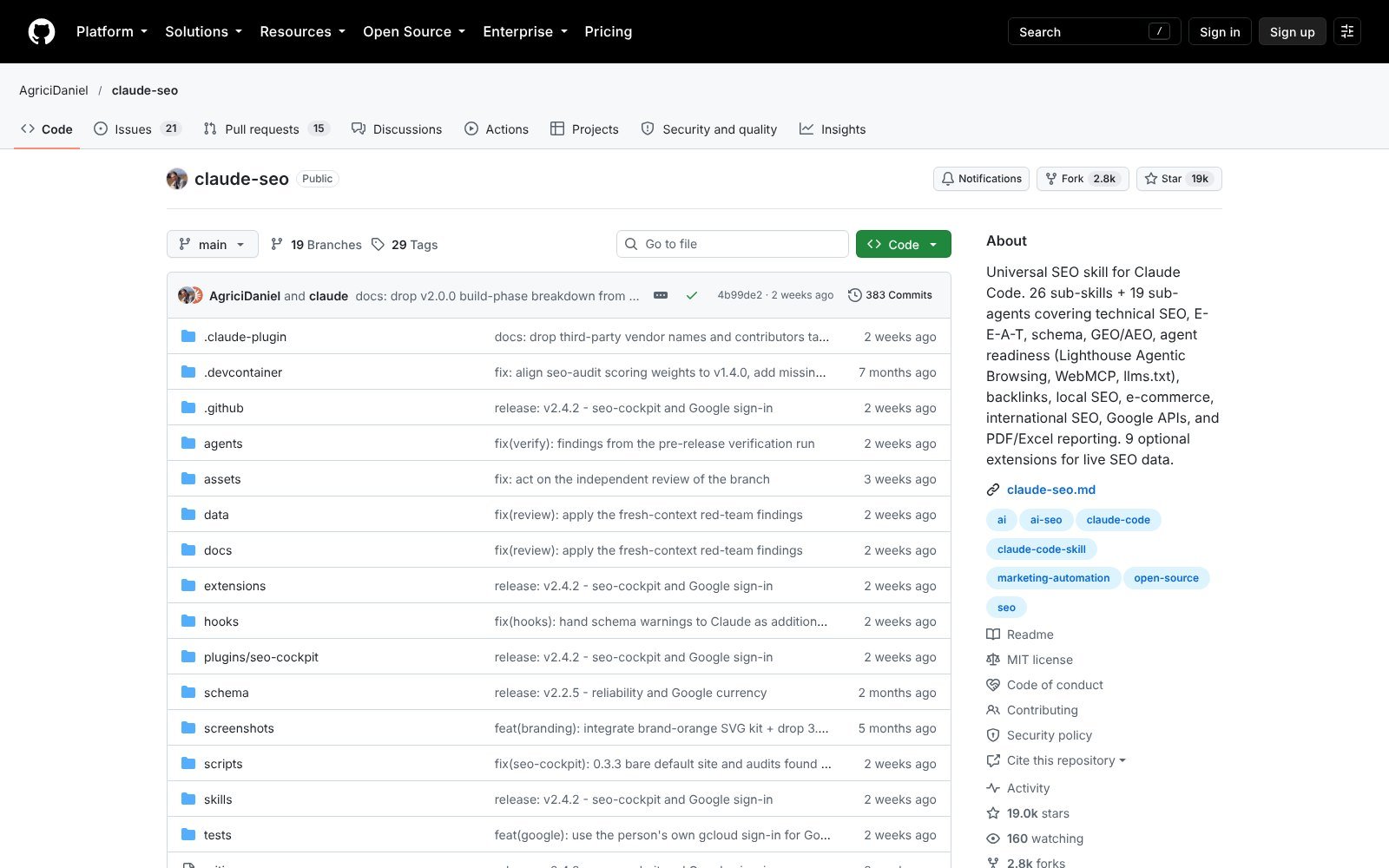
What it does: a large SEO plugin with 26 sub-skills and 19 sub-agents. You get /seo commands for full audits, single pages, technical SEO, E-E-A-T, schema, GEO, local SEO, backlinks, keyword clusters and more. Optional extensions add live data from Ahrefs, DataForSEO and Search Console.
In my test: reviewed, not run. It needs a Python runtime and Chromium set up through /seo setup, so it’s built for Claude Code, not the chat app.
Where to get it: AgriciDaniel/claude-seo, MIT licensed, about 19,000 stars when I checked.
Tip: start with /seo page on one URL before you run a full /seo audit. Sub-agents use a lot of tokens.
5. geo-seo-claude: best GEO toolkit for Claude Code
What it does: a “GEO-first” audit kit. Its /geo commands score how citable your pages are, check AI crawler access, scan brand mentions, write an llms.txt file and build PDF reports.
In my test: reviewed. It overlaps with ai-seo but runs as a full audit.
Where to get it: zubair-trabzada/geo-seo-claude, MIT licensed, 11.1k stars when I checked.
Tip: read the one-line install script before you run it.
6. SE Ranking seo-skills: best if you already pay for SE Ranking
What it does: 26 skills that turn SE Ranking data into briefs, keyword clusters, backlink gaps and AI search share of voice.
In my test: reviewed. They need SE Ranking API access, and data calls use credits.
Where to get it: seranking/seo-skills, MIT licensed.
Tip: check your credit balance before a big run. In Claude Desktop you can add it under Customize > Personal plugin > Add marketplace with seranking/seo-skills.
How to get SEO skills in Claude: make your own or install one
1. Make your own with /skill-creator (fastest)
None of the ready-made skills gave me the one thing I do every week: a short keyword brief built on real numbers. So I made one with /skill-creator, using this prompt:
“/skill-creator Make a skill named seo-keyword-brief. When I give a keyword, build a one-page brief: search intent, the format that wins on page 1, the subtopics every top page covers, questions to answer, a gap none of them cover, a title under 60 characters and a meta description of 140 to 155 characters, an H2 outline, and 3 internal link ideas. Use a connected SEO tool (Ahrefs, Semrush, DataForSEO) or web search for live data, cite the tool and date for every number, and never invent search volumes.”
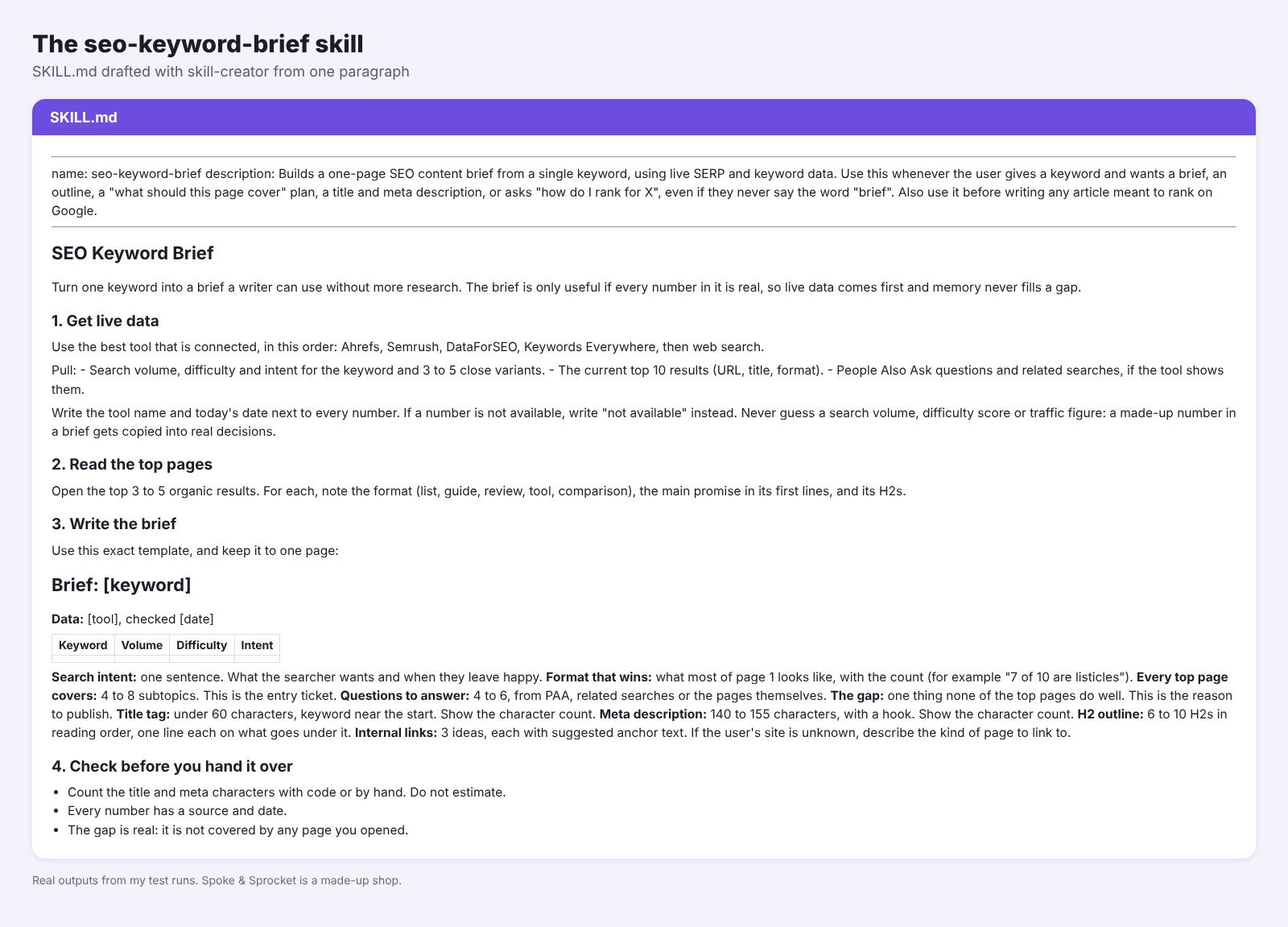
The SKILL.md was ready in a few minutes. It had a description that triggers on “how do I rank for X,” a rule to write “not available” instead of guessing a number, a one-page template, and a final check that counts title and meta characters with code.
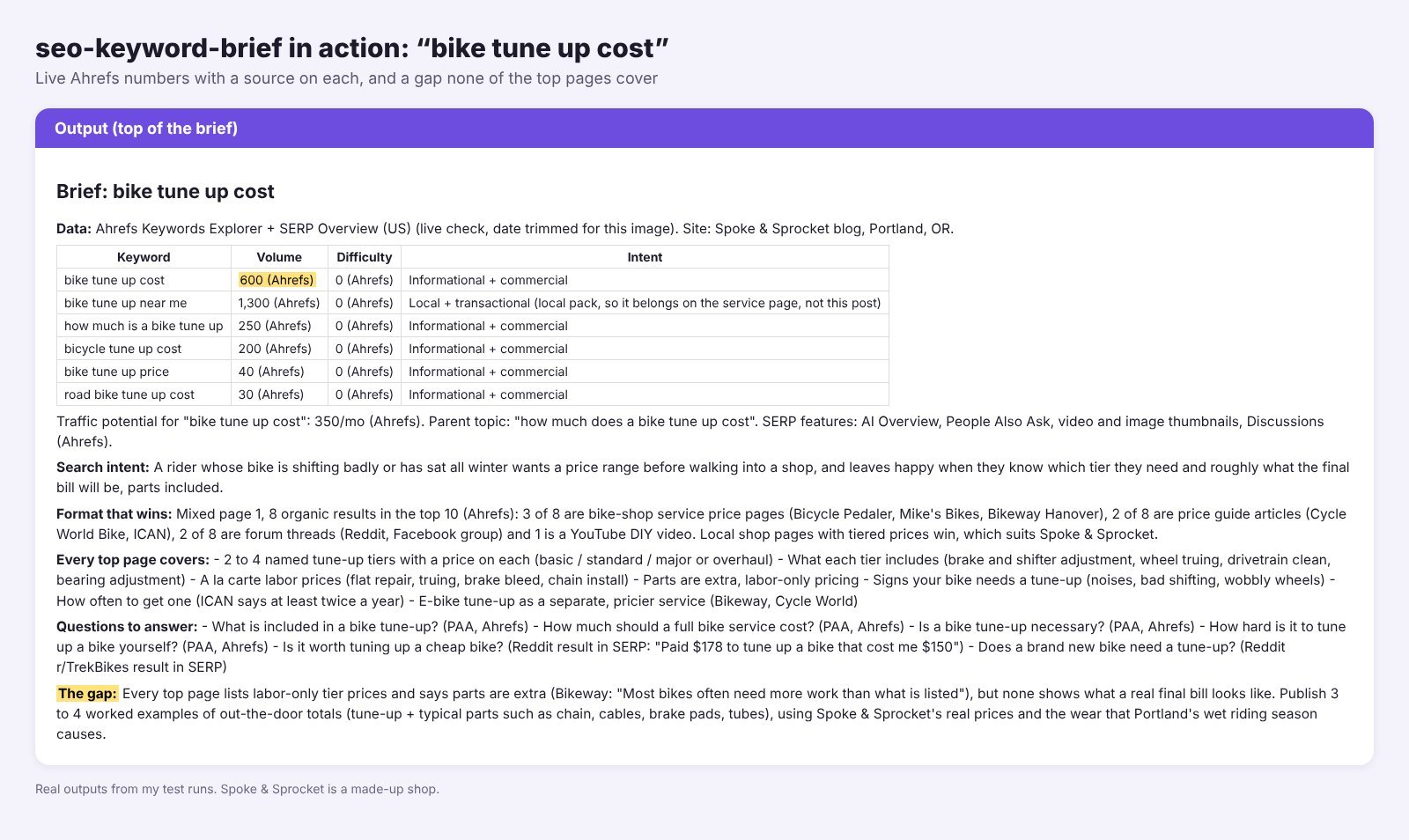
Then I tested it on “bike tune up cost” against plain Claude. Plain Claude didn’t invent a volume, but it filled the brief with price ranges from memory. The skill run used Ahrefs: 600 US searches a month (I pulled the same number myself), a 55-character title, a 143-character meta, and a real gap. Every top page lists labor prices and says “parts extra,” but none shows a real final bill. One fix: it put the year in the title, which I’d drop.
Don’t skip the save step. The skill is only a draft in that chat until you click Save skill at the top right of the SKILL.md preview. Close the chat without saving and it’s gone.
Name it from the start. Put the name in your first message, like “Make a skill named seo-keyword-brief…”, and skill-creator uses it. If you forget, it picks one for you. You can ask “rename it to …” in the same chat before you save, or change it later in Customize > Skills with the Edit button.
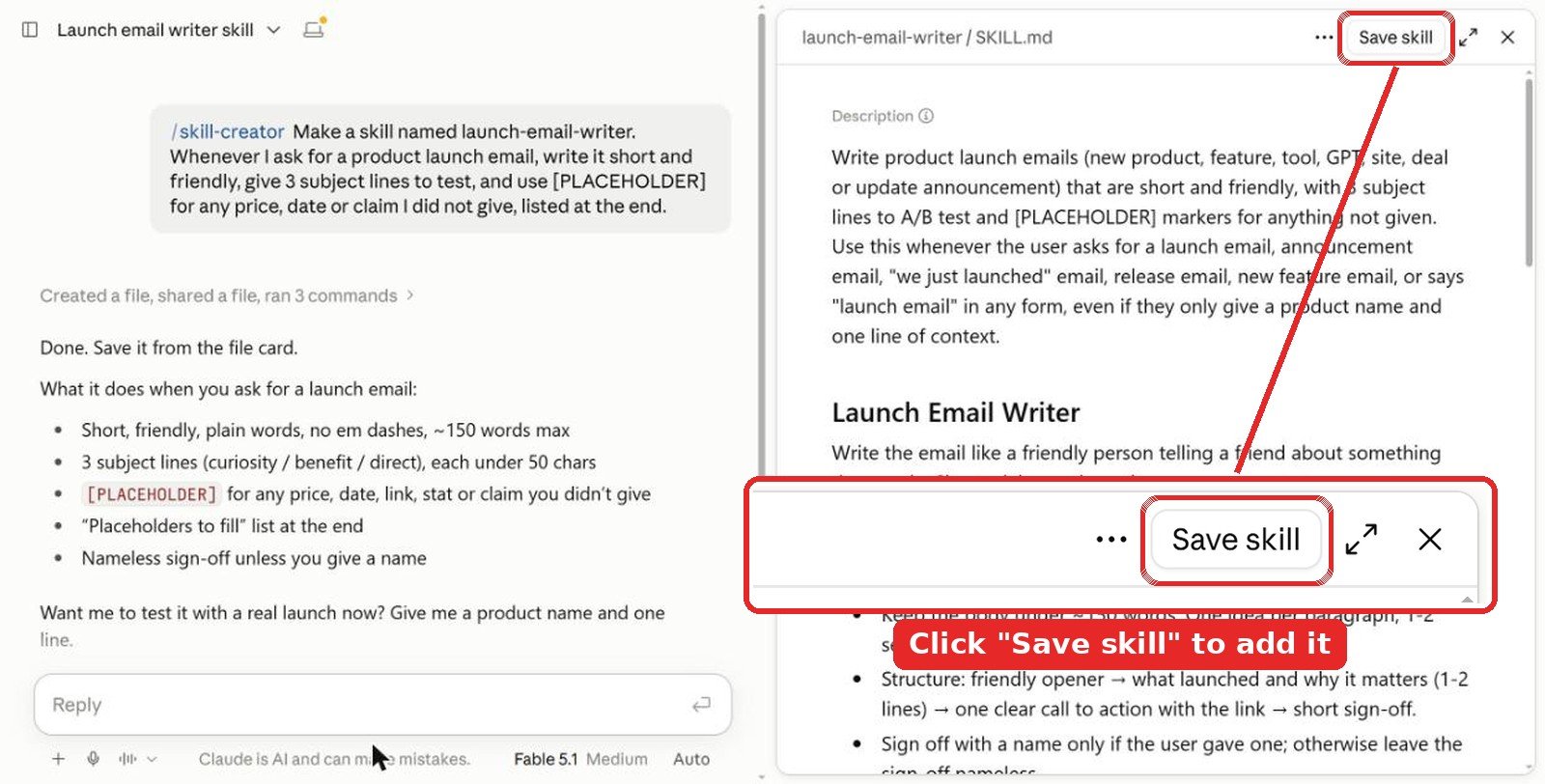
Tip: connect an SEO tool first. In the Claude app, add an SEO connector like Ahrefs so the skill has live data. Without one, it falls back to web search and marks numbers as not available.
2. Install in the Claude app
Skills work on Pro, Max, Team and Enterprise plans and need code execution, so turn on Code execution and file creation first.
- Download the skill folder you want (for example
skills/seo-auditfrom marketingskills) and zip it. - Open Customize > Skills (some help pages still call this Settings > Capabilities), then + Add > Upload skill, and pick the zip.
- Ask for an SEO task and let Claude pick it up, or type
/seo-auditto call it by name.
3. Install in Claude Code
For the whole marketingskills pack, including seo-audit, ai-seo and schema:
/plugin marketplace add coreyhaines31/marketingskills
/plugin install marketing-skills
For claude-seo, the repo gives these commands (Claude Code 1.0.33 or newer):
/plugin marketplace add AgriciDaniel/claude-seo
/plugin install claude-seo@agricidaniel-claude-seo
/seo setup
Tips from testing
- Pick skills for fresh facts. Google rules change faster than Claude’s training data.
- Expect slower runs. The audit skill took about 60% longer. Ask for “top 5 fixes only” if you’re busy.
- Always say “don’t invent facts.” Every run in my tests used placeholders when asked. Leave that line out and you risk made-up prices on your page.
- Connect a data tool. Skills give Claude a method. Ahrefs or Search Console give it numbers.
Video: using Claude skills for SEO
FAQ
What is the best Claude skill for SEO?
seo-audit from the free marketingskills pack. In my test it found the same top fixes as plain Claude, with evidence for each and no false findings.
Are Claude SEO skills free?
Most are. marketingskills, claude-seo and geo-seo-claude are free and MIT licensed on GitHub. SE Ranking’s skills are free too, but they need SE Ranking API access, which uses paid credits. You need a paid Claude plan with code execution turned on.
Can I make my own SEO skill with /skill-creator?
Yes. Type /skill-creator, put the skill name in your first message and describe the job, like a keyword brief or an on-page checklist. Mine took a few minutes. Click Save skill at the top right of the preview, or the draft is lost when you close the chat.
Do Claude SEO skills give real search volume?
Not on their own. A skill is instructions, not data. Connect a tool like Ahrefs, Semrush or DataForSEO for real numbers, and use a skill that tells Claude never to guess a volume.
Do SEO skills work in Claude Code?
Yes, and some only work there. claude-seo and geo-seo-claude run scripts, so they need Claude Code. marketingskills installs there as a plugin too.
The verdict
If you add one SEO skill, make it seo-audit, and grab schema and ai-seo from the same free pack. They made Claude more careful and more current, which is what you need before acting on an audit. If you live in Claude Code and want one command for everything, try claude-seo. Then spend a few minutes making your own brief skill with /skill-creator and connect a real data tool. That pair saved me the most time.
More Claude guides: best Claude skills for marketing, best Claude skills for web design, best design skills for Claude and all Claude articles. For more search tips, see our SEO section.
Tested in Claude in October 2026. Star counts and skill counts were checked the same month and change often.