
- Free: $0. Fine for simple personal maps, but you get 10 online maps, watermarked exports and only 5 Pitch slides.
- Pro: $4.92/month billed yearly (about $59/year) or $10 month to month. With MIND15 on yearly: $50.15/year. Removes the watermark and unlocks all exports.
- Premium: $8.25/month billed yearly (about $99/year) or $15 month to month. With MIND15 on yearly: $84.15/year. Adds unlimited maps, real-time collaboration, editable Gantt charts and 500 AI credits a month.
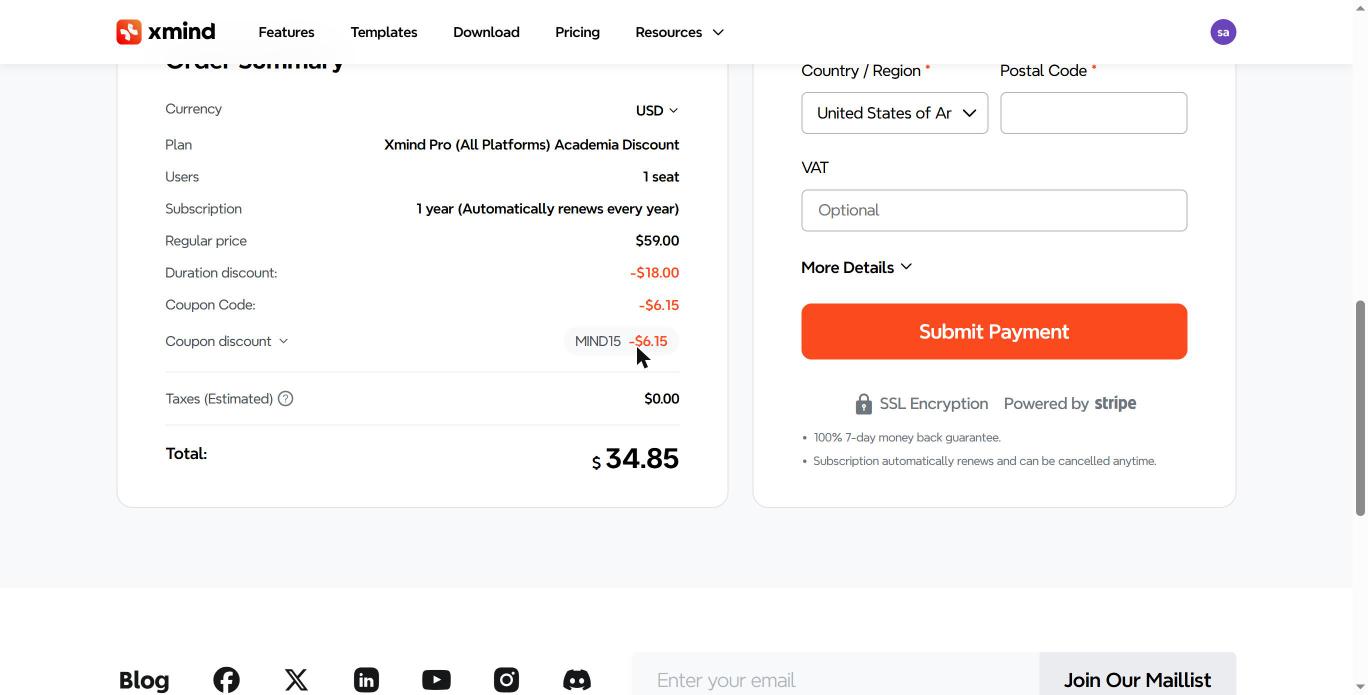
- Teams: Business is $10/seat/month yearly (~$102/seat/yr with MIND15). Students/teachers: Education Pro is $41/yr ($34.85/yr with MIND15).
- Yearly billing + MIND15 = up to 58% off vs paying monthly for a year (71% off for students on Pro).
XMind pricing is simple once you see it side by side. There is a Free plan, a Pro plan for solo users who need clean exports, and a Premium plan for people who want AI and collaboration.
This guide shows the live prices, what each plan really unlocks, the limits of XMind Free, and which plan is worth your money.
See XMind plans with MIND15 (15% off)
XMind pricing at a glance
Here are the official prices for individual plans, checked on the XMind pricing page.
| Plan | Yearly billing | Yearly + MIND15 | Monthly billing | Paying monthly × 12 | Total discount (yearly + MIND15) | Best for |
|---|---|---|---|---|---|---|
| Free | $0 | $0 | $0 | $0 | $0 | Trying XMind, simple personal maps |
| Pro | $4.92/mo (~$59/yr) | $50.15/yr | $10/mo | $120/yr | 58% off ($69.85 saved) | Solo users who export and present |
| Premium | $8.25/mo (~$99/yr) | $84.15/yr | $15/mo | $180/yr | 53% off ($95.85 saved) | AI features and collaboration |
| Business | $10/seat/mo | ~$102/seat/yr | $18/seat/mo | $216/seat/yr | ~53% off (~$114/seat saved) | Teams with shared maps |
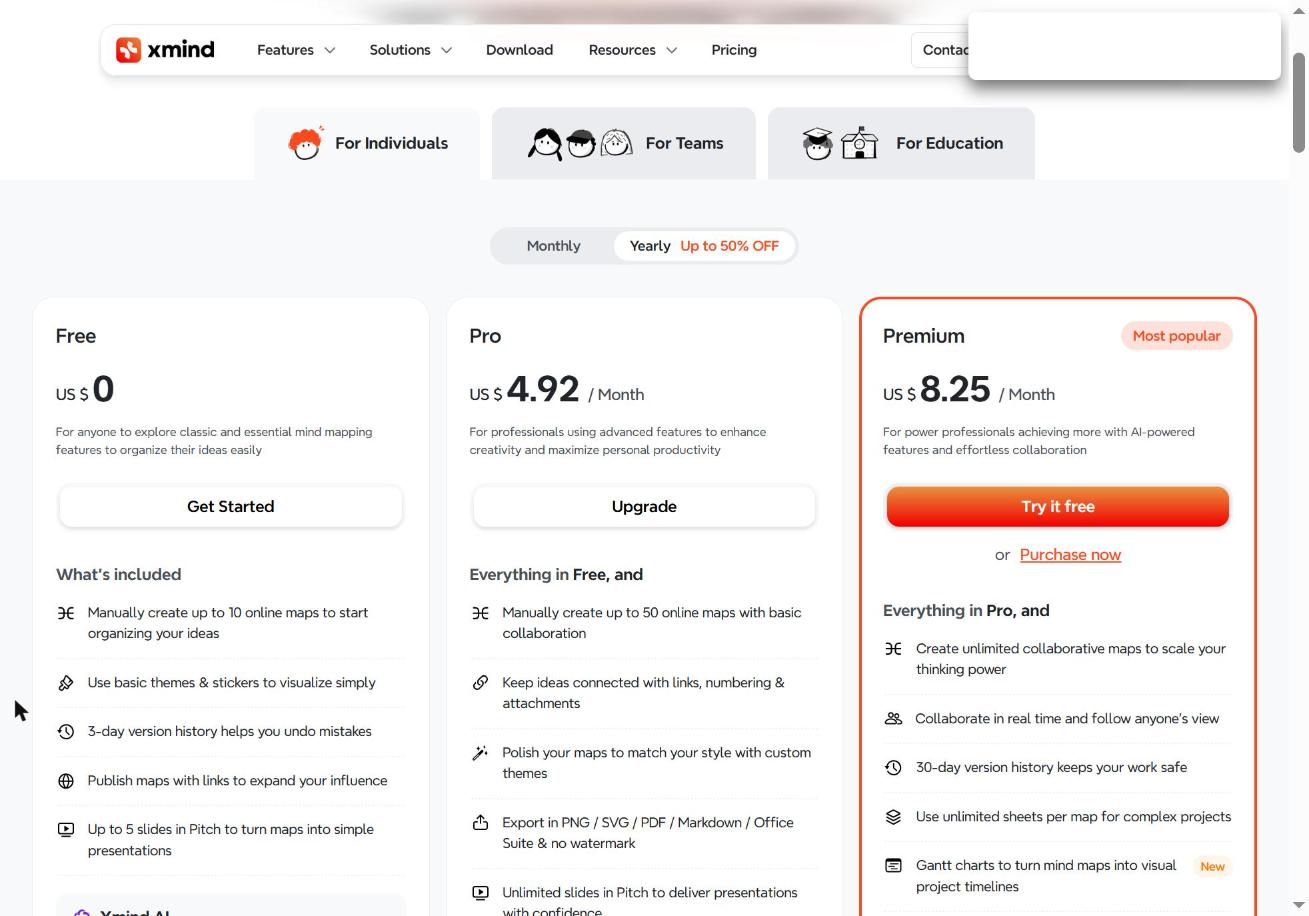
Yearly billing cuts Pro by about 51% and Premium by about 45% compared to paying monthly. If you plan to use XMind for more than a few months, yearly is the smart default.
XMind Free vs Pro vs Premium: what you actually get
The short version: Pro fixes the annoying limits of Free. Premium adds AI, unlimited cloud maps and teamwork.
| Feature | Free | Pro | Premium |
|---|---|---|---|
| Online maps (made by hand) | 10 | 50 | Unlimited |
| Sheets per shared map | 3 | 3 | Unlimited |
| Version history | 3 days | 3 days | 30 days |
| Pitch (slides) | 5 slides | Unlimited | Unlimited |
| Watermark on exports | Yes | No | No |
| Export SVG, Markdown, Word, Excel, OPML | No | Yes | Yes |
| Gantt chart | View only | View only | Edit |
| Real-time collaboration | No | Basic | Yes |
| AI credits | 50 | 50 | 500 per month |
XMind Free: what it includes and its limits
Yes, XMind has a free version, and it has no time limit. You can make mind maps with unlimited topics, use templates, add notes, markers and labels, and share maps by link.
The XMind free version limitations show up fast once you do real work:
- 10 online maps. You can only create up to 10 cloud maps by hand.
- Watermarks. Exported images and PDFs carry the XMind watermark.
- Few export formats. No SVG, Markdown, Word, Excel or OPML export.
- 5 Pitch slides. Presentations stop at 5 slides.
- Limited styling. Only some colored branch styles, no custom themes.
- No attachments, equations or topic links. These sit behind Pro.
- 3-day version history. Older mistakes can’t be rolled back.
- 50 AI credits. Enough to test AI, not to rely on it.
If you only brainstorm for yourself and never export, Free is enough. The moment you share a clean PDF with a client or a teacher, the watermark is the reason most people upgrade.
XMind Pro: who should pay for it
XMind Pro costs $4.92 a month on yearly billing, or $10 a month month-to-month. It is the “remove the limits” plan.
You get everything in Free, plus:
- No watermark on exports
- Export to PNG, SVG, PDF, Markdown and Office formats
- Unlimited Pitch slides, and Pitch export to PowerPoint
- Custom themes and all colored branch styles
- Attachments, math equations, numbering and topic links
- Up to 50 online maps
Pro is the right pick for students, writers and solo consultants. It does not include the AI tools or editable Gantt charts.
XMind Premium: is it worth the extra?
XMind Premium costs $8.25 a month on yearly billing, or $15 month-to-month. It includes all of Pro, plus the features XMind is pushing hardest right now.
- Unlimited online maps and unlimited sheets per map
- Real-time collaboration, with “follow” mode to see someone’s view
- 30-day version history
- Editable Gantt charts, tasks with assignees, and task export to Calendar or Excel
- 500 AI credits every month: text to mind map, summarize pages and files, task breakdowns and to-do lists
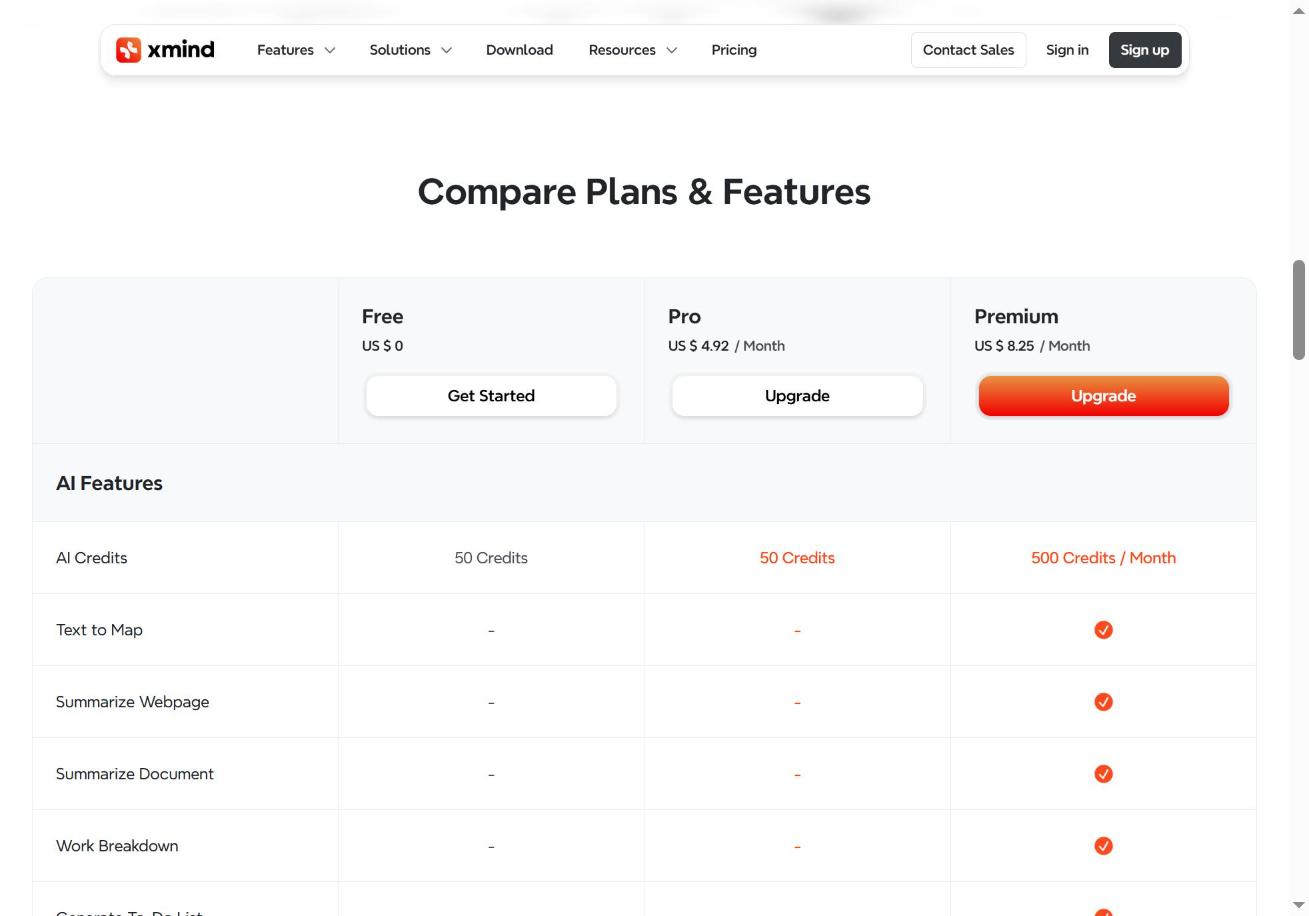
For about $40 more a year than Pro, Premium makes sense if you use AI to build maps from notes, or if you plan projects with other people. If you never touch AI and work alone, stick with Pro.
XMind for Teams pricing
XMind Business costs $10 per seat per month on yearly billing, or $18 per seat month to month. That is about $120 per seat a year. With MIND15 on yearly it works out to about $102 per seat/year.
| Team plan | Yearly billing | Yearly + MIND15 | Monthly billing | Paying monthly × 12 | Total discount (yearly + MIND15) |
|---|---|---|---|---|---|
| Free | $0 | $0 | $0 | $0 | $0 |
| Business | $10/seat/mo (~$120/seat/yr) | ~$102/seat/yr | $18/seat/mo | $216/seat/yr | ~53% off (~$114/seat saved) |
| Enterprise | Custom | Contact sales | Custom | Custom | Custom |
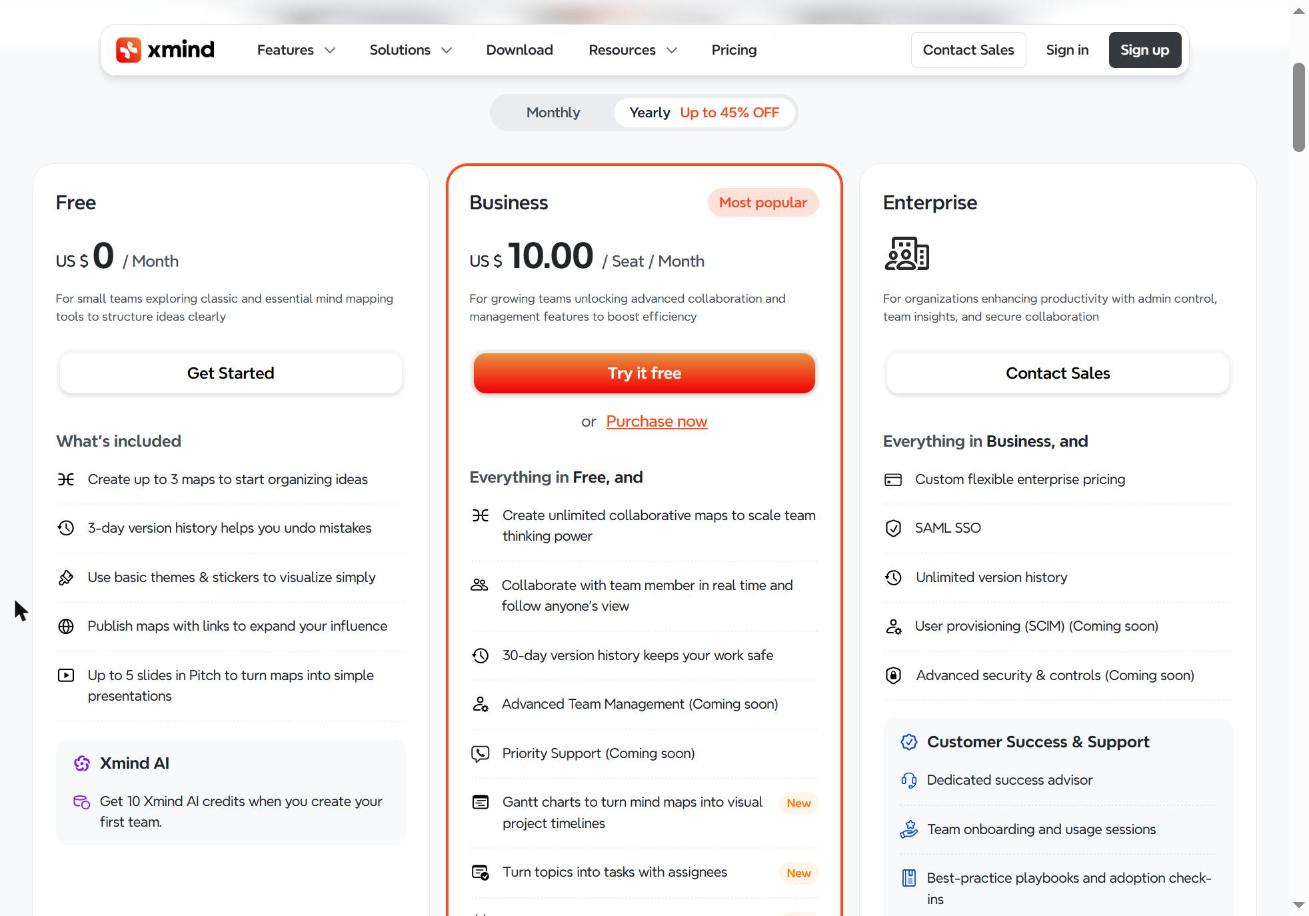
- Free team: 3 maps, 3-day version history, 5 Pitch slides, 10 AI credits when you create the team.
- Business: unlimited shared maps, real-time team collaboration, 30-day history, editable Gantt charts, tasks with assignees, and 800 AI credits per seat every month. 7-day free trial on yearly.
- Enterprise: everything in Business plus SAML SSO, unlimited version history, a dedicated success advisor and team onboarding. Custom pricing.
One catch: XMind does not let you downgrade once a higher team plan is active, so start with the trial before you commit.
XMind for Education pricing (students and teachers)
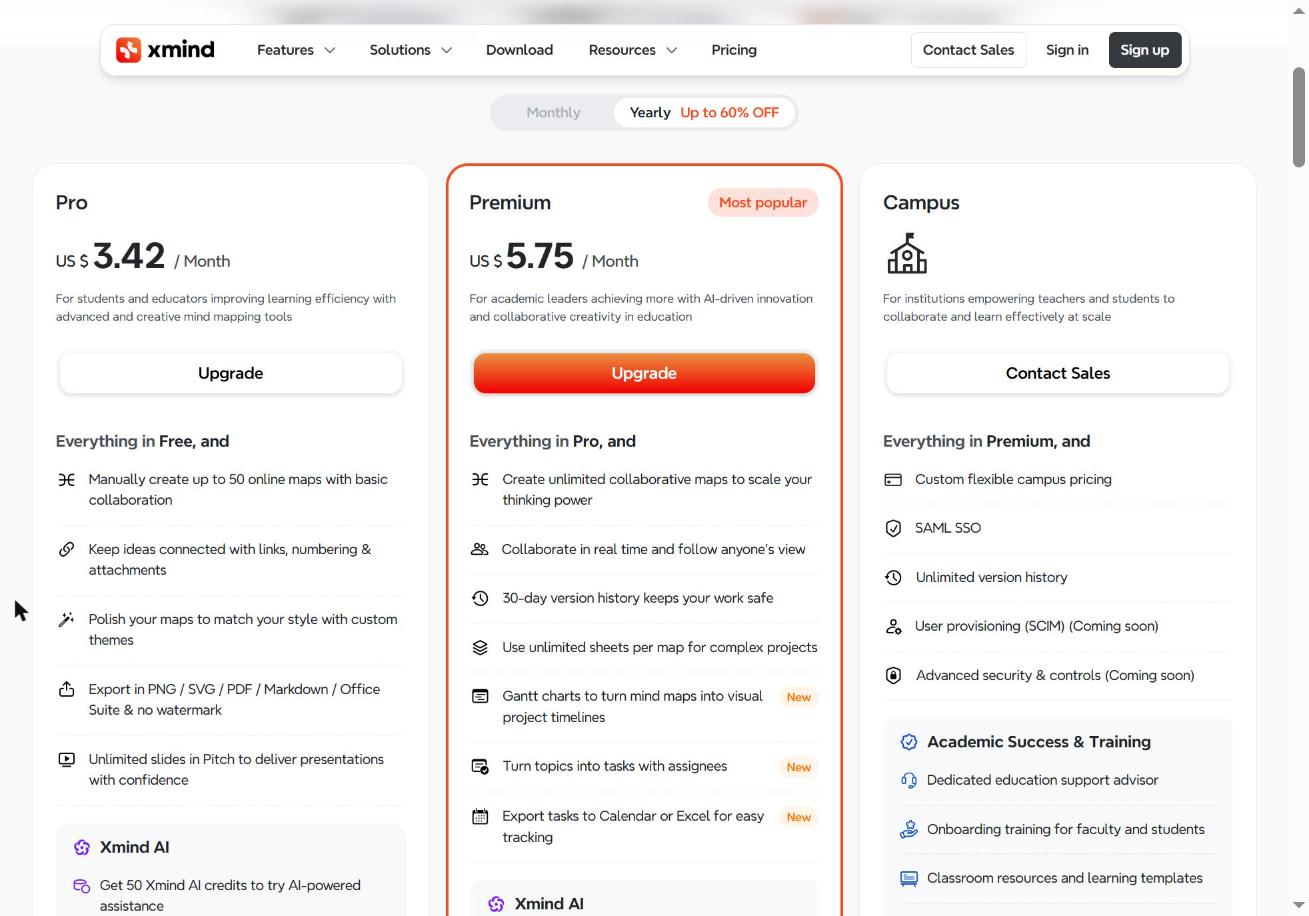
Students and teachers get the biggest discount: up to 60% off. Education plans are billed yearly and you upload proof at checkout, like a student ID or school document.
| Education plan | Yearly billing | Yearly + MIND15 | Monthly option | Total discount (yearly + MIND15) |
|---|---|---|---|---|
| Pro | $3.42/mo ($41/yr) | $34.85/yr | Not offered | 71% off vs regular Pro monthly |
| Premium | $5.75/mo (~$69/yr) | ~$58.65/yr | Not offered | 67% off vs regular Premium monthly |
| Campus | Custom | Contact sales | Custom | Custom |
We tested it: MIND15 stacks on top of the academic discount. Education Pro goes from $59.00 to $41.00 with the student price, then to $34.85 total with the code.
Education Pro and Premium include the same features as the regular plans. Campus is for schools and universities, with SSO, unlimited history and faculty training at custom pricing.
How to pay less for XMind
- Pick yearly billing. It is up to 50% cheaper than monthly.
- Add code MIND15 on the yearly plan. Open “Coupon discount” at checkout, type MIND15 and click Apply. We tested it: Pro yearly drops from $59.00 to $50.15 total. Premium yearly drops from $99 to $84.15 total.
- Try before you buy. Yearly Premium and Business plans come with a 7-day free trial.
- Know the refund window. Yearly plans bought on the XMind website have a 7-day money-back guarantee. Monthly plans are not refundable.
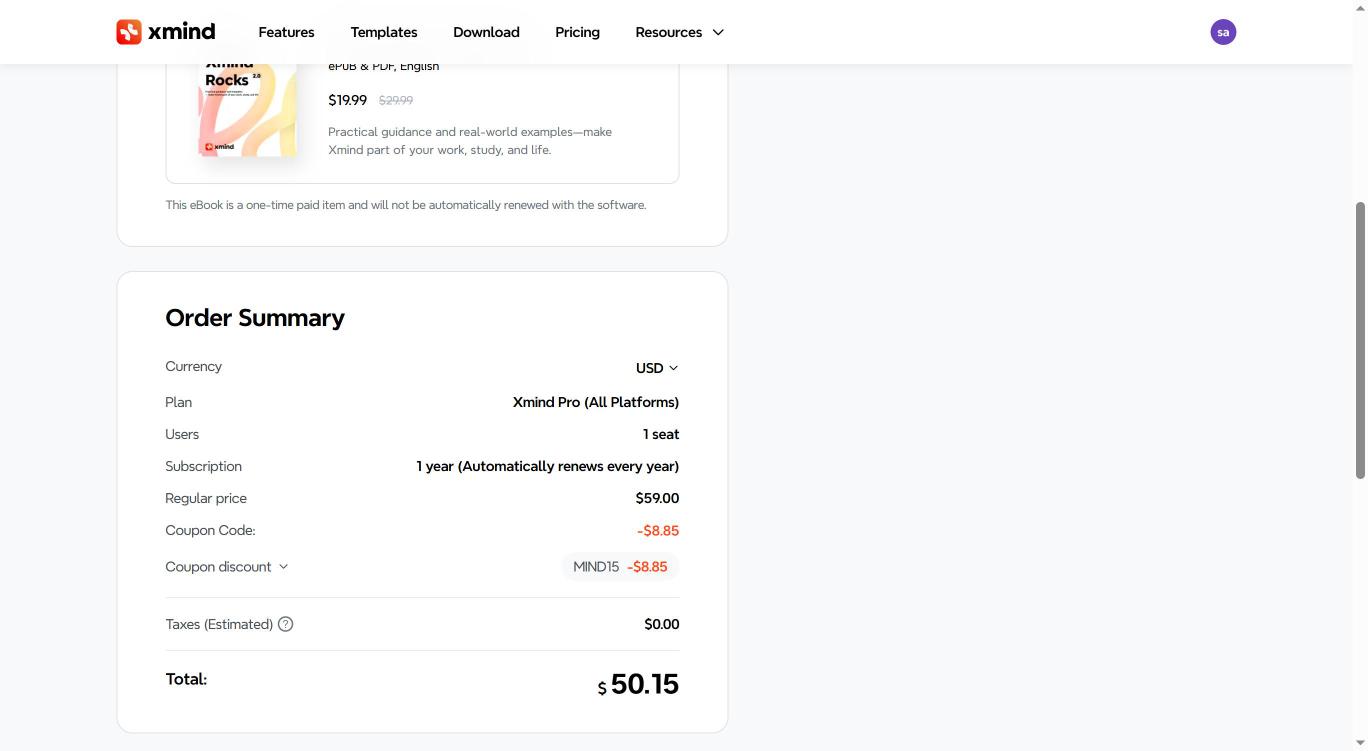
Full steps and screenshots are in our XMind coupon code guide.
Watch: XMind in action
XMind pricing FAQ
How much does XMind cost?
XMind Pro costs $4.92/month billed yearly (about $59 a year) or $10 month-to-month. Premium costs $8.25/month billed yearly (about $99 a year) or $15 month-to-month. The Free plan costs nothing.
Is XMind free?
Yes. XMind Free has no time limit. It covers basic mind mapping, but exports carry a watermark and you can create only 10 online maps by hand.
What is the difference between XMind Pro and Premium?
Pro removes the watermark and unlocks all exports and styling. Premium adds unlimited maps, real-time collaboration, editable Gantt charts, 30-day history and 500 AI credits each month.
How many devices can I use with one subscription?
One Pro or Premium subscription works on up to 5 computers and 5 mobile devices, across Windows, macOS, Linux, iOS and Android.
Does XMind have a free trial?
Yes, a 7-day free trial is available on yearly plans only. Monthly plans don’t include a trial.
What happens to my maps if my subscription ends?
Your maps stay saved and you can still open them. You just lose access to paid features until you renew.
Can I get a refund?
Yearly plans bought on the XMind website can be refunded within 7 days. Monthly plans and AI credit add-ons can’t.
Verdict: which XMind plan should you pick?
- Pick Free if you map ideas only for yourself and never export.
- Pick Pro if you need clean, watermark-free exports and presentations. It is the best value for most solo users.
- Pick Education Pro if you are a student or teacher. At $34.85/year with MIND15 it is the cheapest paid XMind plan.
- Pick Business for teams that share maps every day.
- Pick Premium if you want AI to build maps for you, or you plan projects with others.
Whatever you choose, go yearly and add MIND15 at checkout. Your total: $50.15/year for Pro or $84.15/year for Premium.