
Ask Claude for a poster and you get a web page pretending to be a poster: a purple gradient, centered text, a row of emoji and a “Join Us!” button nobody can click on paper. I wanted to know which Claude skills fix that for real graphic design work. So I gave Claude one brief for a made-up event, the Riverside Print Fair, and made the poster with no skill and then with Anthropic’s canvas-design. I also turned the same event into generative art with algorithmic-art, restyled a social post with theme-factory, and built a print check skill of my own with /skill-creator. Here is what each one changed.
TL;DR
- Best overall:
canvas-designby Anthropic. It turned an emoji-filled template into a poster that looks printed, with no made-up facts. - Best for patterns and art:
algorithmic-art. One seeded p5.js piece gave me endless versions of the same idea. - Best for quick restyles:
theme-factory. Ten color and font sets, but check contrast. One theme made my shapes vanish. - Best quick win: a
print-preflightskill I made with/skill-creator. It caught that both posters were 67 DPI at 18×24 inches, far too small to print.
| Skill | Best for | Installs (skills.sh) | Tested here |
|---|---|---|---|
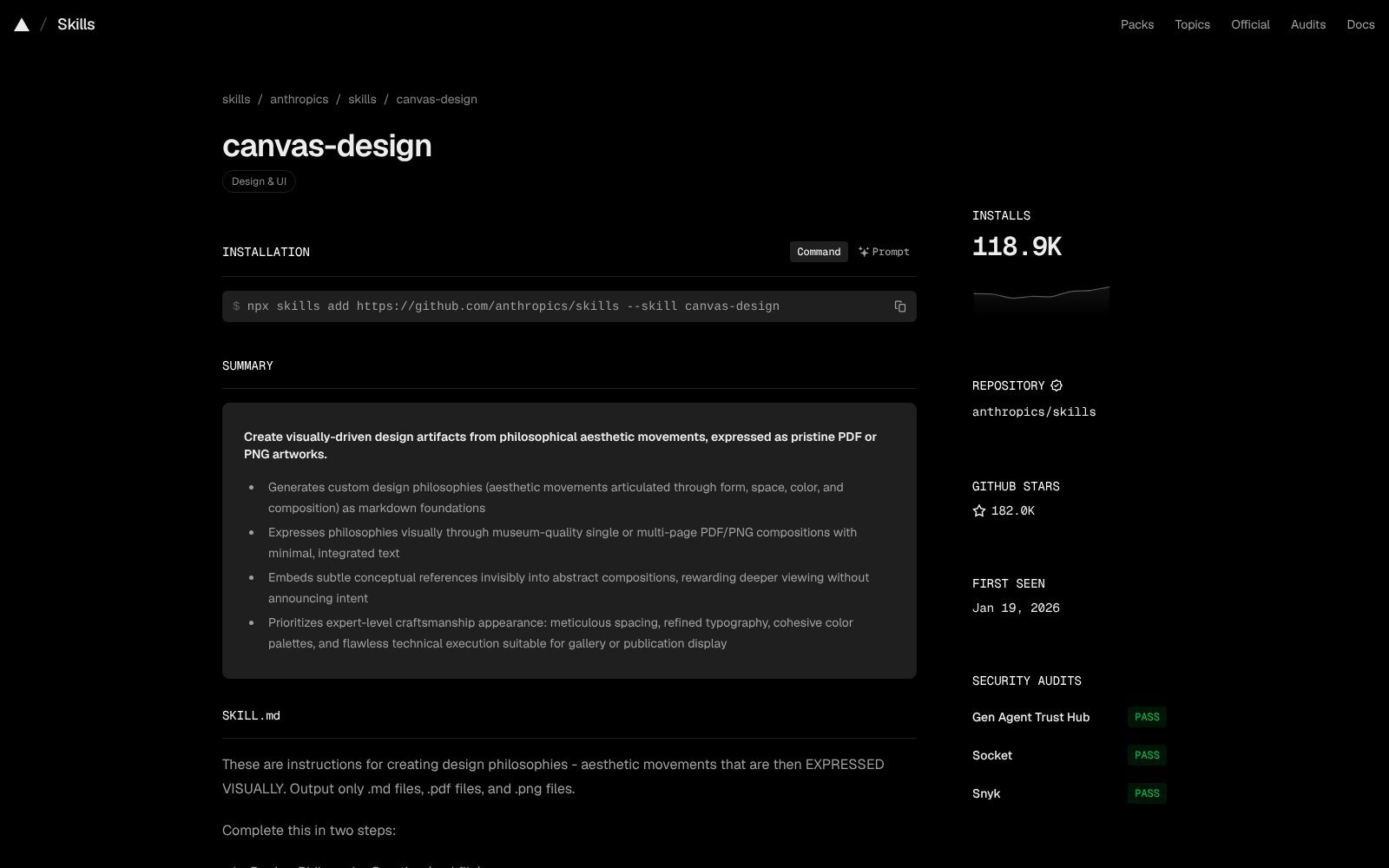
| canvas-design | Posters, print pieces | 118.9K | Yes, with and without |
| algorithmic-art | Generative art, patterns | 87.4K | Yes, 3 seeds |
| theme-factory | Color and font swaps | 92.9K | Yes, 4 themes |
| Canva skills | Editing Canva designs | Canva plugin | Reviewed |
| brand-guidelines | Brand rules template | 105.9K | Reviewed |
| slack-gif-creator | Small animated GIFs | 73.8K | Reviewed |
How I tested
A skill is a folder with a SKILL.md file that Claude reads before it starts a task. To see what a skill adds, I kept everything else the same:
- One brief: “Design an 18×24 inch poster for the Riverside Print Fair, a one-day risograph, zine and small press fair. Saturday, November 14, 10am to 5pm, Pier 4 Warehouse, free entry.” The event is made up.
- Run A had no skill. Run B read the current public
canvas-designSKILL.md first, used the fonts that ship with it, and followed every step. - I rendered every result to PNG in headless Chromium, then measured the files with a script instead of judging by eye alone.
I ran all of this in a Claude session in a cloud sandbox, using the skills’ public files from GitHub. I didn’t add any new skills to my Claude account for this article. Install counts come from skills.sh and stars from GitHub, both checked the day I published.
Test 1: the same poster with and without canvas-design
Without a skill, Claude built the poster as a web page. A purple-to-blue gradient. Centered Arial. Nine emoji. A pill badge that says “Annual Event,” which nobody told it. A calendar emoji that reads July 17 next to a November date. And a yellow “Join Us!” button, on a sheet of paper.
With canvas-design, the process changed before any pixels did. The skill makes Claude write a short design philosophy first, a kind of art movement in four to six paragraphs. Mine was called “Registration Drift”: two inks, never quite aligned, like a riso print. Only then does it build the canvas. It asks for limited color, repeated shapes, small clinical labels and one bold type gesture. It also bundles 54 font files, so you aren’t stuck with system fonts.
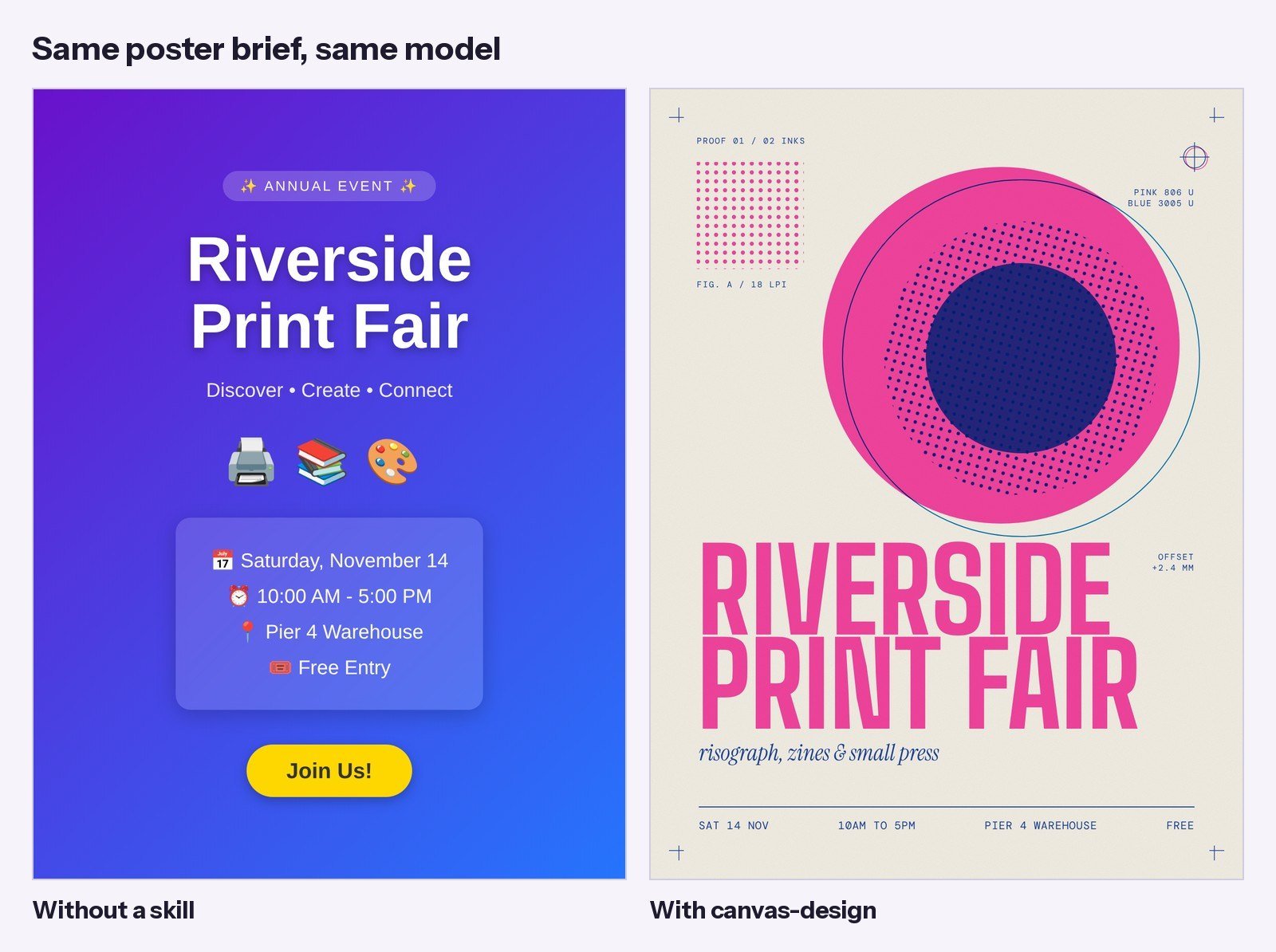
The skill version uses fluorescent pink and blue, two classic riso inks, with a violet where they overprint. Crop marks and a registration target sit in the corners. The title uses Big Shoulders, one of the bundled fonts.
The best part was the last step. The skill tells Claude to refine instead of adding more. My first render had two labels touching the big circle and one sitting on the title. The refine pass moved them. Nothing new was added.
One honest limit: canvas-design makes art, not layouts. It works best when the text is short. For a menu or a flyer with 200 words, it will fight you.
Test 2: generative art with algorithmic-art
algorithmic-art works the same way: write a philosophy first, then code it. The output is an interactive p5.js page built from the skill’s own template, with a seed box, sliders and color pickers in a sidebar. Same seed, same piece, every time.
I asked for art for the fair. Claude made “Ink Currents”: thousands of lines flowing through one noise field, printed in two passes, pink then blue, with a small offset between them. I rendered seeds 7, 42 and 1984.
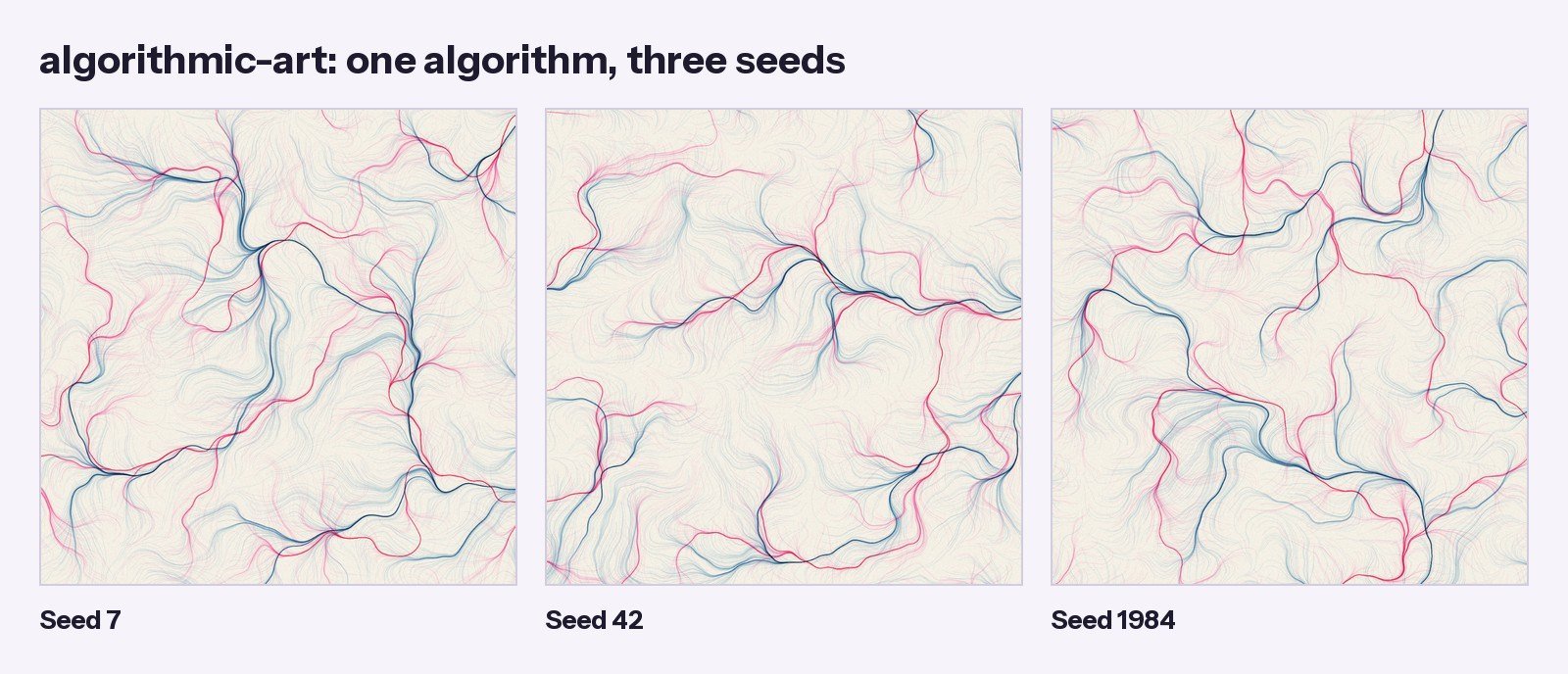
That is the real value. You don’t get one image. You get a machine that makes a family of images in your colors.
Limit: the template loads p5.js from a CDN, and the canvas is 1200px square by default. For print, ask Claude to change the canvas size before you export.
Test 3: restyling a social post with theme-factory
theme-factory has 10 preset themes, each a short file with four hex colors and a header and body font. It can also make a custom theme from a description.
I made one 1080×1350 Instagram post for the fair and applied three presets, then asked for a custom theme based on my poster. Swapping took seconds and the layout stayed put.
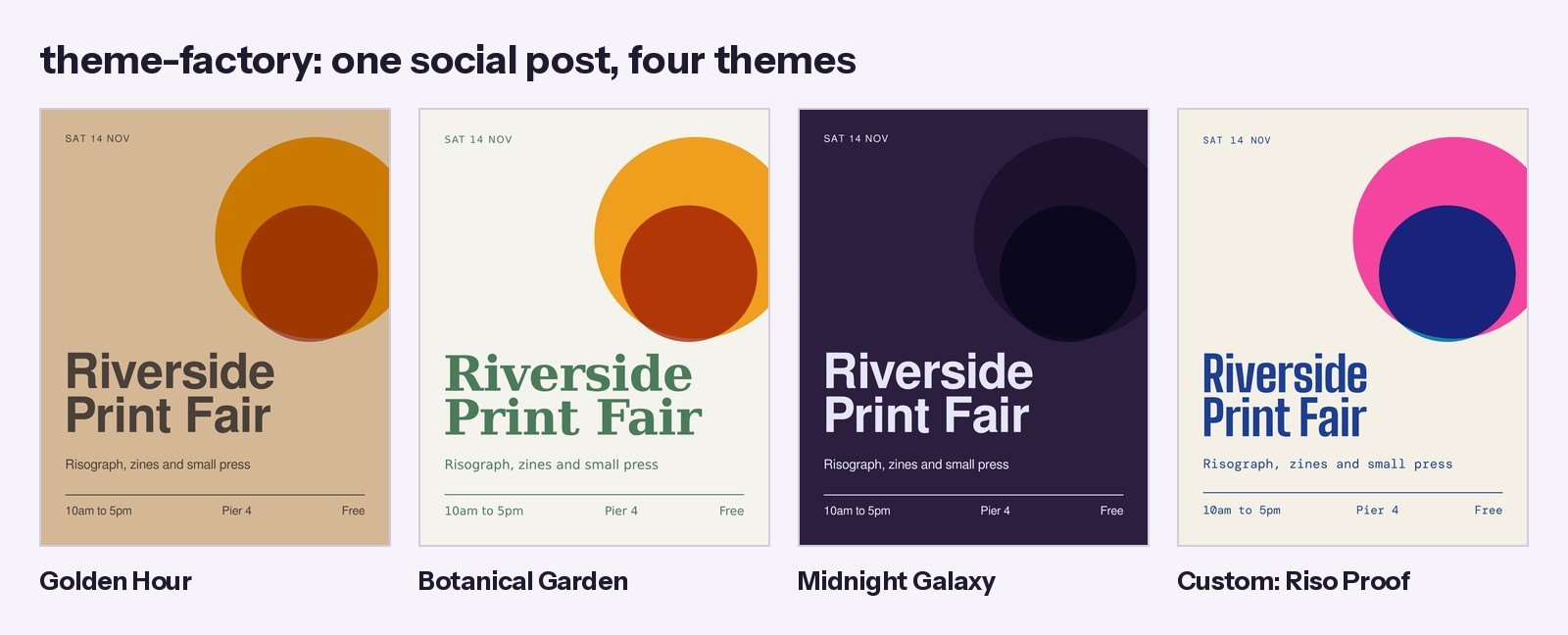
Two things to know. The preset fonts are plain system fonts like FreeSans and DejaVu, which is safe but bland for graphic design. And a theme swaps colors, not judgment. My overlapping circles used a multiply blend. On Midnight Galaxy’s dark purple, they nearly vanished. The custom theme, with real riso colors and a bundled display font, looked the best of the four.
The best Claude skills for graphic design
1. canvas-design: best for posters and print pieces
What it does: has Claude write a visual philosophy, then express it as a single PNG or PDF with minimal text, using 54 bundled font files.
In my test: the biggest change of anything I tried. No emoji, no fake facts, no web button.
Where to get it: anthropics/skills on GitHub (about 180K stars). 118.9K installs on skills.sh.
Tip: name a print method or a reference style in your brief, like “risograph” or “Swiss poster.” The philosophy step gets much sharper with one concrete anchor.
2. algorithmic-art: best for generative art and patterns
What it does: writes a seeded p5.js piece inside an interactive viewer with seed controls, parameter sliders and color pickers.
In my test: one prompt gave me a whole series in my two inks. Good for backgrounds, merch and pattern work.
Where to get it: the same anthropics/skills repo. 87.4K installs on skills.sh.
Tip: write down seeds you like. The seed is the only thing you need to get the exact piece back.
3. theme-factory: best for fast color and font swaps
What it does: applies one of 10 preset themes, or a custom one, to slides, docs, pages and graphics.
In my test: quick and consistent, but the preset fonts are generic and one theme hid my shapes.
Where to get it: anthropics/skills. 92.9K installs.
Tip: skip the presets for client work. Describe the brand and let it build a custom theme.
4. Canva skills: best if your work lives in Canva
What it does: Canva’s official plugin has six active skills: resize-for-social-media, bulk-create, implement-feedback, edit-design, get-design-feedback and brand-check. They work through the Canva MCP server, so you sign in to Canva first.
In my review: I read the skills but didn’t run them on a Canva account for this test. brand-check and get-design-feedback are read-only, which makes them safe to try first. Edits wait for your approval. bulk-create needs Canva Enterprise.
Where to get it: canva-sdks/canva-skills on GitHub.
5. brand-guidelines: best as a template for your brand
What it does: applies Anthropic’s own brand colors and type to anything Claude makes.
In my review: as is, it only helps if you design for Anthropic. Its value is the format. At about 330 words, it shows how short a brand skill can be.
Where to get it: anthropics/skills. 105.9K installs.
Tip: copy it, swap in your hex codes and fonts, and you have a brand skill in ten minutes.
6. slack-gif-creator: best for small animated GIFs
What it does: gives Claude the size and frame limits for Slack GIFs, plus tools to build and validate them.
In my review: narrow, but handy for tiny logo animations. I only read it.
Where to get it: anthropics/skills. 73.8K installs.
How to get graphic design skills in Claude: make your own or install one
1. Make your own with /skill-creator (fastest)
None of the skills above check whether a file is ready to print or post. That is where real design jobs go wrong: wrong size, no bleed, text too close to the trim. So I made a skill for it with this prompt:
“/skill-creator Make a skill named print-preflight: when I make or finish a poster, flyer or social graphic, check it against the target size (print at 300 DPI with 0.125 in bleed, or social sizes like 1080×1350). Measure resolution, aspect ratio, bleed, safe margin and colors with a script, then look for small or low-contrast text, emoji in print work, web buttons and facts I never gave. Report in one table, then fix what you can. Keep it short.”
The draft took a few minutes. The SKILL.md has a description that triggers on plain phrases like “is this ready to print” or “export for Instagram,” and four steps: get the target, measure with a small Python script, read the design yourself, then report and fix. Every line ends as PASS, FIX or NOT CHECKED.
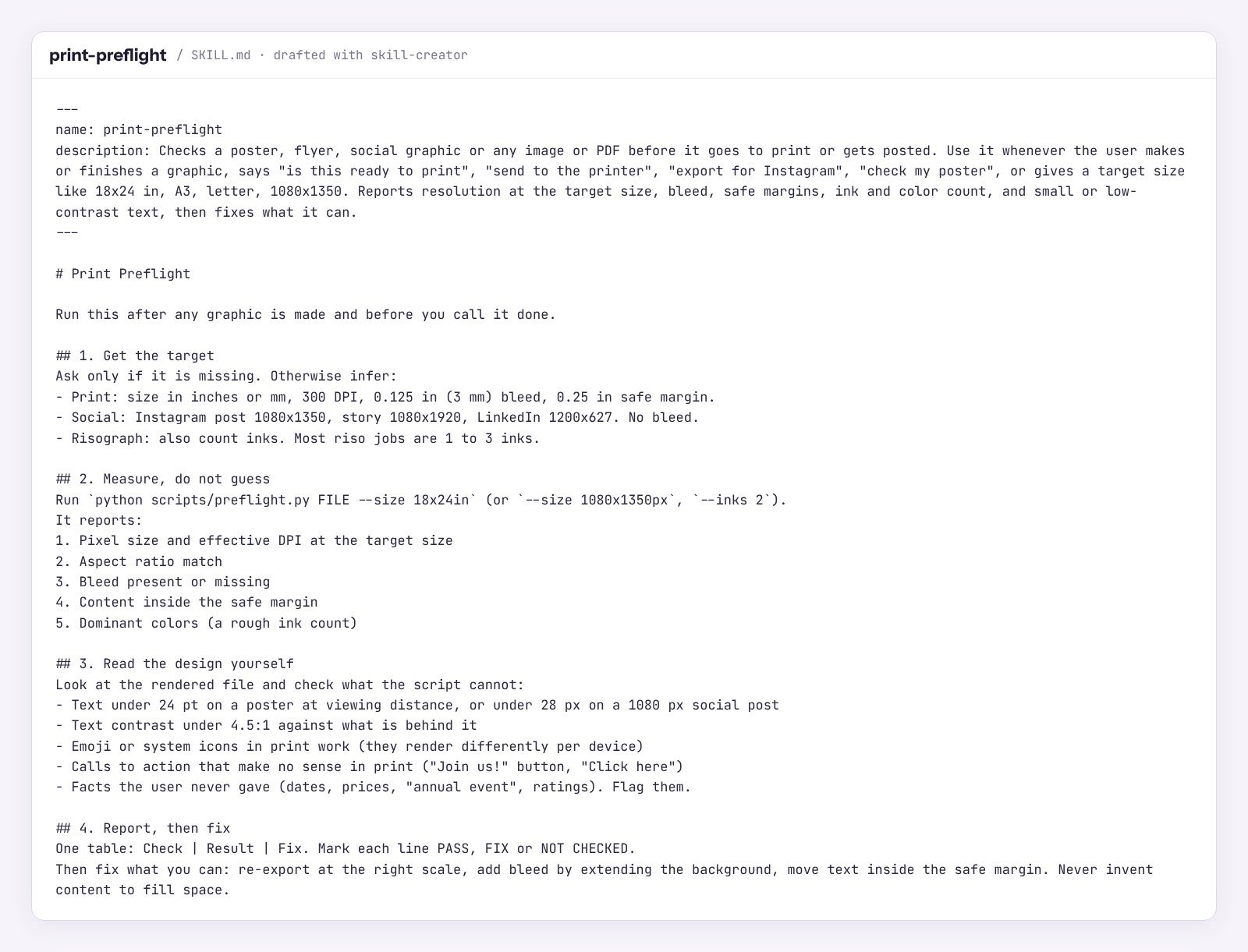
It found a problem neither poster skill mentions. Both posters were 1200×1600 pixels. At 18×24 inches, that is 67 DPI, and print shops want 300. Neither had bleed. I re-exported the canvas-design poster at 4.5x scale and extended the paper color 0.125 inches past the trim. The new file was 5476×7276 pixels, 303 DPI, and passed.
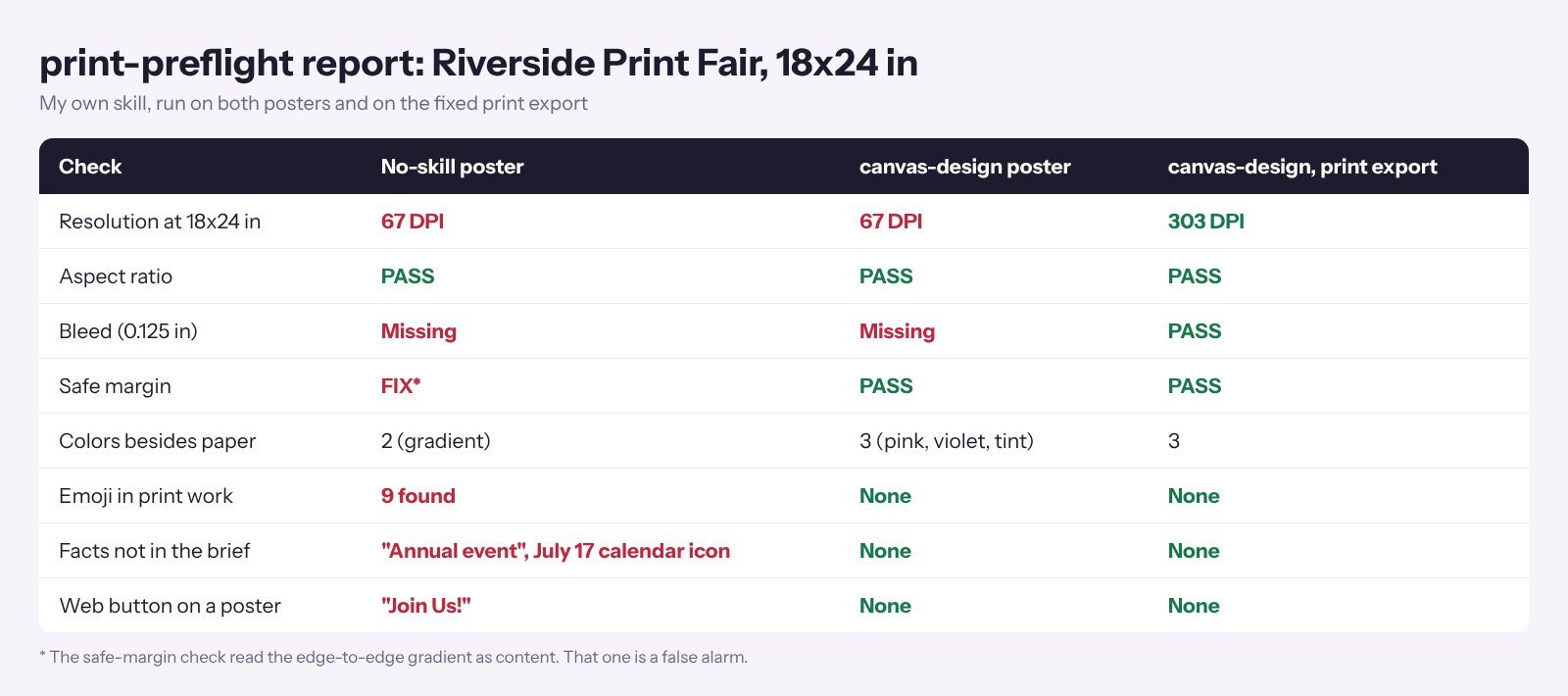
It isn’t perfect. The safe margin check read the edge-to-edge gradient as content, a false alarm. And its color count sees the violet overprint as a third color, even though a riso press only needs two inks for it. Read the table before you let it “fix” anything.
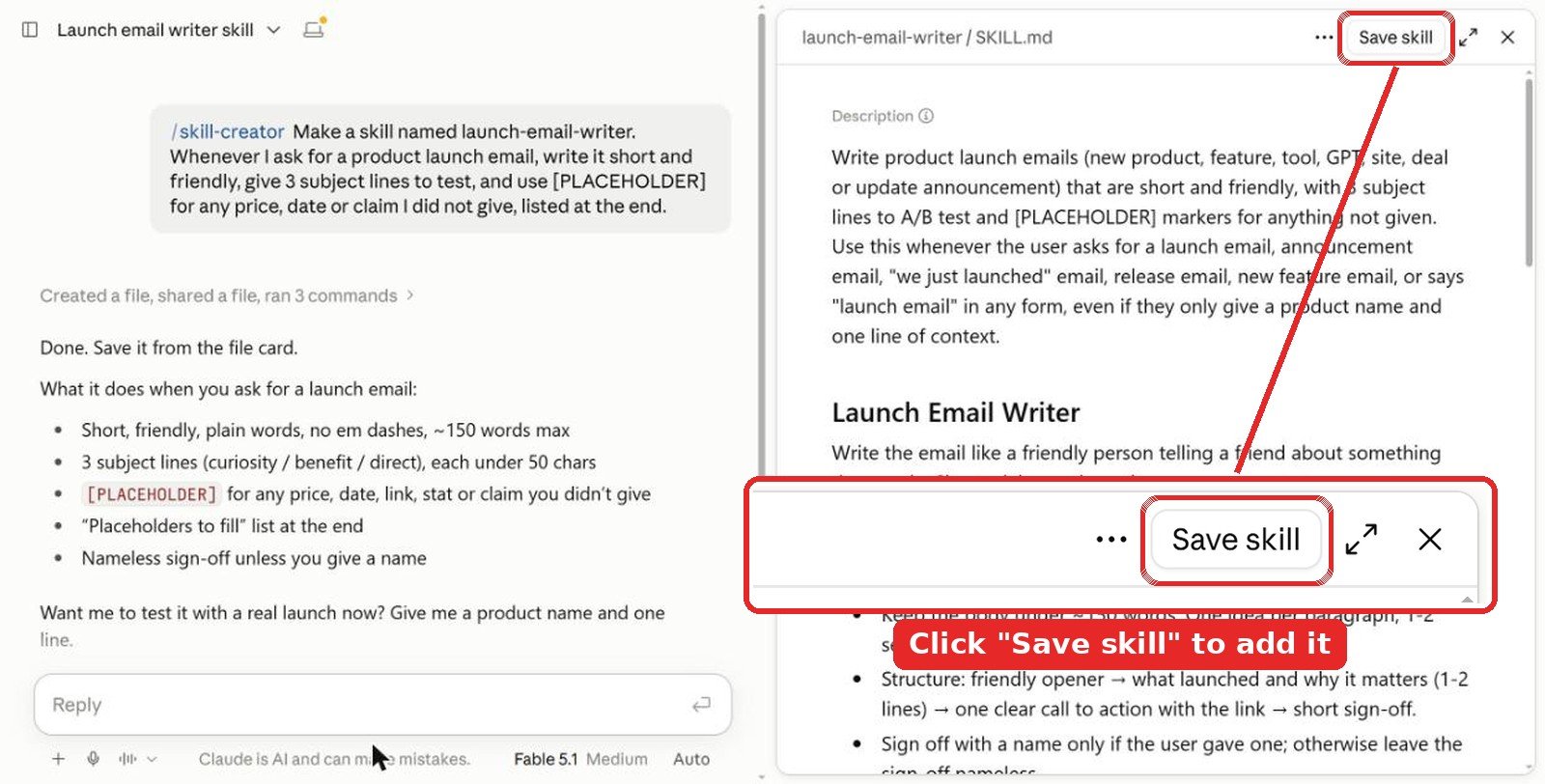
Don’t skip the save step. The skill is only a draft in that chat until you click Save skill at the top right of the SKILL.md preview. Close the chat without saving and it’s gone.
Name it from the start. Put the name in your first message, like “Make a skill named print-preflight…”, and skill-creator uses it. If you forget, it picks one for you. You can ask “rename it to …” in the same chat before you save, or change it later in Customize > Skills with the Edit button.
Tip: give it your printer’s real specs. Some shops want 3 mm bleed, some want 0.25 inch. One line in the SKILL.md saves a reprint.
2. Install in the Claude app
Anthropic’s help center lists skills for Pro, Max, Team and Enterprise plans. They need code execution, so turn on Code execution and file creation first. Anthropic’s example skills, including the three I tested, are already in the app for paid plans. You just switch them on.
- For any other skill, download its folder and zip it.
- Go to Customize > Skills, add a new skill and choose to upload it, then pick the zip.
- Ask for a poster and let Claude pick it up, or type
/canvas-designto call it by name.
3. Install in Claude Code
For Anthropic’s skills, add the repo as a plugin marketplace:
/plugin marketplace add anthropics/skills
/plugin install example-skills@anthropic-agent-skills
To install single skills, or Canva’s plugin:
npx skills add https://github.com/anthropics/skills --skill canvas-design
npx skills add https://github.com/anthropics/skills --skill algorithmic-art
npx skills add https://github.com/anthropics/skills --skill theme-factory
/plugin marketplace add canva-sdks/canva-skills
/plugin install canva@canva-skills
Tips from testing
- Say where it will live. “18×24 inch poster for a riso press” and “Instagram post” are different jobs. Without that, Claude designs for a screen.
- Keep text short for canvas-design. It shines with a title and four facts, not a paragraph.
- Check every fact on the page. My no-skill poster added “Annual Event” and a July date icon. Nobody would catch that until it’s printed.
Video: Claude skills for designers
FAQ
What is the best Claude skill for graphic design?
canvas-design by Anthropic. In my test it replaced an emoji-filled web template with a poster that looks printed, used its own bundled fonts and fixed its own overlaps. It has 118.9K installs on skills.sh.
Can Claude make print-ready posters?
Yes, with one extra step. Both of my posters came out at 1200×1600 pixels, which is only 67 DPI at 18×24 inches. Ask Claude to export at 300 DPI and add 0.125 inch bleed, or use a preflight skill to check.
Can I make my own graphic design skill with /skill-creator?
Yes. Type /skill-creator, put the name in your first message and describe the checks you want, like print size, bleed and safe margins. Mine took a few minutes. In the Claude app, click Save skill at the top right of the preview or the draft is lost.
Does Claude work with Canva?
Yes. Canva has an official Claude plugin with six skills, including brand-check, get-design-feedback and resize-for-social-media. It works through the Canva MCP server, so you sign in to Canva first. bulk-create needs Canva Enterprise.
Are these graphic design skills free?
Yes. Anthropic’s skills are free on GitHub and Canva’s plugin is free to install. In the Claude app, skills need a Pro, Max, Team or Enterprise plan with code execution turned on.
The verdict
If you add one graphic design skill to Claude, make it canvas-design. It changed the poster more than anything else, and it stopped Claude from inventing details. Add algorithmic-art when you need a pattern or a series, and theme-factory for fast restyles, with a custom theme instead of the presets. If you work in Canva, try Canva’s read-only brand-check first. Then spend five minutes on a preflight skill with /skill-creator. Mine caught a print problem that would have cost a full reprint.
More Claude guides: best design skills for Claude, best design skills for Claude Code, best UI skills for Claude, best Claude skills for web design, best Claude skills for marketing, best Claude skills for SEO and all Claude articles. For design ideas beyond AI, see our graphic design and illustration section.
Tested in Claude in October 2026. Install and star counts were checked the same month and change often.