
Claude Code can build a front end in minutes. The catch is that it builds the same one every time: a purple gradient, three identical cards and a “Get Started →” button. I wanted to know which design skills fix that inside a real codebase, not a chat window. So I set up a small Vite, React and Tailwind project for a made-up pottery studio called Spindle and built its landing page twice, once with no skill and once with Anthropic’s frontend-design. Then I ran a browser check with webapp-testing and a token check I made myself with /skill-creator. Here is what each one changed.
TL;DR
- Best overall:
frontend-designby Anthropic. It replaced a stock SaaS template with a page built around the business, and it even caught my own first idea as a cliché. - Best partner for it:
webapp-testing. It lets Claude Code look at the page in a real browser. It found a schedule squeezed into 42px columns on a phone. - Best command pack:
impeccable, with 24 commands like audit, polish and typeset. - Best quick win: a
design-token-guardskill I made with/skill-creator. It found 26 off-brand color classes in the plain build.
| Skill | Job in your repo | Installs (skills.sh) | Tested here |
|---|---|---|---|
| frontend-design | Builds a distinct UI | 1.0M | Yes, with and without |
| webapp-testing | Checks it in a browser | 180.3K | Yes, fix loop |
| impeccable | Audit and polish commands | 340.9K | Reviewed |
| web-design-guidelines | Line-by-line UI review | 751.0K | Reviewed |
| figma-design-to-code | Figma file to code | Figma plugin | Reviewed |
| ui-ux-pro-max | Design system data | 401.5K | Reviewed |
How I tested
A design skill is a folder with a SKILL.md file. Claude Code reads it before it touches your UI. To see what a skill adds, I kept everything else the same:
- One repo: Vite, React 19 and Tailwind v4, with a theme file for colors and fonts.
- One brief: “Build the landing page for Spindle, a pottery studio in Portland that sells 4-week wheel classes and open studio memberships: hero, schedule, pricing, FAQ.”
- Run A had no skill. Run B read the current public
frontend-designSKILL.md first and followed it step by step. - I then rendered both pages in headless Chromium at 1440px and 390px and measured overflow, contrast and tap targets with a Playwright script, the way
webapp-testingtells Claude to work.
I ran all of this in a Claude Code session in a cloud sandbox, using the skills’ public SKILL.md files. I didn’t add any new skills to my Claude account for this article. Install counts come from skills.sh and stars from GitHub, both checked the day I published.
Test 1: the same page with and without frontend-design
Without a skill, the page was the template you have seen a hundred times. A purple-to-pink gradient hero. “Unleash Your Creativity With Clay,” with one word in yellow. All-caps labels over every heading. Class cards numbered 01, 02, 03 even though they aren’t a sequence. Worst of all, a stats row with “500+ Happy Students” and “4.9★ Average Rating.” Nobody gave Claude those numbers. It made them up.
With frontend-design, the skill made Claude write a short plan first: 4 to 6 named colors, type roles, a layout sketch. Then it checks that plan against a list of looks AI pages fall into. That check caught me. My first palette was a cream background, a serif headline and a clay-orange accent. It felt right for pottery, but the skill lists that exact combo as the number one AI tell. So I switched to cobalt and celadon, two classic glaze colors, on a cool porcelain white.
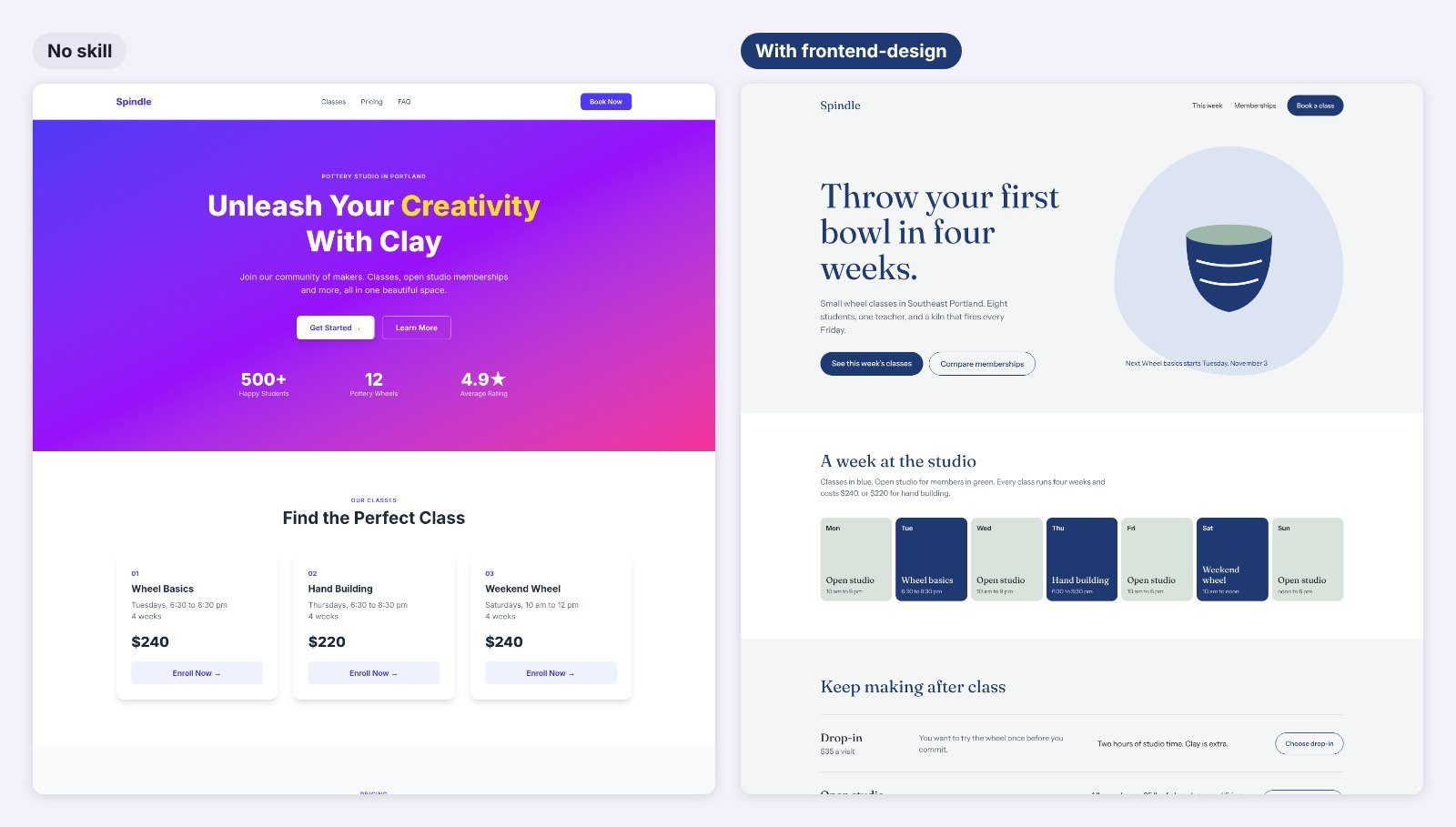
The skill version opens with a plain promise, “Throw your first bowl in four weeks,” and the next class date. Its one bold element is a weekly schedule, with classes in blue and open studio in green. Pricing became three rows that say who each plan is for, not three cards with a “Most Popular” badge. It also added a skip link, visible focus rings and a reduced-motion rule without being asked. No invented stats anywhere.
Test 2: letting Claude Code see the page with webapp-testing
frontend-design even tells Claude to take screenshots and critique its own work “if your environment supports it.” webapp-testing is how you give it that. It has Claude write small Python Playwright scripts, start your dev server with a helper, and inspect the rendered page before acting.
I ran one script on both builds. The plain page was 92px wider than a 390px phone, because its card grids had no mobile breakpoint. Its gray FAQ text measured 2.60:1 contrast, well under the 4.5:1 AA line. The frontend-design page passed overflow and contrast. But the script flagged one thing I had missed: on a phone, the seven-day schedule shrank to seven 42px columns, and the words broke mid-letter.
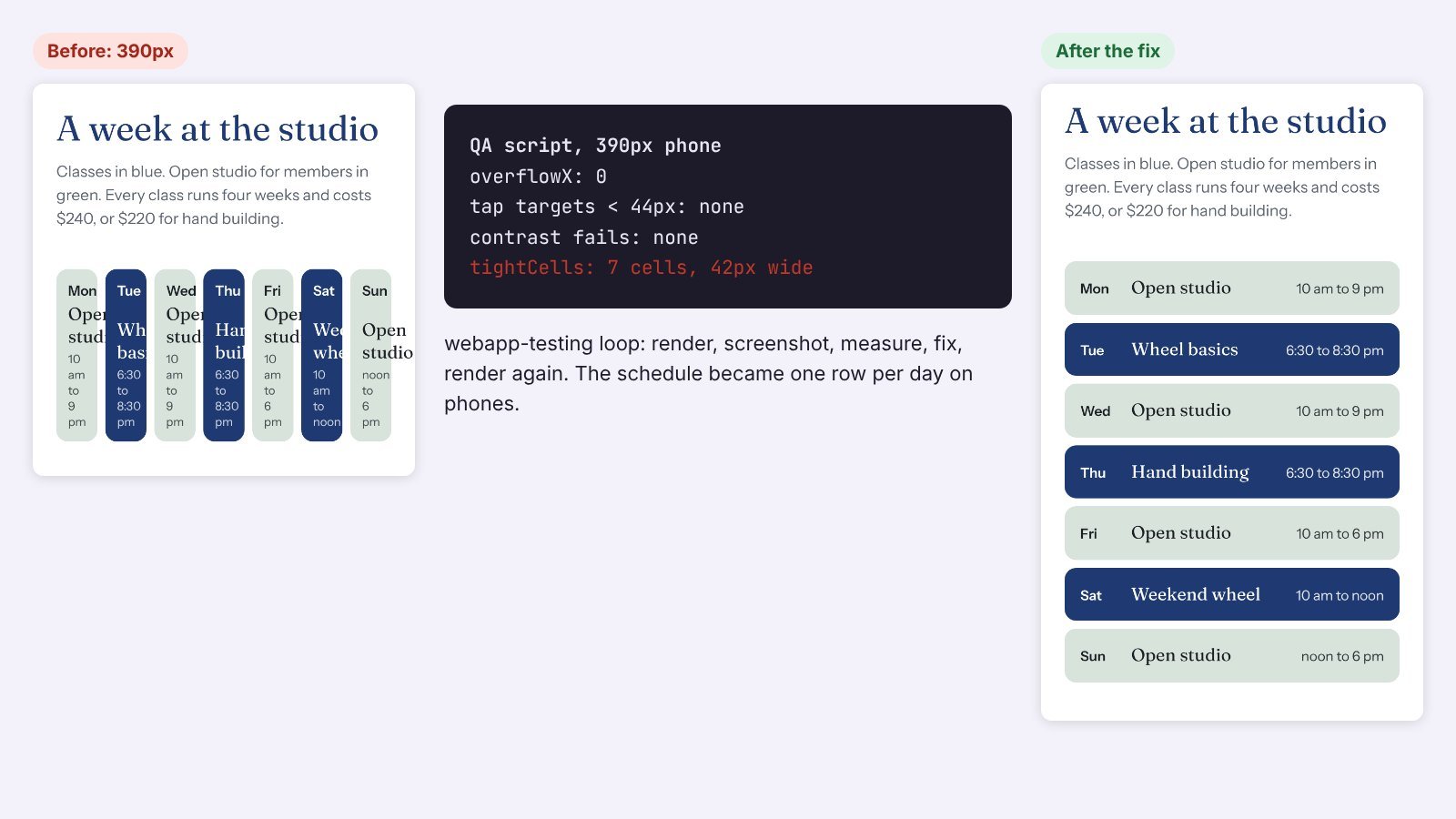
The fix took one pass: one row per day on phones, seven columns from tablet width up. A second run flagged the desktop nav links at 20px tall, so I added padding. The third run came back clean.
One honest limit: the checker is only as good as its script. My first contrast check misread Tailwind v4’s oklch colors and reported fake failures. It also counted a hidden skip link as a 1px tap target. Read the output before you let Claude “fix” anything.
The best design skills for Claude Code
Numbers are from skills.sh and GitHub on the day I checked. Many top-ranking lists still quote counts from months ago.
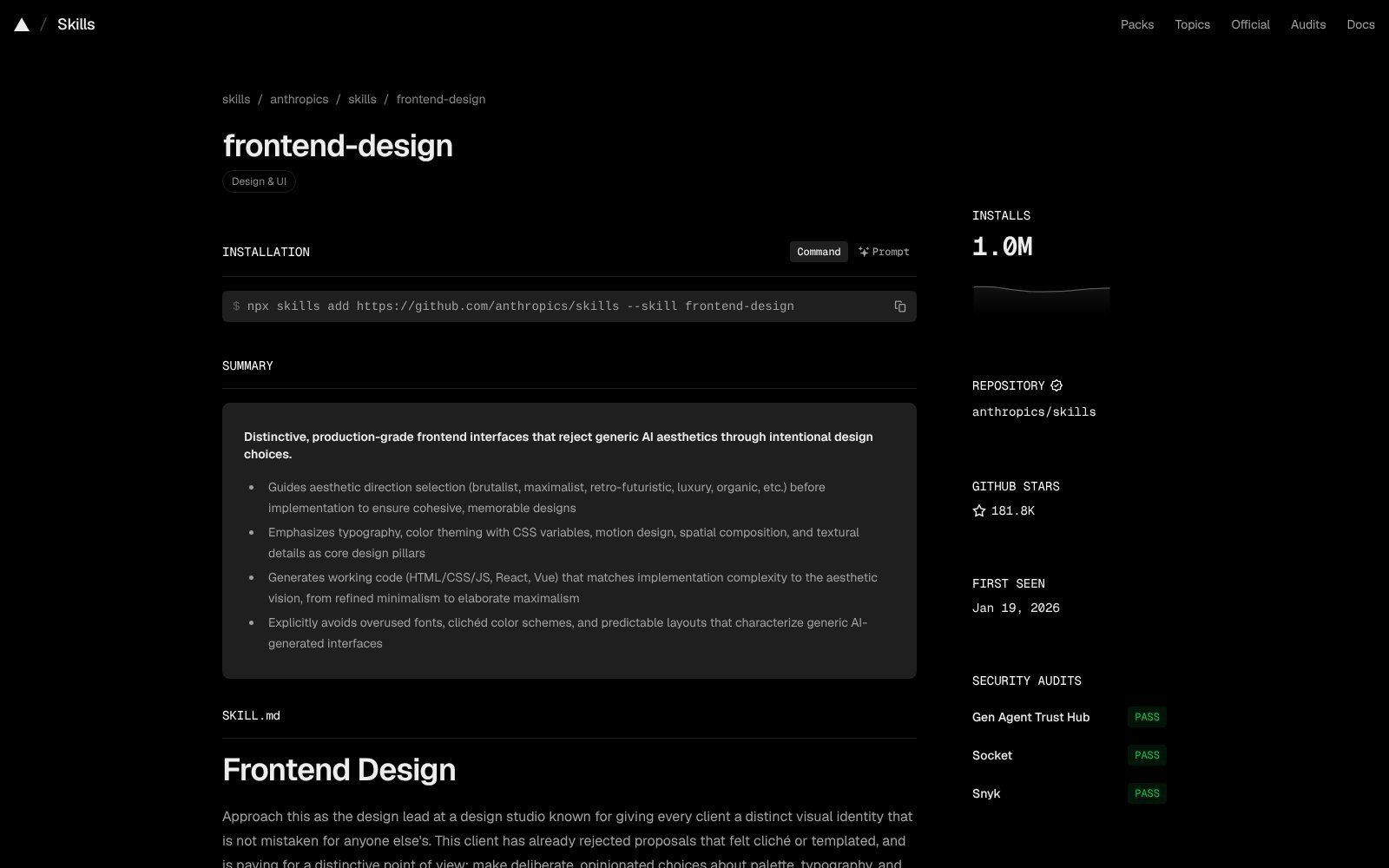
1. frontend-design: best overall
What it does: makes Claude plan a palette, type and layout for your subject, check the plan against common AI looks, then build. Anthropic updated it last month to push harder against generic defaults.
In my test: the biggest change of anything I tried. It removed fake stats and template chrome, and it added accessibility basics on its own.
Where to get it: anthropics/skills on GitHub (about 180K stars). 1.0M installs on skills.sh.
Tip: give it real content. Real class times and prices gave it something to design around. Lorem ipsum gives it nothing.
2. webapp-testing: best for checking the result
What it does: teaches Claude to test a local web app with Playwright: start the server, wait for the page to load, screenshot, inspect, then act.
In my test: it turned “looks done” into “measured done.” It caught the mobile schedule bug and the small nav targets.
Where to get it: the same anthropics/skills repo. 180.3K installs on skills.sh.
Tip: ask for two viewports every time, like 390px and 1440px. Most layout bugs only show up on one of them.
3. impeccable: best command pack
What it does: one skill with 24 commands you run as /impeccable plus a verb, such as craft, critique, audit, polish, bolder, quieter, typeset and layout.
In my review: it is the closest thing to a design workflow in a box. Use it to push one screen in a clear direction.
Where to get it: pbakaus/impeccable, Apache 2.0, about 82K stars, 340.9K installs.
Tip: run audit before polish. Polishing a layout that breaks on mobile just makes a prettier bug.
4. web-design-guidelines: best line-by-line reviewer
What it does: Vercel’s skill fetches its latest Web Interface Guidelines and checks your files against them, with file and line numbers.
In my review: it pairs well with webapp-testing. One reads your code, the other looks at the rendered page. In my UI skills test it found 16 issues where a plain review found 7.
Where to get it: vercel-labs/agent-skills. 751.0K installs.
Tip: its rules can clash with frontend-design on small things like button casing. Pick one rule and write it in your CLAUDE.md.
5. figma-design-to-code: best if your design lives in Figma
What it does: Figma’s official skill for the Figma MCP server. It pulls a screenshot and design context for a frame, then tells Claude to reuse your existing components and tokens instead of pasting raw markup.
In my review: I didn’t have a Figma file for Spindle, so I only read the skill.
Where to get it: the Figma plugin, claude plugin install figma@claude-plugins-official. Source in figma/mcp-server-guide.
6. ui-ux-pro-max: best for picking a design system
What it does: a searchable library of 192 color palettes, 74 font pairings and 50 active UI styles that Claude can query before it builds.
In my review: useful when you have no brand yet. If you already have tokens, it can pull Claude away from them.
Where to get it: nextlevelbuilder/ui-ux-pro-max-skill, MIT, about 137K stars, 401.5K installs.
Tip: use it once to choose a system, save the result as tokens, then turn it off.
How to get front end design skills in Claude: make your own or install one
1. Make your own with /skill-creator (fastest)
None of the skills above check whether new code sticks to the tokens your repo already has. That is the drift I see most in real projects: a stray hex code here, a default Tailwind blue there. So I made a skill for it with this prompt:
“/skill-creator Make a skill named design-token-guard: when I build or edit UI in a repo, find the project’s design tokens (Tailwind @theme, tailwind.config, CSS variables), flag raw hex colors, default Tailwind palette classes, arbitrary values and fonts set by name with file:line, render the page at 390px and 1440px and measure overflow, contrast and tap targets, then report in one table and fix. Keep it short.”
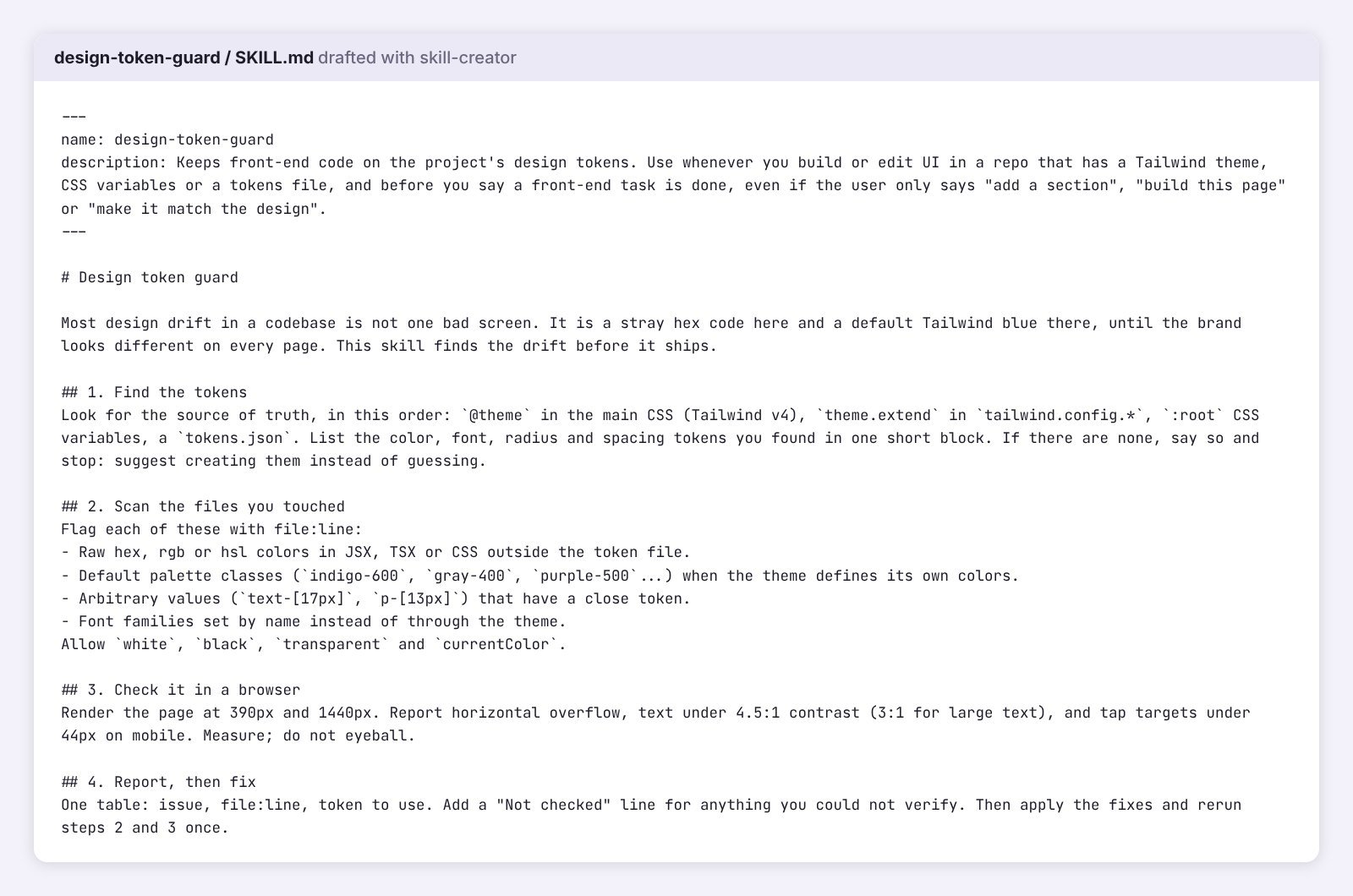
The draft took a few minutes. The SKILL.md has a “pushy” description so it triggers on plain requests like “add a section,” and four steps: find the tokens, scan the files you touched, check the page in a browser, report then fix. It also adds a “Not checked” line for anything it can’t verify.
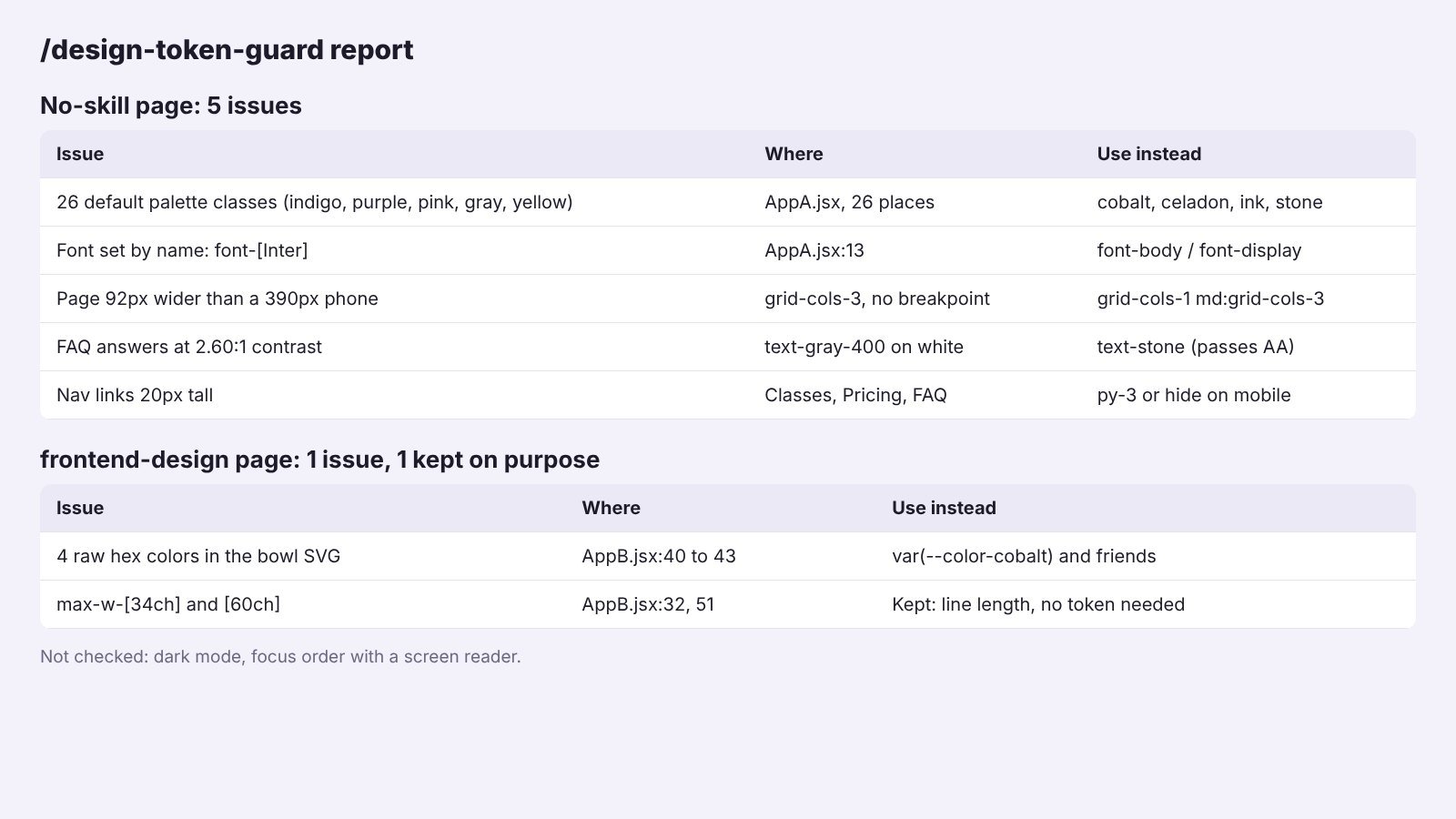
On the plain page it found 5 issues, led by 26 default palette classes like indigo-600 and gray-400 in a project that has its own colors. On the frontend-design page it found 4 raw hex colors in the bowl illustration. I swapped them for theme variables. It left two line-length widths alone on purpose, since no token fits them.
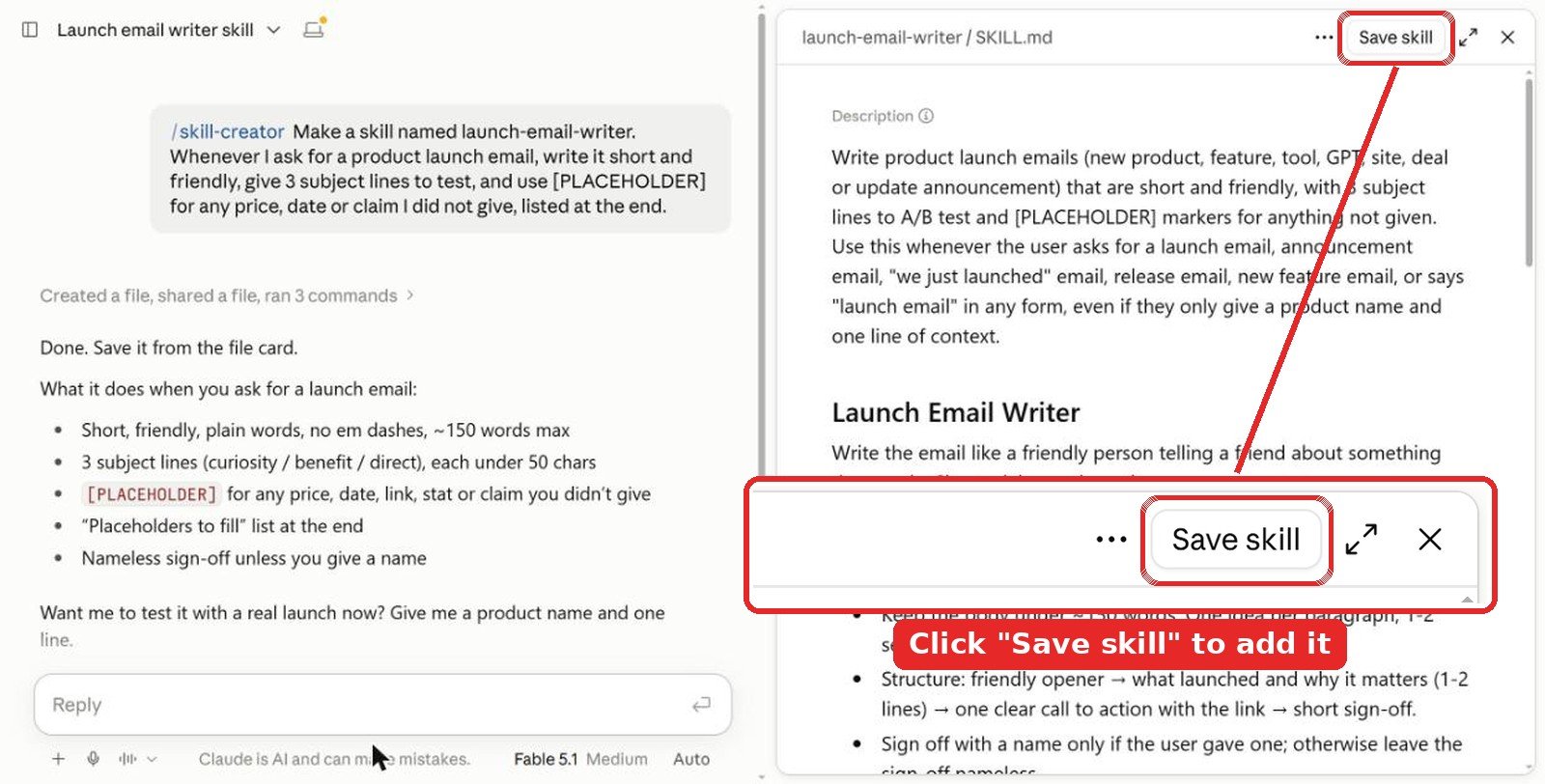
Don’t skip the save step. The skill is only a draft in that chat until you click Save skill at the top right of the SKILL.md preview. Close the chat without saving and it’s gone.
Name it from the start. Put the name in your first message, like “Make a skill named design-token-guard…”, and skill-creator uses it. If you forget, it picks one for you. You can ask “rename it to …” in the same chat before you save, or change it later in Customize > Skills with the Edit button.
Tip: in Claude Code you can skip the app. Put the folder in .claude/skills/ inside your repo and commit it, so everyone on the project gets the same checks.
2. Install in the Claude app
Skills work on Free, Pro, Max, Team and Enterprise plans and need code execution, so turn on Code execution and file creation first.
- Download the skill folder you want and zip it.
- Go to Customize > Skills, click +, then Create skill > Upload a skill, and pick the zip.
- Ask for a design task and let Claude pick it up, or type
/frontend-designto call it by name.
3. Install in Claude Code
For Anthropic’s skills, add the repo as a plugin marketplace:
/plugin marketplace add anthropics/skills
/plugin install example-skills@anthropic-agent-skills
To install single skills, use the open skills CLI or each project’s own plugin:
npx skills add https://github.com/anthropics/skills --skill frontend-design
npx skills add https://github.com/anthropics/skills --skill webapp-testing
npx skills add https://github.com/vercel-labs/agent-skills --skill web-design-guidelines
npx impeccable install
claude plugin install figma@claude-plugins-official
Tips from testing
- Use one builder, one checker. frontend-design to make the page, webapp-testing to look at it. Two builder skills pull in different directions.
- Put your tokens in the repo first. Skills follow a theme file far better than a description in chat.
- Watch for made-up numbers. My no-skill run invented a 4.9 star rating. On a real site that is a trust problem, not a design one.
- Read before you install. Community skills can run scripts. Skim them first.
Video: frontend design skills in Claude Code
FAQ
What is the best design skill for Claude Code?
frontend-design by Anthropic. In my test it replaced a stock gradient template with a page built around the business, removed made-up stats and added focus rings on its own. It has 1.0M installs on skills.sh.
Which skill lets Claude Code check its own UI?
webapp-testing, also by Anthropic. It has Claude write Playwright scripts that load your page, take screenshots and inspect it. In my test it caught a schedule that broke into 42px columns on a phone.
Can I make my own design skill with /skill-creator?
Yes. Type /skill-creator, put the name in your first message and describe the checks you want, like design tokens and contrast. Mine took a few minutes. In the Claude app, click Save skill at the top right of the preview or the draft is lost.
Are these Claude Code design skills free?
Yes. All six are free to install from GitHub or their plugin. Skills in the Claude app work on Free, Pro, Max, Team and Enterprise plans with code execution turned on.
Do these skills work for front end design in React and Tailwind?
Yes. I tested in a Vite, React and Tailwind v4 project. frontend-design and my token skill both read the Tailwind theme, and webapp-testing works with any local dev server.
The verdict
If you add one design skill to Claude Code, make it frontend-design. It changed the page more than anything else, and it stopped Claude from inventing stats. Pair it with webapp-testing so Claude checks its work in a real browser, because the best-looking build in my test still broke on a phone. Add impeccable if you like working in commands, and the Figma skill if your designs start in Figma. Then spend five minutes on your own token skill with /skill-creator. Mine found problems in both builds.
More Claude guides: best UI skills for Claude, best design skills for Claude, best Claude skills for web design, best Claude skills for SEO, best Claude skills for marketing and all Claude articles. For design ideas beyond AI, see our graphic design and illustration section.
Tested in Claude Code in October 2026. Install and star counts were checked the same month and change often.