
Ask Claude for a blog intro and you can spot the AI in two seconds. “Let’s dive in.” “Not just survive, but thrive.” A dash in every other sentence. I wanted to know which Claude skills fix that for real writing work. So I took three drafts Claude wrote with no skill, a blog intro, a wordy help article and a product launch email, and ran each one through a popular writing skill: humanizer, writing-clearly-and-concisely and copy-editing. Then I built a voice editor of my own with /skill-creator and tried it on a newsletter. Here is what changed.
TL;DR
- Best overall:
humanizerby blader. It cut a blog intro from 108 to 67 words and removed all 9 AI patterns my script found, without adding a single fact. - Best for marketing copy:
copy-editingfrom Corey Haines’ marketingskills. Its Seven Sweeps caught a “loved by thousands” claim I never gave Claude. - Best for plain how-to text:
writing-clearly-and-concisely. Strunk’s rules took a help paragraph from 31.7 to 10.5 words per sentence. - Best quick win: a
voice-editorskill I made with/skill-creator. It flagged a wrong weekday in a newsletter before it went out.
| Skill | Best for | Installs (skills.sh) | Tested here |
|---|---|---|---|
| humanizer | Removing AI tells | 9.9K | Yes, blog intro |
| copy-editing | Marketing copy, emails | 145.4K | Yes, launch email |
| doc-coauthoring | Long docs and specs | 92.3K | Reviewed |
| writing-clearly-and-concisely | Plain, short prose | 2K | Yes, help article |
| internal-comms | Team updates, newsletters | 78.7K | Reviewed |
| content-research-writer | Research and citations | 8.1K | Reviewed |
How I tested
A skill is a folder with a SKILL.md file that Claude reads before a task. I kept each job the same and changed only the skill:
- Each test started with a short brief and a first draft that Claude wrote with no skill loaded. I kept that draft as the “before.”
- Then Claude read the skill’s current public SKILL.md from GitHub and edited the same draft, following every step in the file.
- A small Python script counted words, sentence length, dashes, passive phrases and a list of common AI patterns, so I wasn’t judging by feel alone.
- I checked every “after” against the brief. Any fact the brief didn’t contain counts as invented.
I ran all of this in a Claude session in a cloud sandbox. I didn’t add any new skills to my Claude account for this article. Install counts come from skills.sh and stars from GitHub, both checked on the day I published.
Test 1: a blog intro with and without humanizer
Without a skill, I asked for a short intro for a post on why houseplants struggle in winter. The facts were fine, but it read like every AI blog post: an em dash, “The good news?”, “not just survive the season, but thrive,” “In this guide, we’ll,” the words robust, key and crucial, and “Let’s dive in” to close.
With humanizer, the work follows four steps from the skill: mark the tells, draft a rewrite, check the draft for anything added or lost, then write the final version. The skill lists 26 patterns, based on Wikipedia’s guide to signs of AI writing, and it is strict about one thing: don’t add a fact, name, number or quote that isn’t in the source.
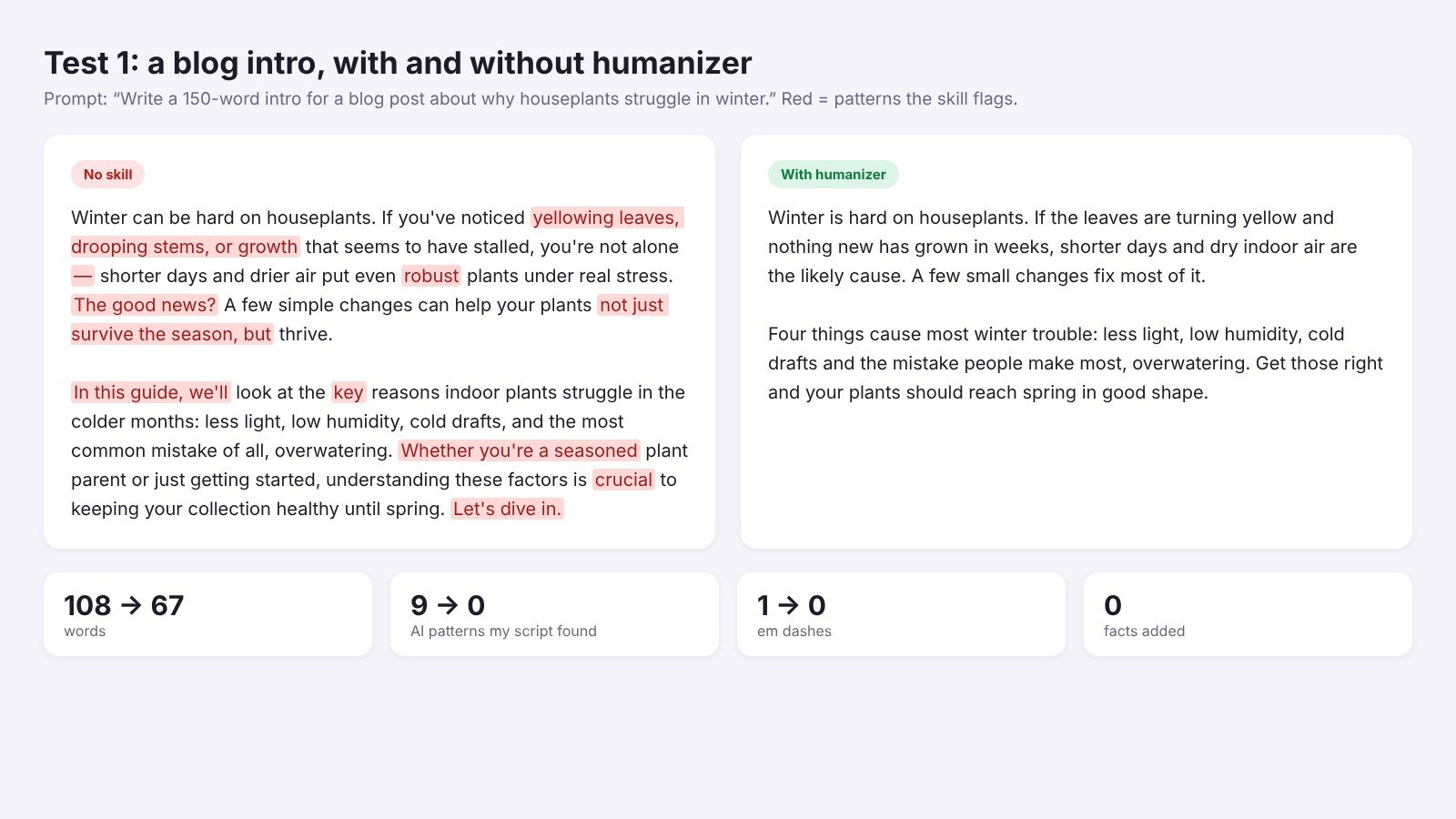
The result went from 108 words to 67. My script found 9 AI patterns before and 0 after. Every fact stayed: less light, low humidity, cold drafts and overwatering as the most common mistake.
One honest limit: humanizer counts curly quotes as a weak AI sign. On my site curly quotes are house style, so I ignore that one. If you give it a sample of your own writing first, the skill matches your habits instead, dashes included.
Test 2: a help article with writing-clearly-and-concisely
This skill packs the 18 rules from William Strunk’s The Elements of Style into a short SKILL.md, plus the full 1918 book as a reference file of about 12,000 tokens. The rules that matter most are bolded in the file: use active voice, put statements in positive form, be specific and omit needless words.
I gave it a wordy help paragraph about exporting notes, full of “in order to” and lines like “the export button will be made visible.”
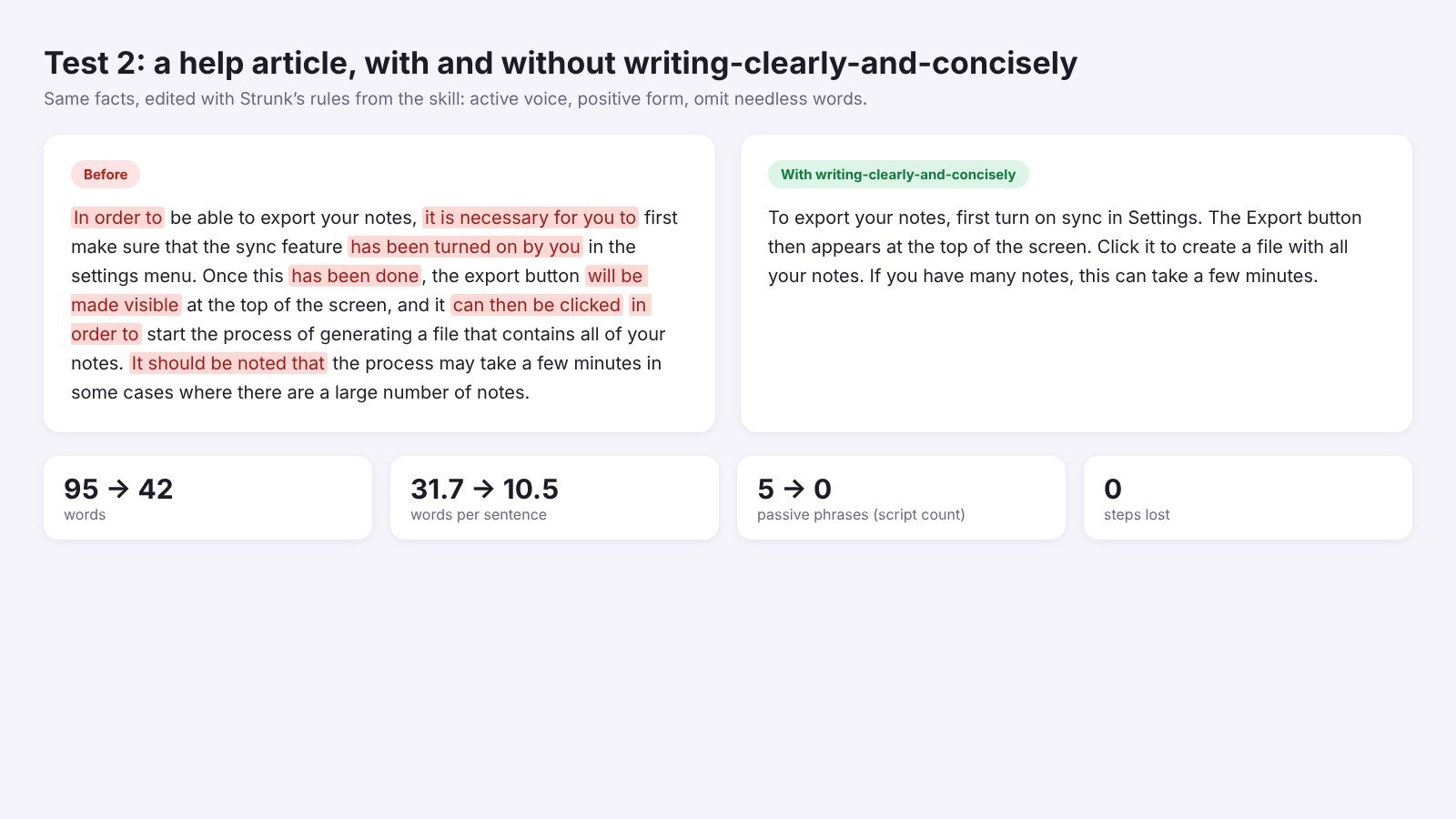
The edit cut 95 words to 42 and average sentence length from 31.7 words to 10.5. My script counted 5 passive phrases before and none after. No step got lost.
Limit: this skill makes text clear, not lively. It’s perfect for docs, help pages and emails to your team. On a personal blog post it can sand off your personality, so pair it with a voice rule.
Test 3: a launch email through copy-editing
copy-editing comes from Corey Haines’ marketingskills repo. It edits in seven passes it calls the Seven Sweeps: clarity, voice and tone, so what, prove it, specificity, heightened emotion and zero risk.
My brief was three facts: a notes app called Inkwell, offline sync, $4 a month. The no-skill email added three more on its own: “loved by thousands of early users,” “a beautiful distraction-free editor” and “powerful organization tools.”
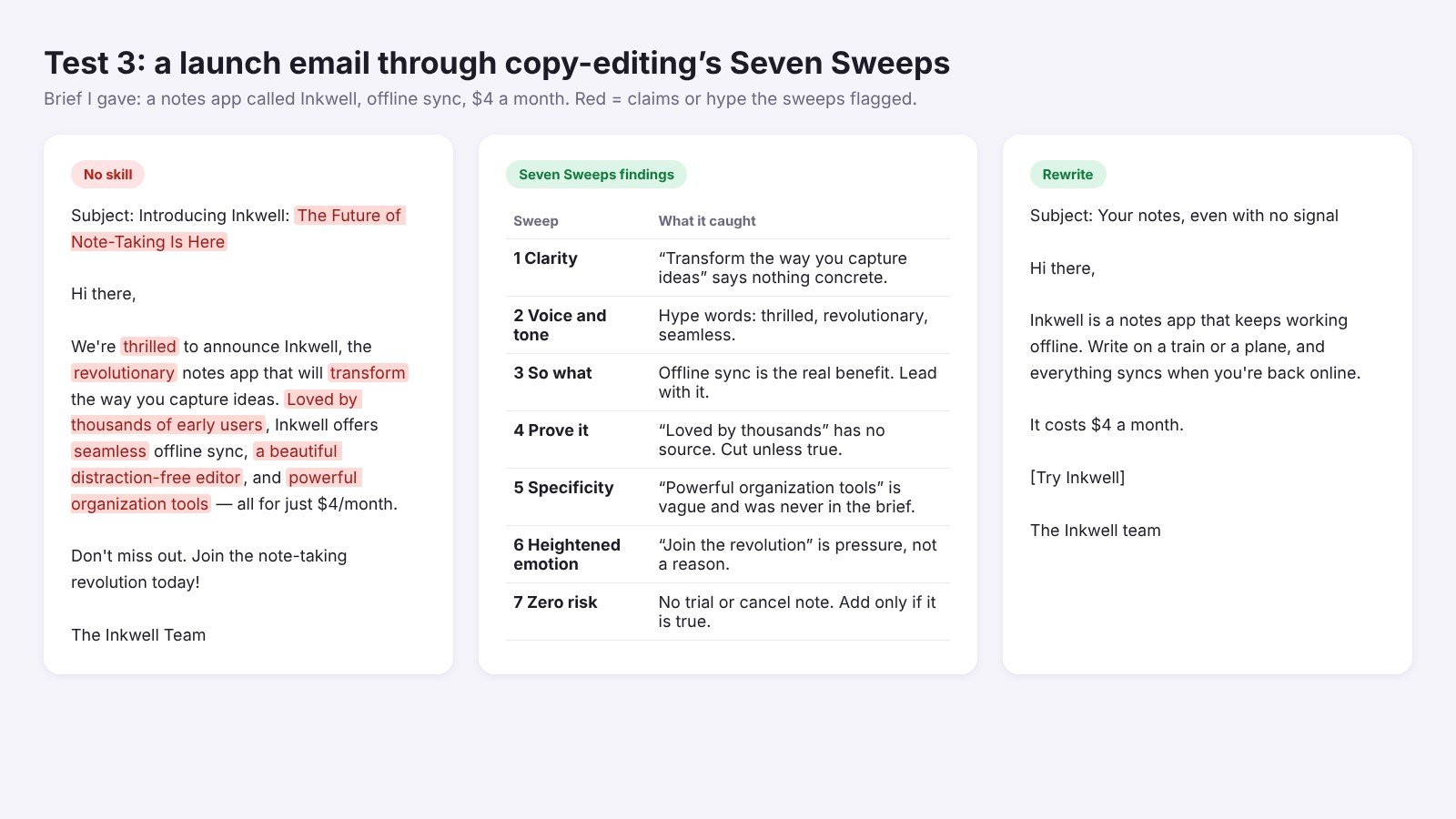
The Prove It sweep was the one that mattered. It flagged the “thousands” claim as unsupported, and the Specificity sweep flagged features that were never in the brief. The rewrite leads with the real benefit, notes that keep working offline, and states the price.
Limit: the email got shorter and more honest, but also a bit plain. copy-editing edits what you have. If you need new copy from scratch, its sister skill copywriting in the same repo is the better start.
The best writing skills for Claude
1. humanizer: best for removing AI tells
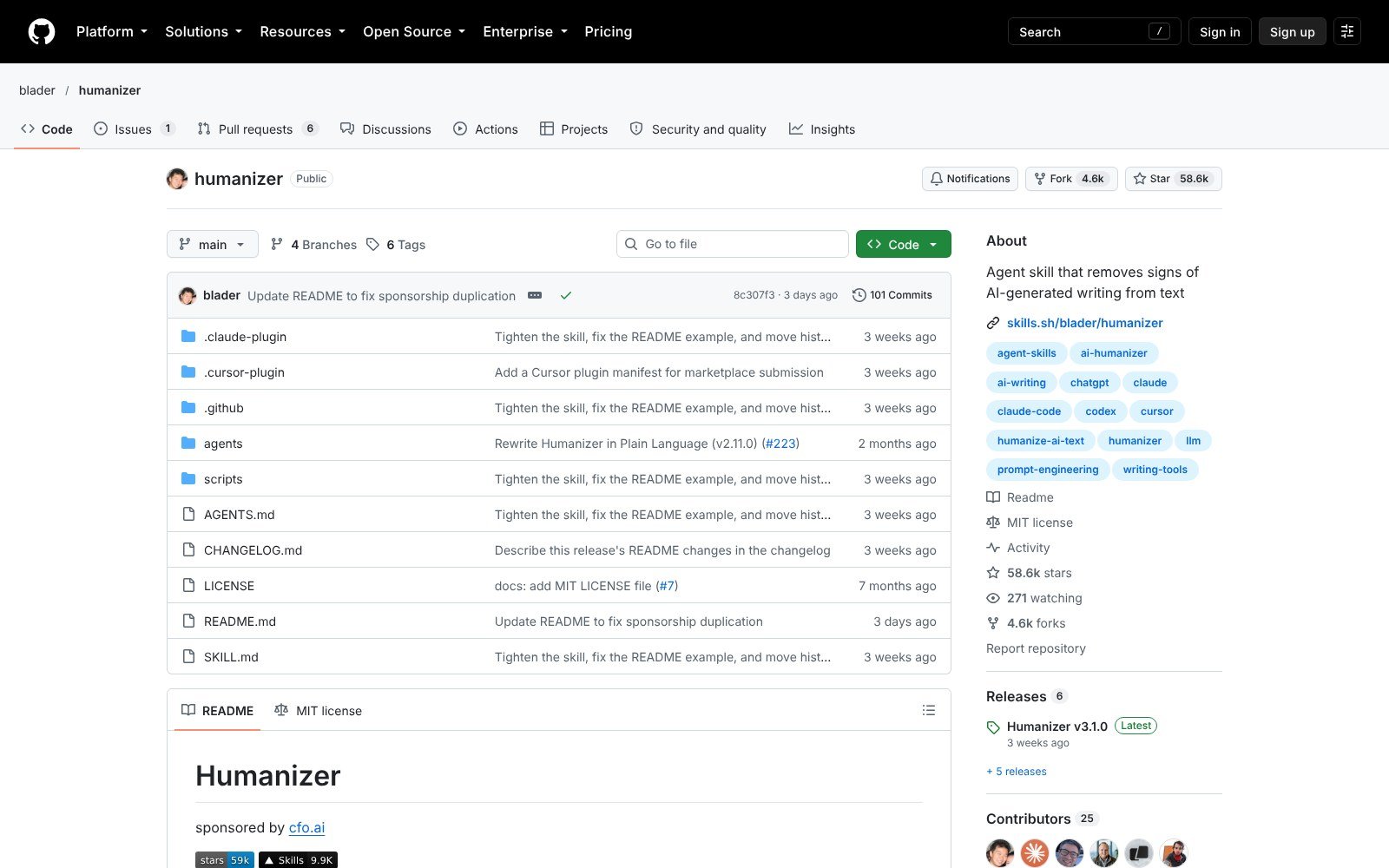
What it does: rewrites AI-sounding text so it reads like a person wrote it, without changing what it says. It shows a draft, the patterns left, and a final version.
In my test: 9 patterns to 0, 108 words to 67, no facts added. The biggest win of the day.
Where to get it: github.com/blader/humanizer, 58.6K stars and 9.9K installs on skills.sh.
Tip: paste two or three paragraphs you wrote yourself before the draft. The skill uses them as the voice to match.
2. copy-editing: best for marketing copy and emails
What it does: edits existing copy in seven focused passes, from clarity to risk, then runs quick word, sentence and paragraph checks.
In my test: it caught three claims I never gave Claude and cut the email from 65 words to 42.
Where to get it: coreyhaines31/marketingskills, a repo of 52 marketing skills with 55.6K stars. copy-editing alone has 145.4K installs.
Tip: ask for one sweep at a time on long pages. “Run only the Prove It sweep” gives you a clean list of claims to check.
3. doc-coauthoring: best for long documents
What it does: Anthropic’s skill walks you through writing a doc together in three stages: gathering context, refining the structure section by section, and reader testing. The last stage hands the draft to a fresh sub-agent to see what a new reader misses.
In my test: I read the full SKILL.md but didn’t run a long doc through it for this article. It asks a lot of questions first, so it suits specs, proposals and decision docs, not a quick post.
Where to get it: anthropics/skills on GitHub, 92.3K installs on skills.sh.
4. writing-clearly-and-concisely: best for plain, short prose
What it does: applies Strunk’s rules to anything a person will read: docs, commit messages, error messages, reports and UI text.
In my test: 95 words to 42, and no passive phrases left.
Where to get it: obra/the-elements-of-style, 558 stars and 2K installs.
5. internal-comms: best for team updates and newsletters
What it does: another Anthropic skill. It picks a guide based on what you’re writing: 3P updates (progress, plans, problems), a company newsletter, FAQ answers or general comms.
In my test: reviewed, not run.
Where to get it: anthropics/skills, 78.7K installs.
Tip: replace the example files with two or three real updates from your team. That is how it learns your format.
6. content-research-writer: best for research-heavy posts
What it does: works with you on an article: research, citations, better hooks, outlines and feedback on each section as you write.
In my test: reviewed, not run. It’s the only one of the six built around finding sources, not just editing words.
Where to get it: ComposioHQ/awesome-claude-skills, 8.1K installs.
Tip: check every citation it adds. A skill can tell Claude to cite, but it can’t make a source exist.
A note on edit-article: skills.sh lists Matt Pocock’s edit-article with 191.8K installs, more than any skill above. But I couldn’t find it in his current GitHub repo, which now lists writing-for-agents instead, so I left it out.
How to get writing skills in Claude: make your own or install one
1. Make your own with /skill-creator (fastest)
None of the skills above know your voice. So I made a skill that keeps my rules in one place, with this prompt:
“/skill-creator Make a skill named voice-editor: when I paste a blog post, newsletter or email and ask to edit or tighten it, rewrite it in my voice: short sentences, plain words, first person, no em or en dashes, none of my banned words (delve, crucial, robust, key, seamless, transform, thrilled, revolutionary). Keep every fact and never add a number, name or claim I didn’t give. Then show a table of what changed and what I need to check.”
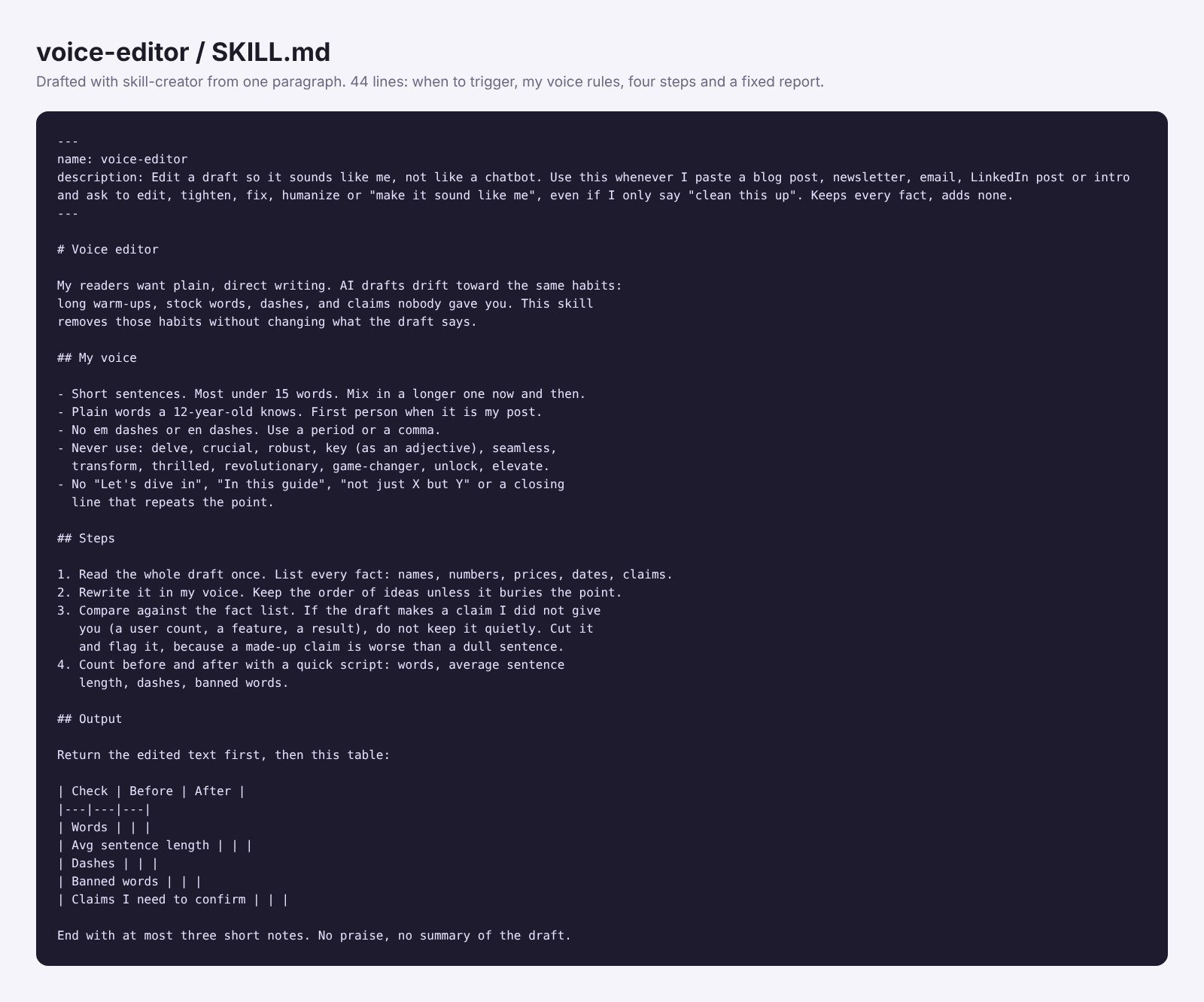
The draft took a few minutes. The SKILL.md is 44 lines. It has a description that triggers on plain phrases like “clean this up” or “make it sound like me,” my voice rules, four steps (list the facts, rewrite, compare, count) and a fixed report table.
I tried it on a plant swap newsletter. The brief said October 25, Elm Street Library, 10am. The no-skill draft said “Saturday, October 25,” but October 25 falls on a Sunday this year. It also claimed “Over 100 people joined us last time.” voice-editor cut both and listed them under claims to confirm. The text went from 93 words to 38.
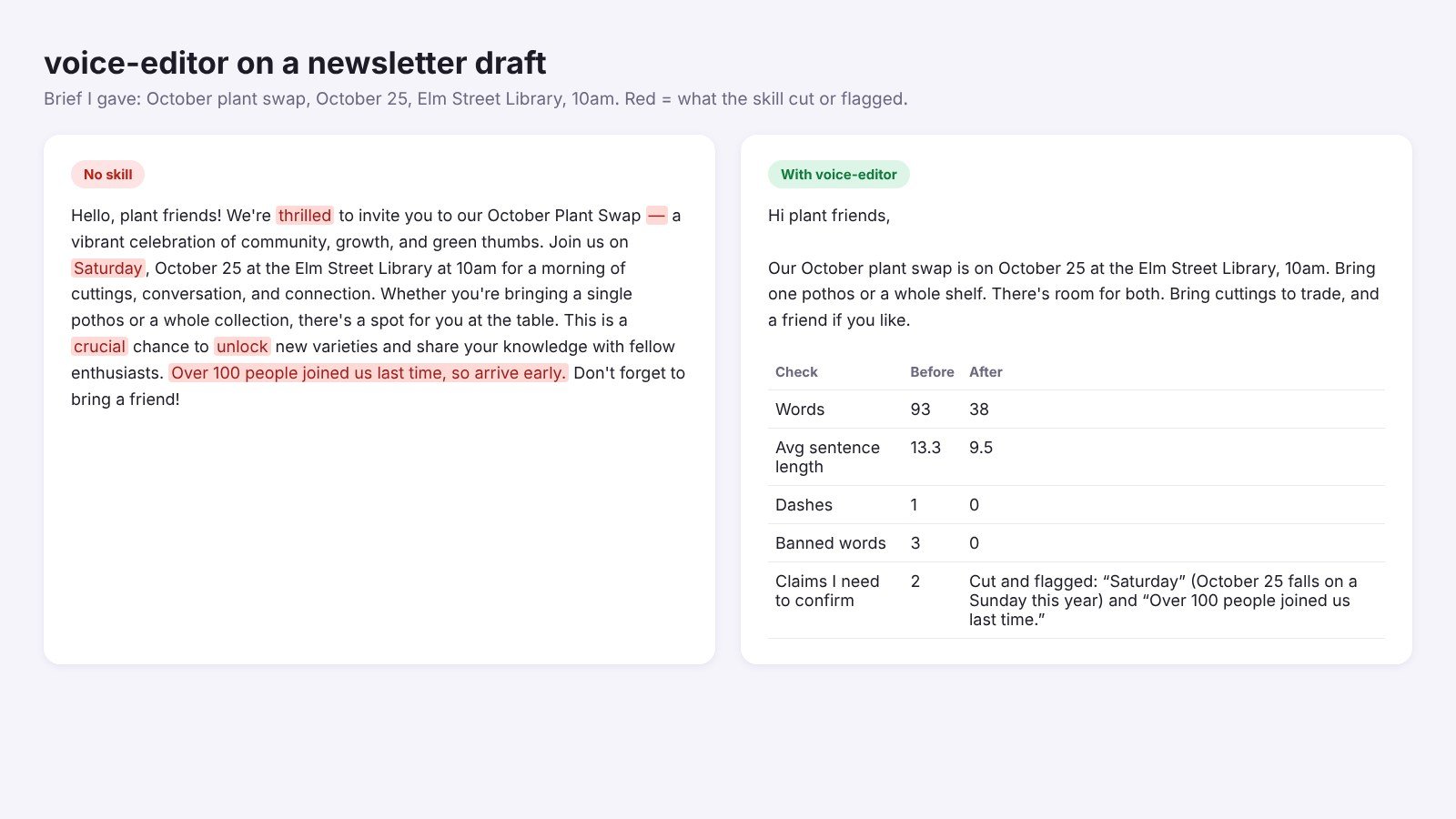
It isn’t perfect. It cut “vibrant,” but that word wasn’t on my list, so the table didn’t count it. Add the words that bug you most as you find them.
Don’t skip the save step. The skill is only a draft in that chat until you click Save skill at the top right of the SKILL.md preview. Close the chat without saving and it’s gone.
Name it from the start. Put the name in your first message, like “Make a skill named voice-editor…”, and skill-creator uses it. If you forget, it picks one for you. You can ask “rename it to …” in the same chat before you save, or change it later in Customize > Skills with the Edit button.
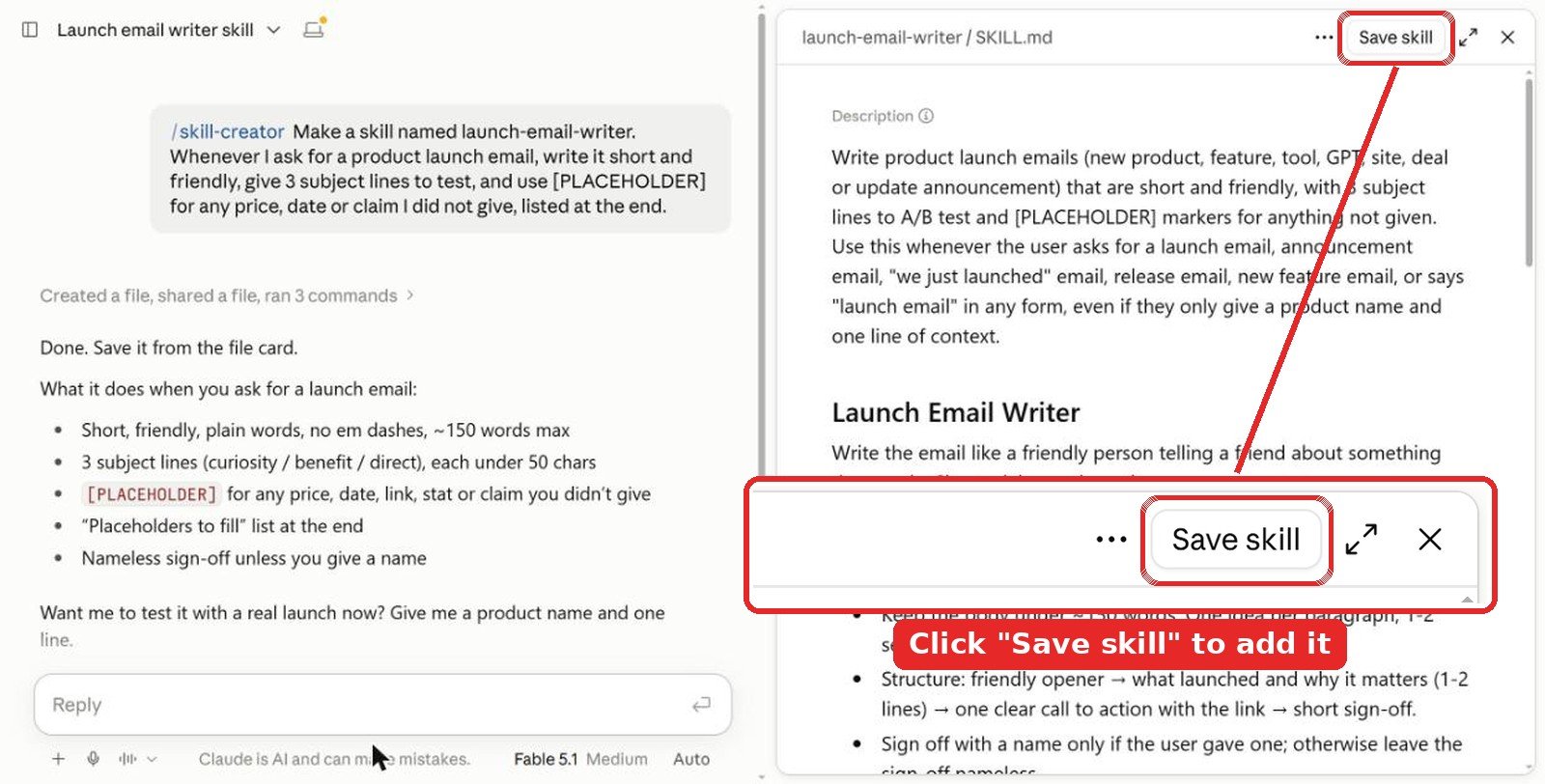
Tip: paste one paragraph you wrote and liked into the prompt, so the skill has a real example of your voice.
2. Install in the Claude app
Anthropic’s help center lists skills for Pro, Max, Team and Enterprise plans. They need code execution, so turn on Code execution and file creation first. Anthropic’s example skills are already in the app on paid plans. You just switch them on.
- For any other skill, download its folder from GitHub and zip it.
- Go to Customize > Skills (older help pages call it Settings > Capabilities), choose to upload a skill, then pick the zip.
- Paste a draft and ask Claude to edit it, or type
/humanizerto call the skill by name.
3. Install in Claude Code
For humanizer, add its repo as a plugin marketplace:
/plugin marketplace add blader/humanizer
/plugin install humanizer@humanizer
For Anthropic’s skills and the marketing set:
/plugin marketplace add anthropics/skills
/plugin install example-skills@anthropic-agent-skills
npx skills add coreyhaines31/marketingskills --skill copy-editing
Tips from testing
- Write the brief as facts. “Inkwell, offline sync, $4 a month” gave the skills something to check against. Without a brief, nobody can tell an invented claim from a real one.
- Start with two skills. humanizer for voice plus writing-clearly for docs covers most everyday writing. Add more only when a job needs it.
- Keep your own rules. Every public skill has defaults you may not share, like humanizer’s view on curly quotes. A short voice skill of your own fixes that.
Video: adding a humanizer skill to Claude
FAQ
What is the best Claude skill for writing?
humanizer by blader. In my test it removed all 9 AI patterns my script found in a blog intro and cut it from 108 to 67 words, without adding any facts. It has 58.6K GitHub stars.
Can a Claude skill make AI writing sound human?
It helps a lot. humanizer checks text against 26 patterns, like forced contrasts, stock words and dashes, and rewrites around them. It works best when you also paste a sample of your own writing.
Can I make my own writing skill with /skill-creator?
Yes. Type /skill-creator, put the name in your first message and list your voice rules and banned words. Mine took a few minutes. In the Claude app, click Save skill at the top right of the preview or the draft is lost.
Which Claude skill is best for emails and marketing copy?
copy-editing from coreyhaines31/marketingskills. Its Seven Sweeps caught three claims in my launch email that I never gave Claude. For new copy from scratch, use copywriting from the same repo.
Are Claude writing skills free?
Yes. All six skills here are free on GitHub. In the Claude app, skills need a Pro, Max, Team or Enterprise plan with code execution and file creation turned on.
The verdict
If you add one writing skill to Claude, make it humanizer. It changed my drafts more than anything else and stayed honest about facts. Add copy-editing if you write emails or landing pages, and writing-clearly-and-concisely for docs and help text. Then spend five minutes on your own voice skill with /skill-creator. Mine caught a wrong date that none of the drafts flagged on their own.
More Claude guides: best Claude skills for marketing, best Claude skills for SEO, best design skills for Claude, best Claude skills for graphic design, best UI skills for Claude, best Claude skills for web design and all Claude articles. For more on the craft itself, see our writing tips and tools section.
Tested in Claude in October 2026. Install and star counts were checked the same month and change often.