
Hand Claude a CSV and you get a confident answer fast. But fast isn’t the same as right. I wanted to know which Claude skills catch the mistakes a quick analysis makes, so I built a messy orders file for a small plant shop, 1,209 rows with duplicates, test orders, refunds and mixed date formats, and ran the same jobs with no skill and then with a skill: explore-data, validate-data, xlsx and data-visualization. Then I made a chart style skill of my own with /skill-creator. One of these tests turned a fake 41.7% growth spike into a flat month.
TL;DR
- Best first step:
explore-datafrom Anthropic’s data plugin. It found 7 problems in my file before I asked a single question, including 26 duplicate rows and 3 test orders. - Best before you share:
validate-data. It rated my no-skill summary “Needs revision” and showed June was down 0.2%, not up 41.7%. - Best for Excel: Anthropic’s
xlsxskill. 53 live formulas, 0 errors, and a check cell that proves the totals match. - Best quick win: a
chart-styleskill I made with/skill-creator. Every chart now says what was filtered out.
| Skill | Best for | Installs (skills.sh) | Tested here |
|---|---|---|---|
| explore-data | Profiling a new file | 5.8K | Yes, orders CSV |
| validate-data | QA before sharing | 3.6K | Yes, revenue summary |
| xlsx | Excel reports with formulas | 185.5K | Yes, monthly report |
| data-visualization | Clear, honest charts | 13.5K | Yes, category chart |
| statistical-analysis | Outliers, trends, tests | 4.5K | Reviewed |
| data-storytelling | Slides and exec summaries | 16.6K | Reviewed |
How I tested
A skill is a folder with a SKILL.md file that Claude reads before a task. I kept every job the same and changed only the skill:
- The data: a sample orders file I generated for a made-up plant shop, January to June 2025. I planted real-world problems on purpose: 26 duplicate rows, 3 “TEST” orders at $999.99, refunds with negative totals, 70 blank regions, “west ” with a trailing space, and 36 dates in MM/DD/YYYY format.
- The “before”: Claude with no skill loaded, given a short, normal request like “give me a quick summary of this file.”
- The “after”: Claude read the skill’s current public SKILL.md from GitHub and ran the same request, following the steps in the file.
- The check: I recalculated every number with pandas and LibreOffice.
I ran this in a Claude session in a cloud sandbox and didn’t add any new skills to my Claude account for this article. Install counts come from skills.sh and stars from GitHub, both checked on the day I published.
Test 1: a quick summary vs explore-data
Without a skill, Claude summed the total column and moved on. It reported $62,480 in revenue, 1,209 orders, a $51.68 average order and a headline that would make any shop owner happy: “Revenue grew strongly in June, up 41.7% on May.”
With explore-data, Claude doesn’t answer your question first. It profiles the file: rows, columns, the grain (one row per what), null rates and red flags like placeholder values, duplicates and mixed formats.
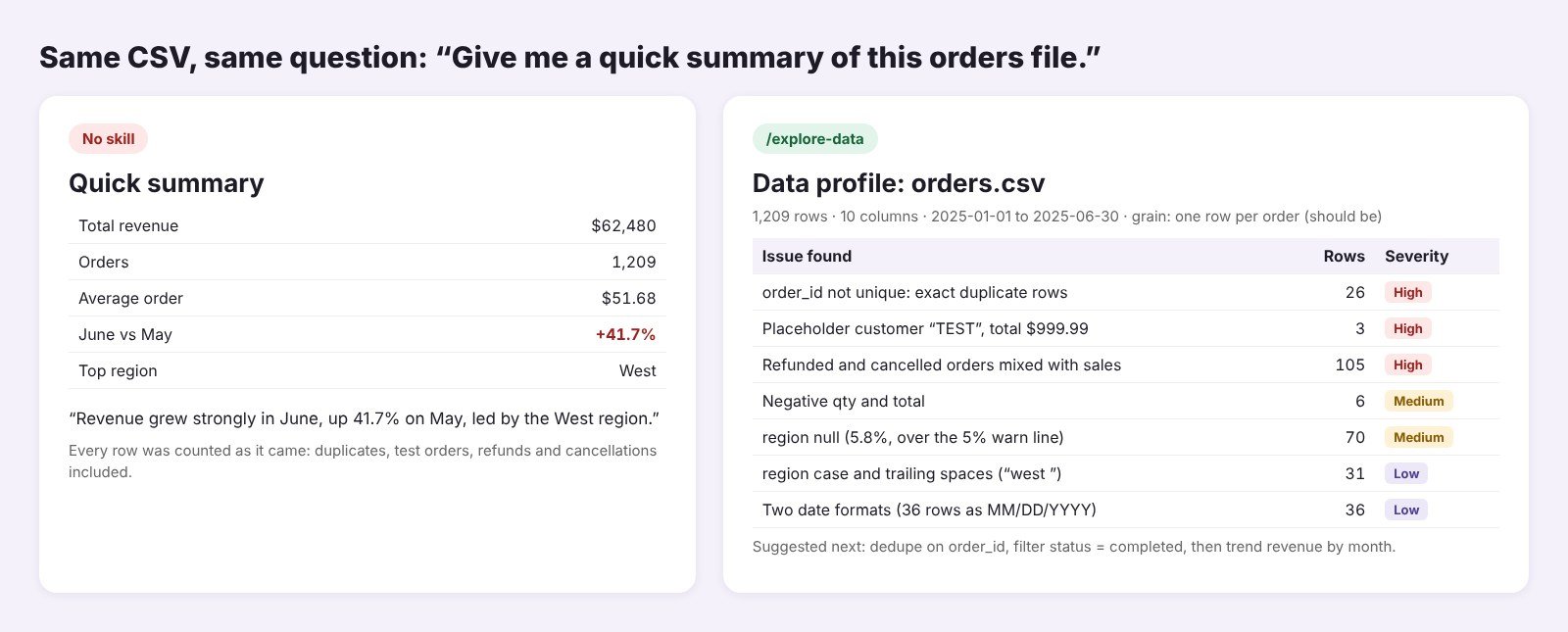
It found all seven problems I planted. The big three: 26 duplicate order IDs, 3 orders from a customer called “TEST,” and 105 refunds and cancellations mixed in with sales. Its suggested next step was right: dedupe, keep completed orders, then trend revenue by month.
Limit: it tells you what’s wrong but doesn’t clean the file unless you ask.
Test 2: validate-data on the no-skill summary
Next I handed the no-skill summary to validate-data as if I were about to send it to my team. It reviews an analysis in eight steps and ends with a rating of “Ready to share,” “Share with noted caveats” or “Needs revision.”
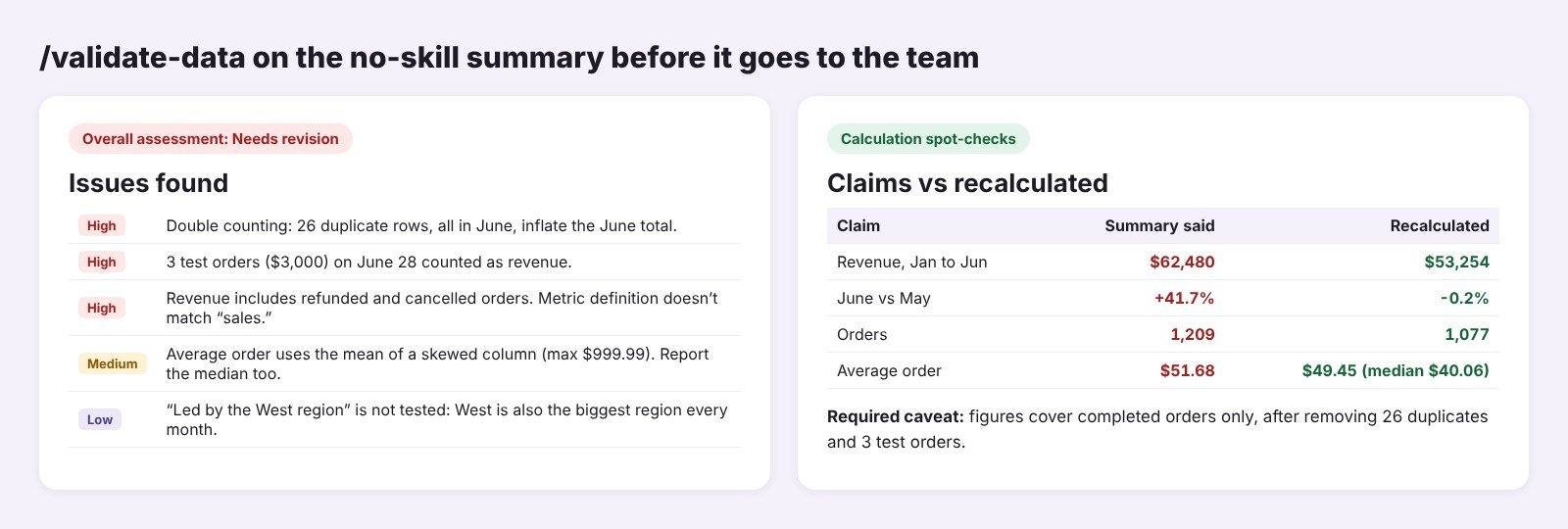
The verdict was “Needs revision.” All 26 duplicate rows sat in June, and the 3 test orders (about $3,000) were dated June 28. Together they created the whole “growth.” After the fixes, revenue was $53,254, not $62,480. June vs May went from +41.7% to -0.2%. It also flagged that the average order came from a skewed column and asked for the median ($40.06) next to it.
This test sold me. A fake 41.7% jump could have changed what the shop ordered for July.
Limit: it can only check what it can see. It will ask about missing days, but it can’t fill them.
Test 3: an Excel report with the xlsx skill
Next, a monthly Excel report by category from the clean data. Without a skill, I got pasted numbers: 0 formulas, no totals, no source note.
Anthropic’s xlsx skill has a few hard rules: use formulas, never hardcoded results; put inputs in blue; document every assumption; and run its recalc.py script until it reports zero formula errors.
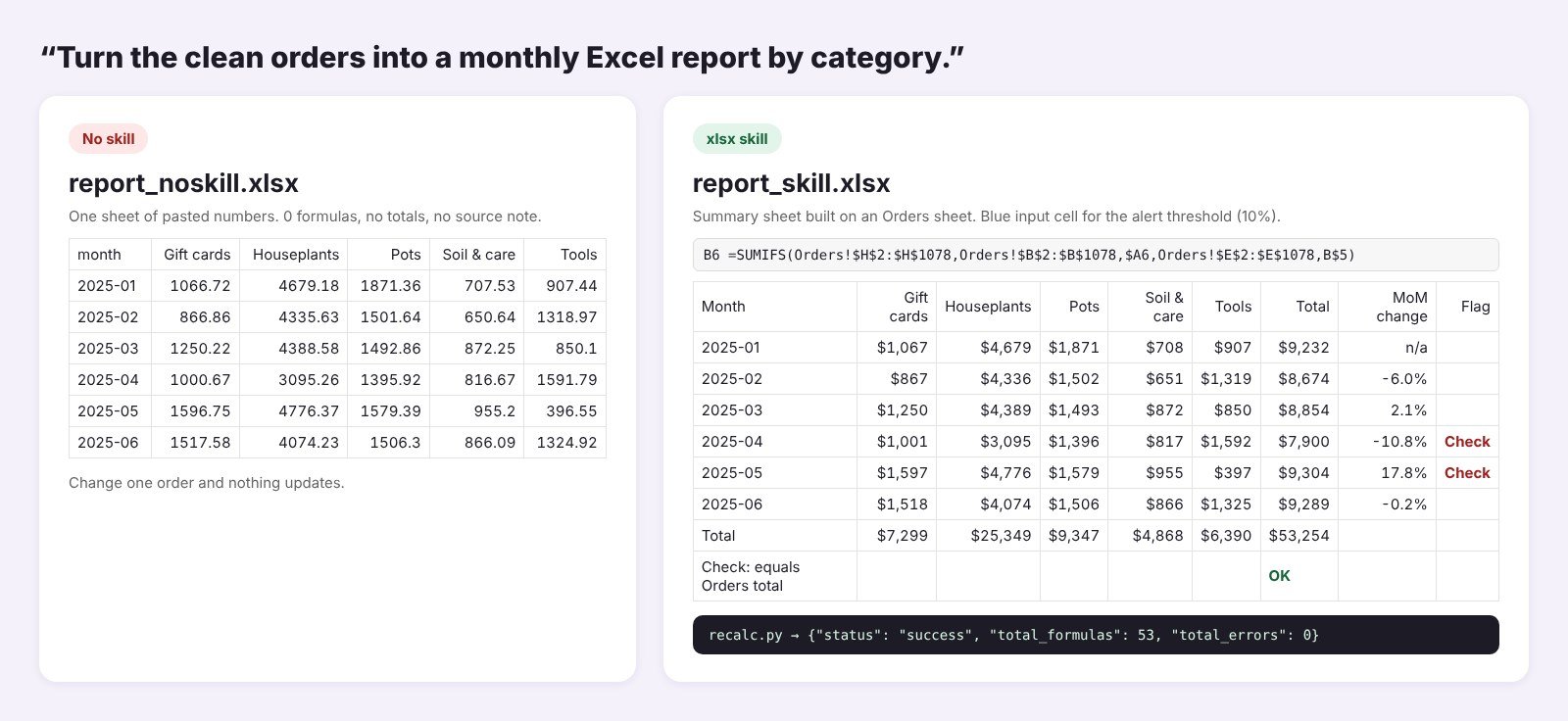
The skill version has an Orders sheet with all 1,077 clean rows and a Summary sheet where every cell is a SUMIFS formula. It added month-over-month change, a blue 10% alert threshold you can edit, and a “Check” flag on April (-10.8%) and May (+17.8%). The last row compares the grand total with the Orders sheet and shows “OK.” recalc.py reported 53 formulas and 0 errors.
Limit: the skill itself warns that a clean recalc proves formulas work, not that they’re right. That’s why I like the total check row.
Test 4: a chart with data-visualization
Last, “chart revenue by category.” With no skill and the raw file, Claude made a default pie chart with five slices. It looked fine, but Tools showed 16% because the three test orders were inside it. On clean data, Tools is 12%.
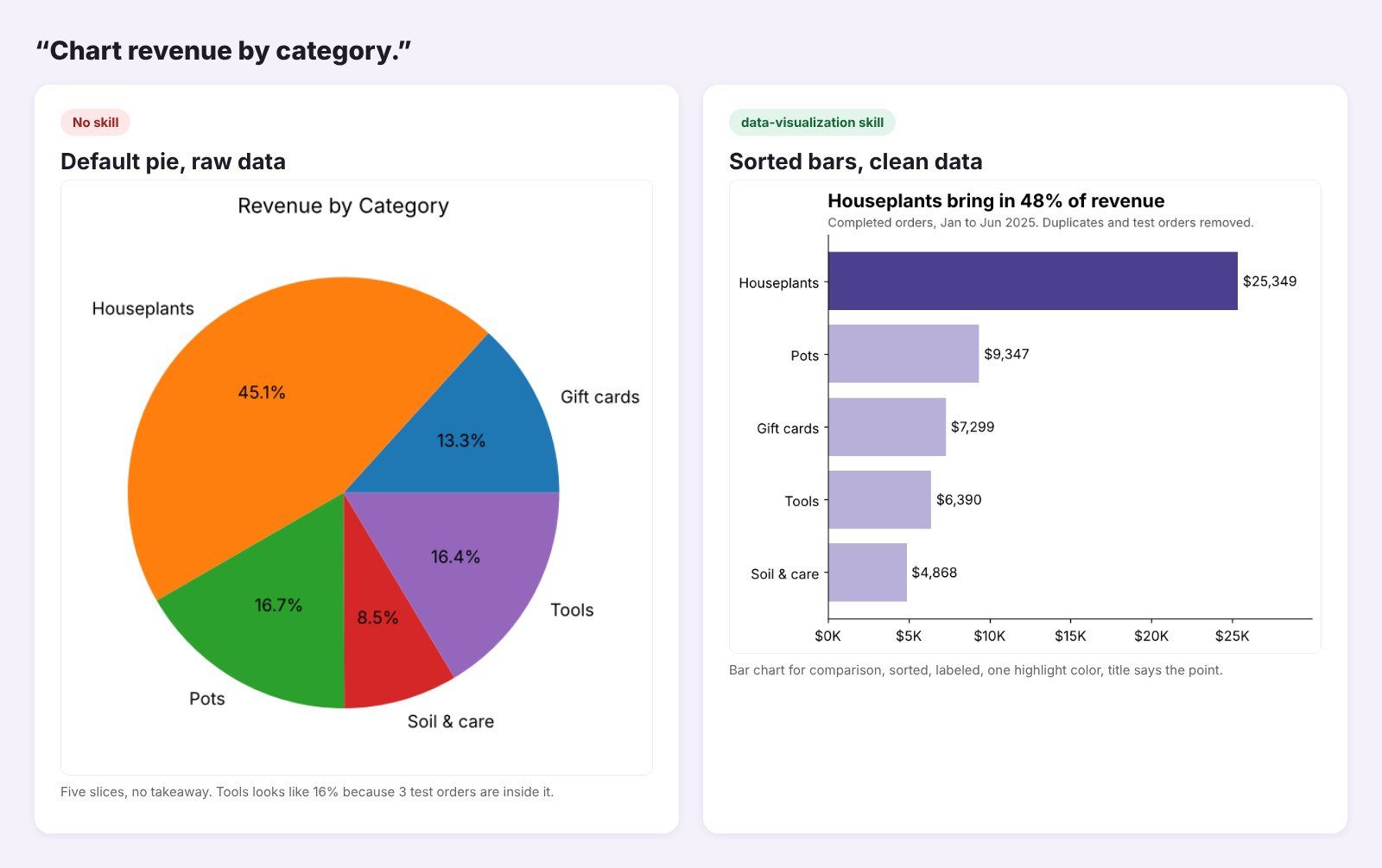
The data-visualization skill starts with a chart selection guide: bars for comparing categories, lines for time, and a list of when not to use certain charts. The result was a sorted bar chart with value labels, one highlight color and a title anyone can read in two seconds: “Houseplants bring in 48% of revenue.”
Limit: it can’t be called with a slash command. Its SKILL.md sets user-invocable: false, so Claude loads it on its own when you ask for a chart.
The best Claude skills for data analysis
1. explore-data: best first step on any new file
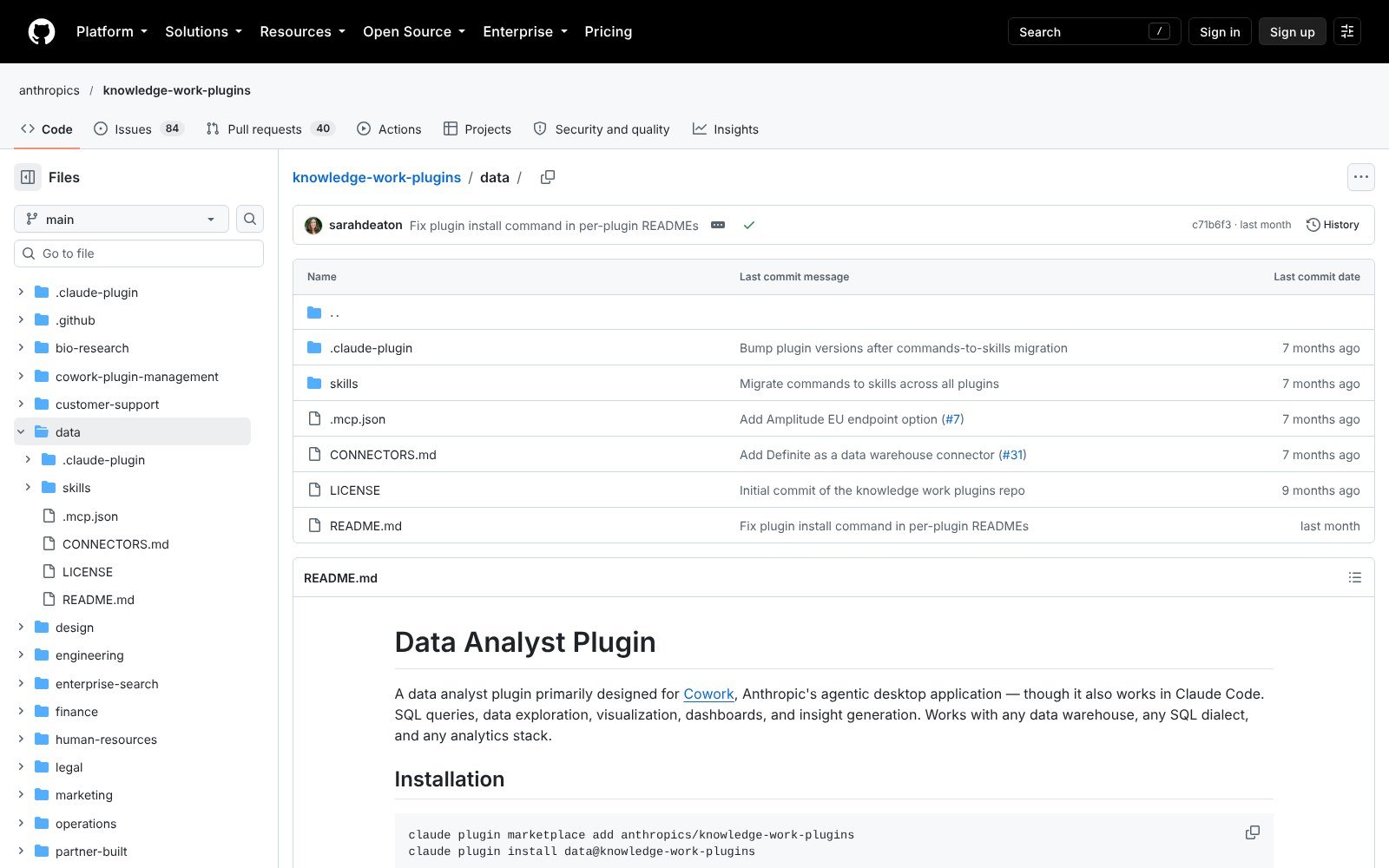
What it does: profiles a table or file (CSV, Excel, Parquet, JSON), scores each column for completeness and flags quality issues before you analyze anything.
In my test: 7 of 7 planted problems found, ranked High, Medium and Low.
Where to get it: the data plugin in anthropics/knowledge-work-plugins (30.3K stars). The plugin folder holds 10 skills, from sql-queries to build-dashboard.
Tip: run it on every file you didn’t build yourself. My test orders looked like normal rows until it listed the customer IDs.
2. validate-data: best before you share numbers
What it does: checks a finished analysis for double counting, bad joins, survivorship bias and misleading charts, then rates it.
In my test: caught a fake 41.7% growth claim and recalculated all four headline numbers.
Where to get it: same data plugin, 3.6K installs on skills.sh.
Tip: paste your summary text, not just the numbers. It checks whether the words match the data, and that’s how my “led by the West region” line got flagged as untested.
3. xlsx: best for Excel reports
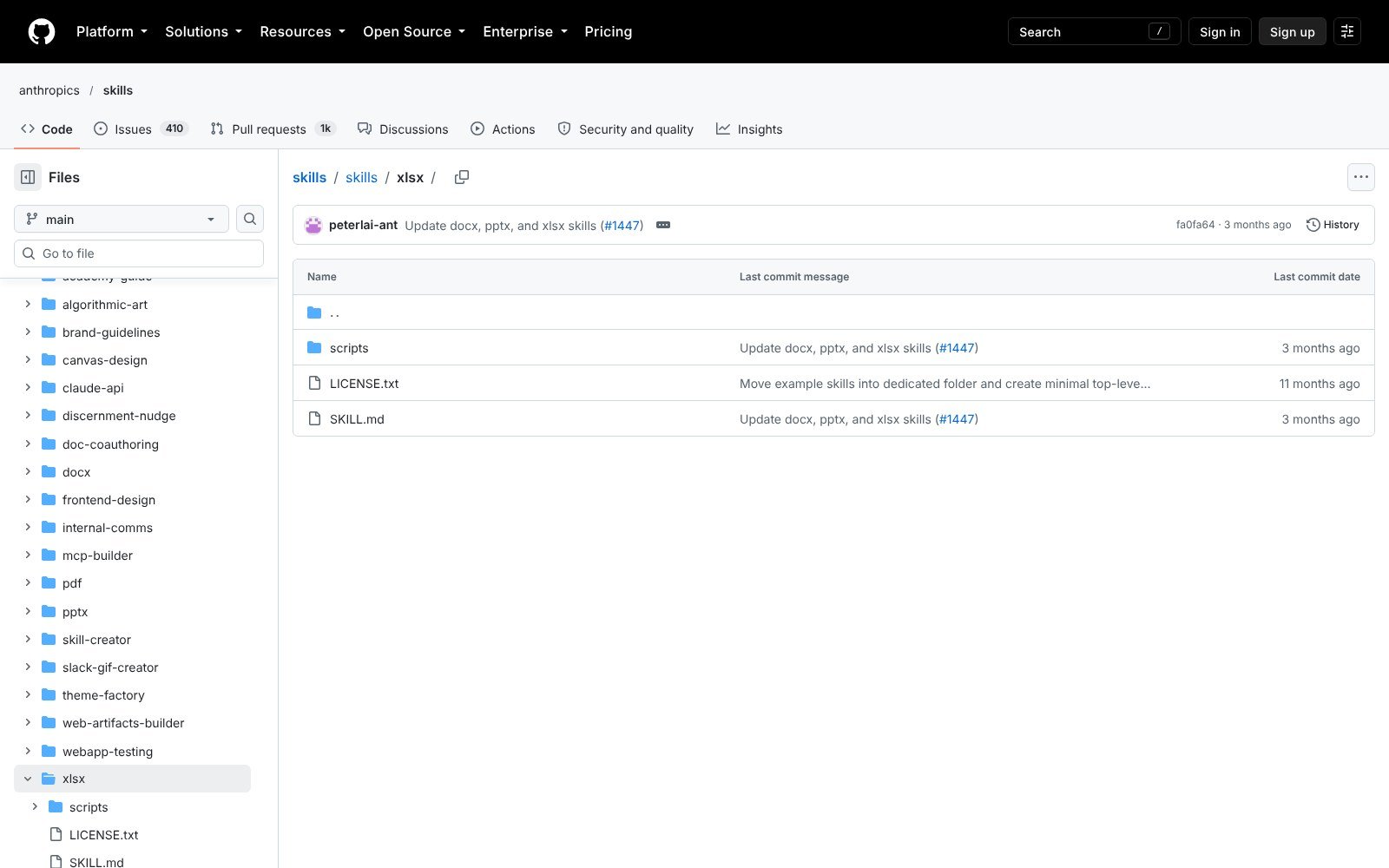
What it does: reads, cleans, builds and edits spreadsheets (.xlsx, .xlsm, .csv, .tsv) with live formulas and checks them with LibreOffice.
In my test: 53 formulas, 0 errors, plus a total check that matched to the cent.
Where to get it: anthropics/skills (180.3K stars), 185.5K installs. It’s also built into the Claude app as the Excel skill.
Tip: when you edit an existing workbook, tell Claude which cells are inputs. The skill is told to match your file’s conventions and only write there.
4. data-visualization: best for charts people read
What it does: chart choice, Python code patterns for matplotlib, seaborn and plotly, design rules and accessibility checks.
In my test: swapped a five-slice pie for a sorted bar chart with a real takeaway.
Where to get it: the data plugin, 13.5K installs, the most popular skill in that plugin on skills.sh.
5. statistical-analysis: best for outliers and trends
What it does: descriptive stats, moving averages, outlier detection, hypothesis tests, and warnings on traps like Simpson’s paradox and correlation vs causation.
In my test: reviewed, not run on its own. Its advice to report the median next to the mean for skewed data showed up in the validate-data review.
Where to get it: the data plugin, 4.5K installs.
6. data-storytelling: best for presenting results
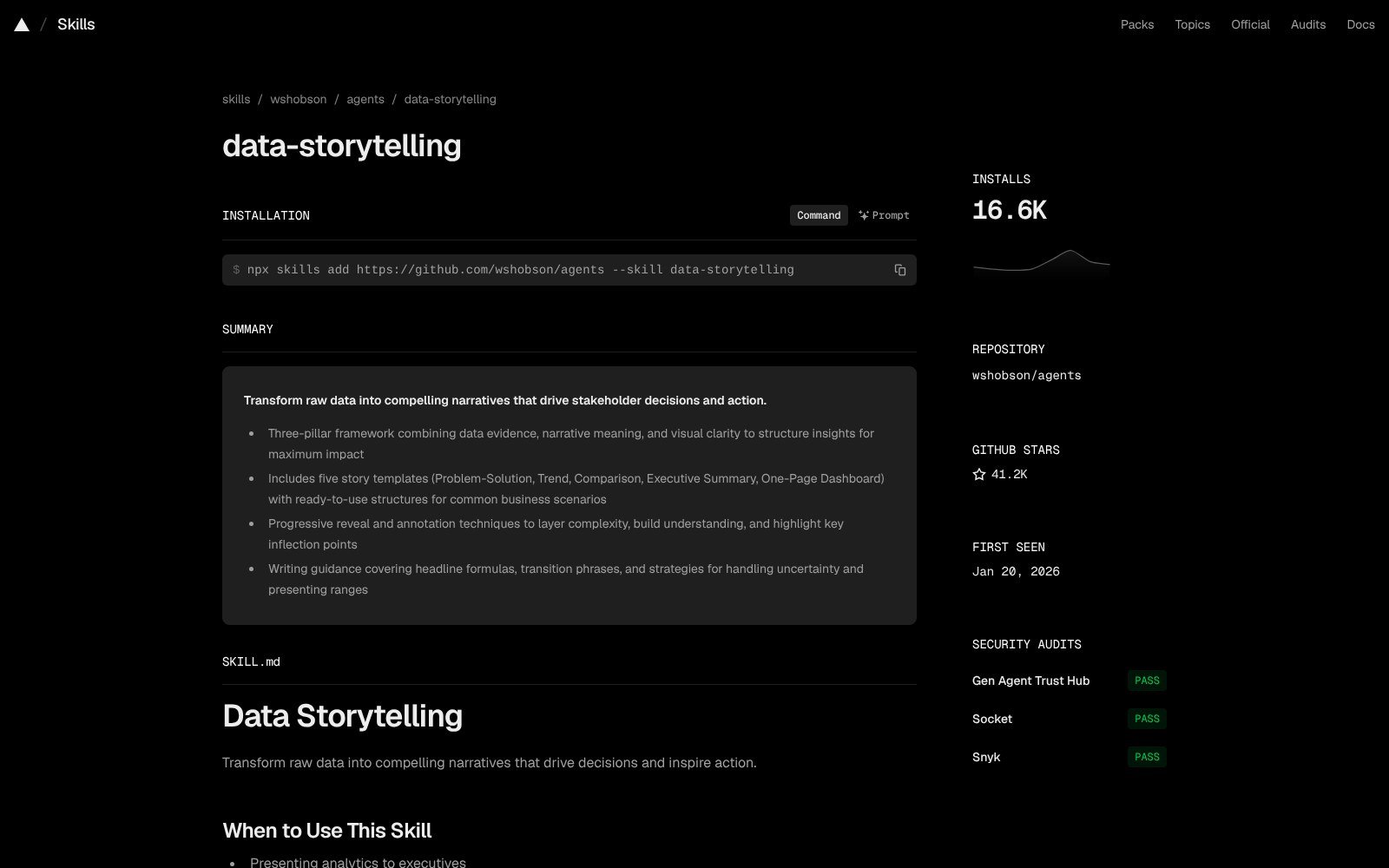
What it does: turns findings into a story for a meeting, with five templates: Problem-Solution, Trend, Comparison, Executive Summary and One-Page Dashboard.
In my test: reviewed, not run. Use it after the numbers are validated, never before.
Where to get it: wshobson/agents (41.2K stars), 16.6K installs.
7. Scientific Agent Skills: best for research data
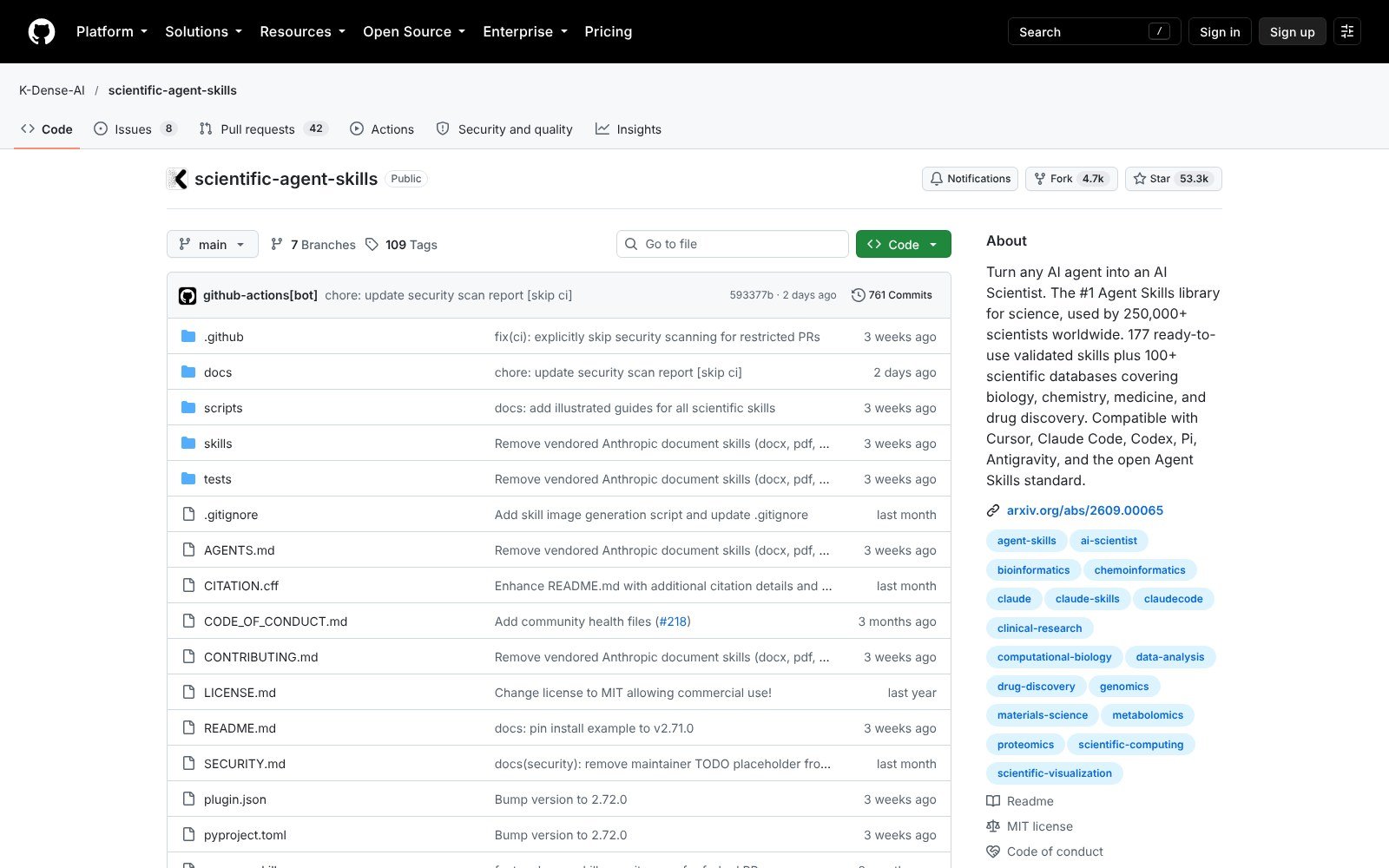
What it does: 177 skills for science work, including exploratory-data-analysis, statistical-analysis, statsmodels, polars, seaborn and scientific-visualization.
In my test: reviewed, not run. Its EDA skill targets scientific file formats, so it’s overkill for a shop CSV.
Where to get it: K-Dense-AI/scientific-agent-skills, 53.3K stars.
How to get data analysis skills in Claude: make your own or install one
1. Make your own with /skill-creator (fastest)
The skills above don’t know your house style. I wanted every chart to look the same and to always say what was left out. So I made one with this prompt:
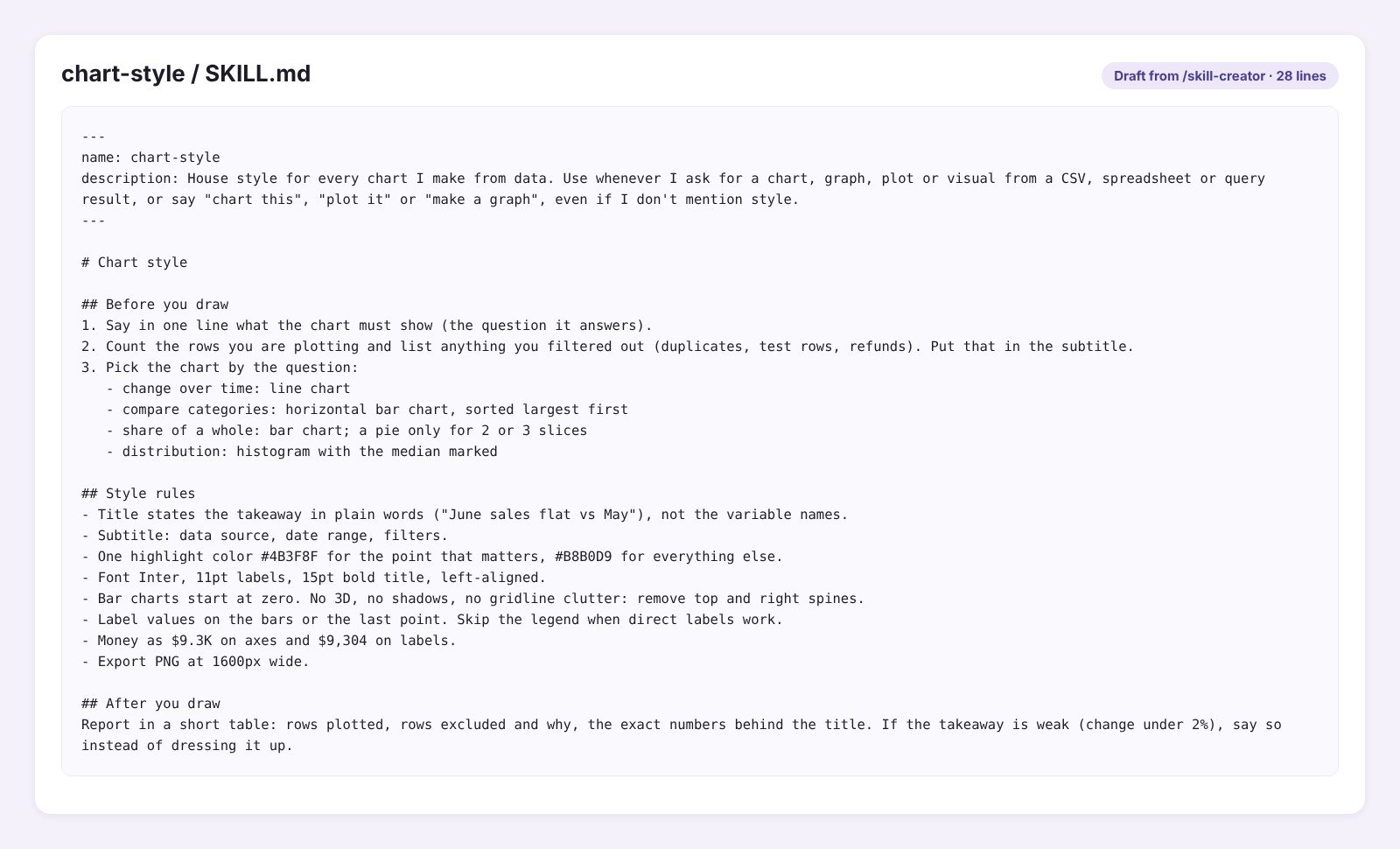
“/skill-creator Make a skill named chart-style: whenever I ask for a chart from a CSV, spreadsheet or query result, use my house style. Title states the takeaway, subtitle gives the source, date range and filters. One highlight color #4B3F8F, #B8B0D9 for the rest, Inter font. Bar charts start at zero and are sorted, direct labels instead of legends, no pie charts over 3 slices. Before drawing, count the rows and list what was filtered out. After, report rows plotted, rows excluded and the numbers behind the title.”
The draft took a few minutes. The SKILL.md is 28 lines: a description that triggers on plain phrases like “chart this” or “plot it,” three steps before drawing, the style rules, and a short report after. It added one rule I didn’t ask for but kept: if a change is under 2%, say so.
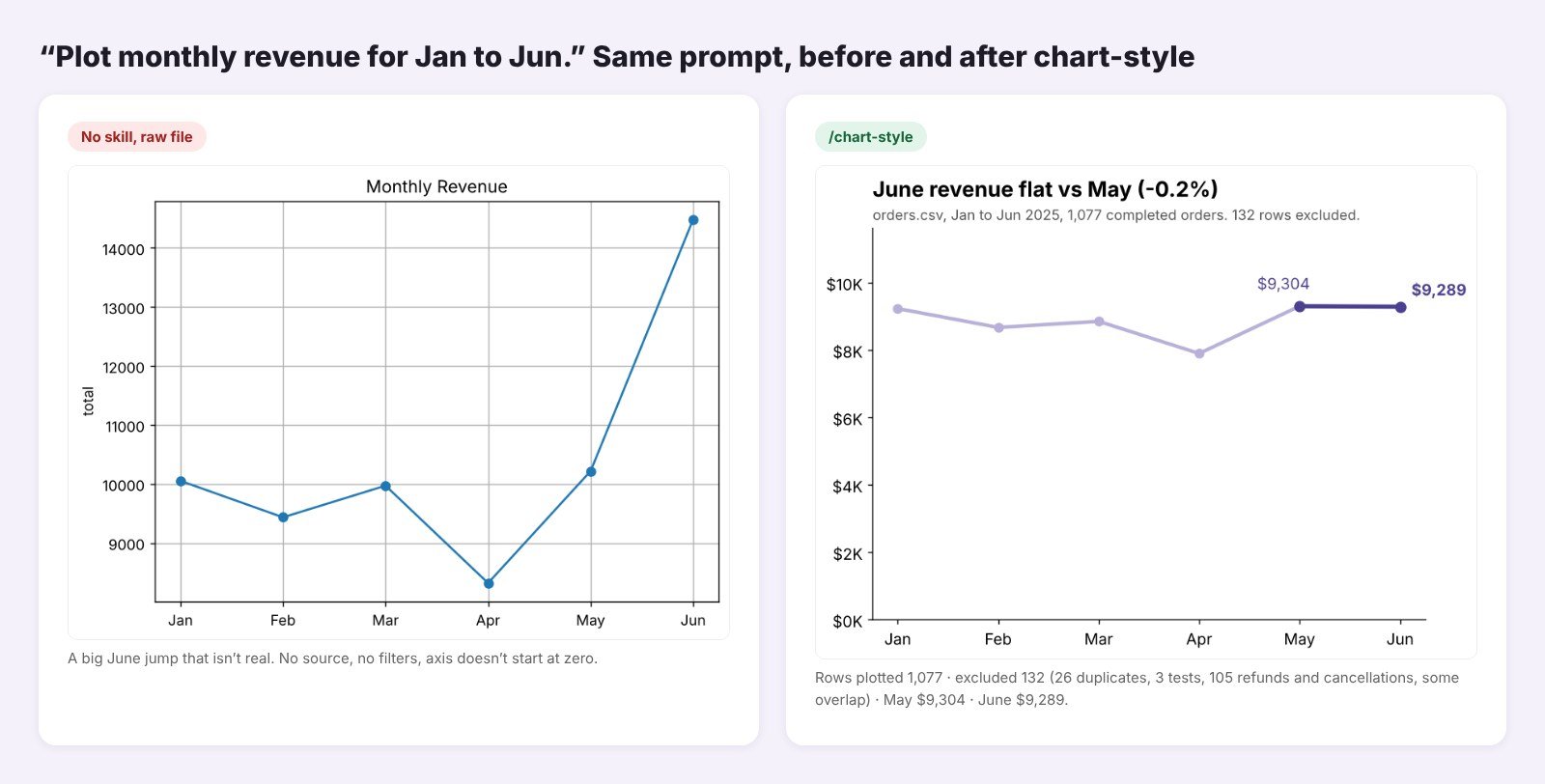
I tried it on “plot monthly revenue for Jan to Jun.” The no-skill line chart on the raw file showed a huge June spike, with an axis that started at about $8,000. The chart-style version used the clean data, started at zero and said it plainly: “June revenue flat vs May (-0.2%).” Its report listed 1,077 rows plotted and 132 excluded.
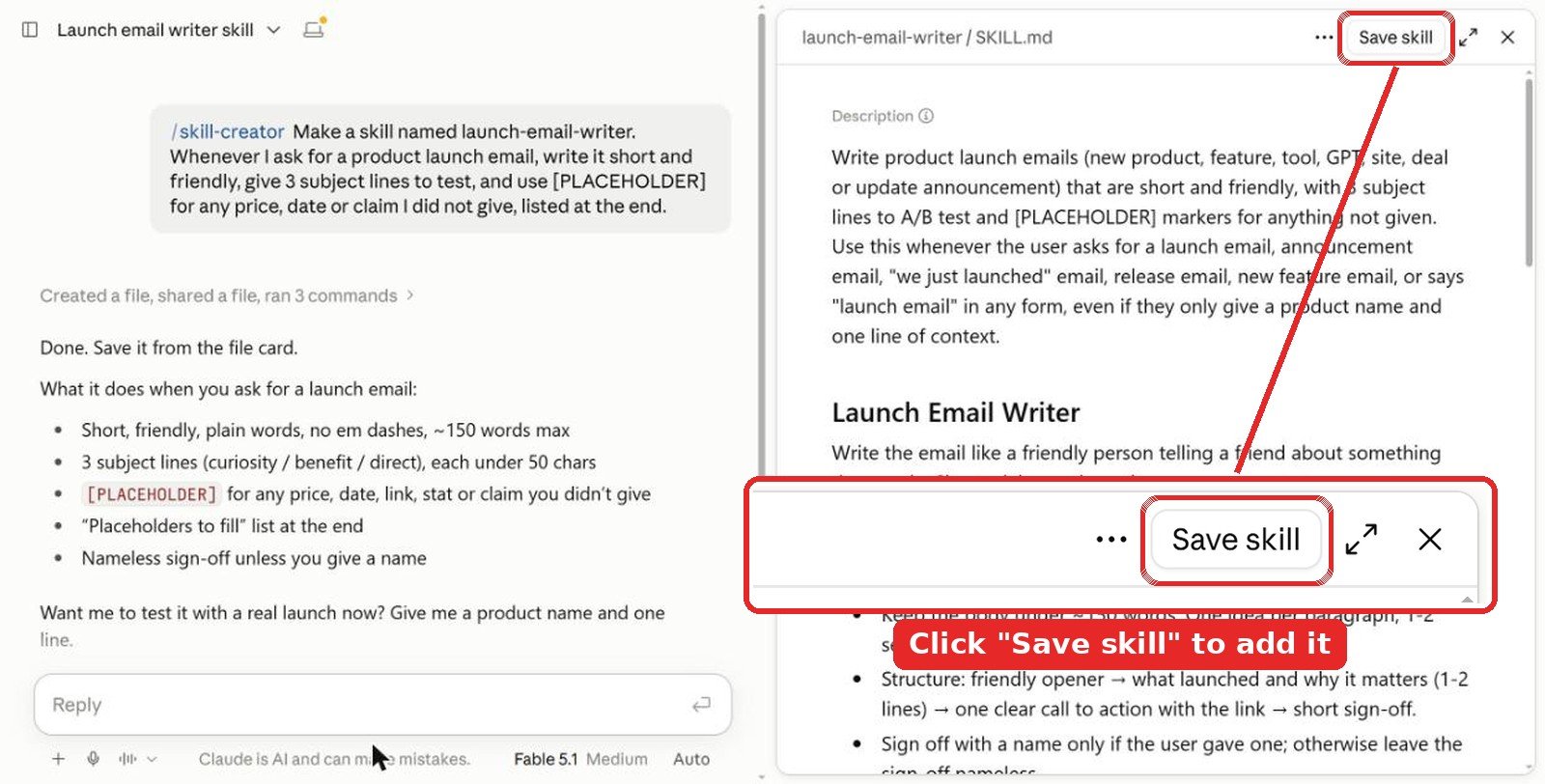
Don’t skip the save step. The skill is only a draft in that chat until you click Save skill at the top right of the SKILL.md preview. Close the chat without saving and it’s gone.
Name it from the start. Put the name in your first message, like “Make a skill named chart-style…”, and skill-creator uses it. If you forget, it picks one for you. You can ask “rename it to …” in the same chat before you save, or change it later in Customize > Skills with the Edit button.
Tip: paste a chart you like and say “match this.” It beats describing every color.
2. Install in the Claude app
Anthropic’s help center says skills work on Free, Pro, Max, Team and Enterprise plans. They need code execution, so turn on Code execution and file creation first (Settings > Capabilities on personal plans). The Excel, Word, PowerPoint and PDF skills are already there; Claude uses them when a task fits.
- For any other skill, download its folder from GitHub, for example
data/skills/explore-data, and zip it. - Go to Customize > Skills, click +, then Create skill and Upload a skill, and pick the zip.
- Attach your CSV and type
/explore-data, or just ask “profile this file.”
3. Install in Claude Code
The whole Data Analyst plugin installs in two lines:
claude plugin marketplace add anthropics/knowledge-work-plugins
claude plugin install data@knowledge-work-plugins
For the xlsx skill and single skills from other repos:
/plugin marketplace add anthropics/skills
/plugin install document-skills@anthropic-agent-skills
npx skills add https://github.com/wshobson/agents --skill data-storytelling
Tips from testing
- Profile first, ask second. Every wrong number in my no-skill tests came from rows nobody looked at.
- Validate any big change. A 40% jump is either great news or bad data.
- Keep three skills, not thirty. explore-data, validate-data and xlsx cover most weekly reporting.
Video: data analysis with Claude Code
FAQ
What is the best Claude skill for data analysis?
explore-data from Anthropic’s Data Analyst plugin. In my test it found all 7 problems I planted in a 1,209-row orders file before any analysis started.
Can Claude skills stop wrong numbers in a report?
They help a lot. validate-data rated my no-skill summary “Needs revision” and showed that a 41.7% June jump was really a 0.2% drop once duplicates and test orders were removed.
Can I make my own data analysis skill with /skill-creator?
Yes. Type /skill-creator, put the name in your first message and list your rules. My chart-style skill took a few minutes and came out at 28 lines. In the Claude app, click Save skill at the top right of the preview or the draft is lost.
Which Claude skill is best for Excel?
Anthropic’s xlsx skill. It writes live formulas and checks them. My report had 53 formulas and 0 errors.
Are Claude data analysis skills free?
Yes. Every skill in this list is free on GitHub. In the Claude app, skills need code execution and file creation turned on, and Anthropic’s help center lists them for Free, Pro, Max, Team and Enterprise plans.
The verdict
If you analyze data with Claude, start with Anthropic’s Data Analyst plugin and use two of its skills every time: explore-data before you ask questions and validate-data before you share answers. Together they turned a 41.7% “growth” month into the flat month it really was. Add xlsx when the result has to live in Excel. Then spend five minutes on a chart style skill with /skill-creator, so every chart you send says what it left out.
More Claude guides: best writing skills for Claude, best Claude skills for marketing, best Claude skills for SEO, best design skills for Claude, best Claude skills for graphic design, best UI skills for Claude, best design skills for Claude Code, best Claude skills for web design and all Claude articles. If you run a small online shop like the one in my test, see our e-commerce guides.
Tested in Claude in October 2026. Install and star counts were checked the same month and change often. The orders file is sample data I generated for this test.