
FastMoss isn’t only a dashboard anymore. Through its Developer Center you can reach the same TikTok Shop data three other ways: an MCP for AI chat apps, a CLI for coding agents, and a REST API for your own systems. The MCP and CLI share one API key and one credit pool. The REST API has its own key and is billed per request.
That might sound like something only engineers care about. It isn’t. The MCP in particular means a seller with zero coding skills can type “what are the rising kitchen products in the US this week?” into Claude or ChatGPT and get an answer built on real FastMoss data. This guide explains each option in plain words, shows the exact setup steps, and helps you pick.
| Option | Works with | Best for | Code needed |
|---|---|---|---|
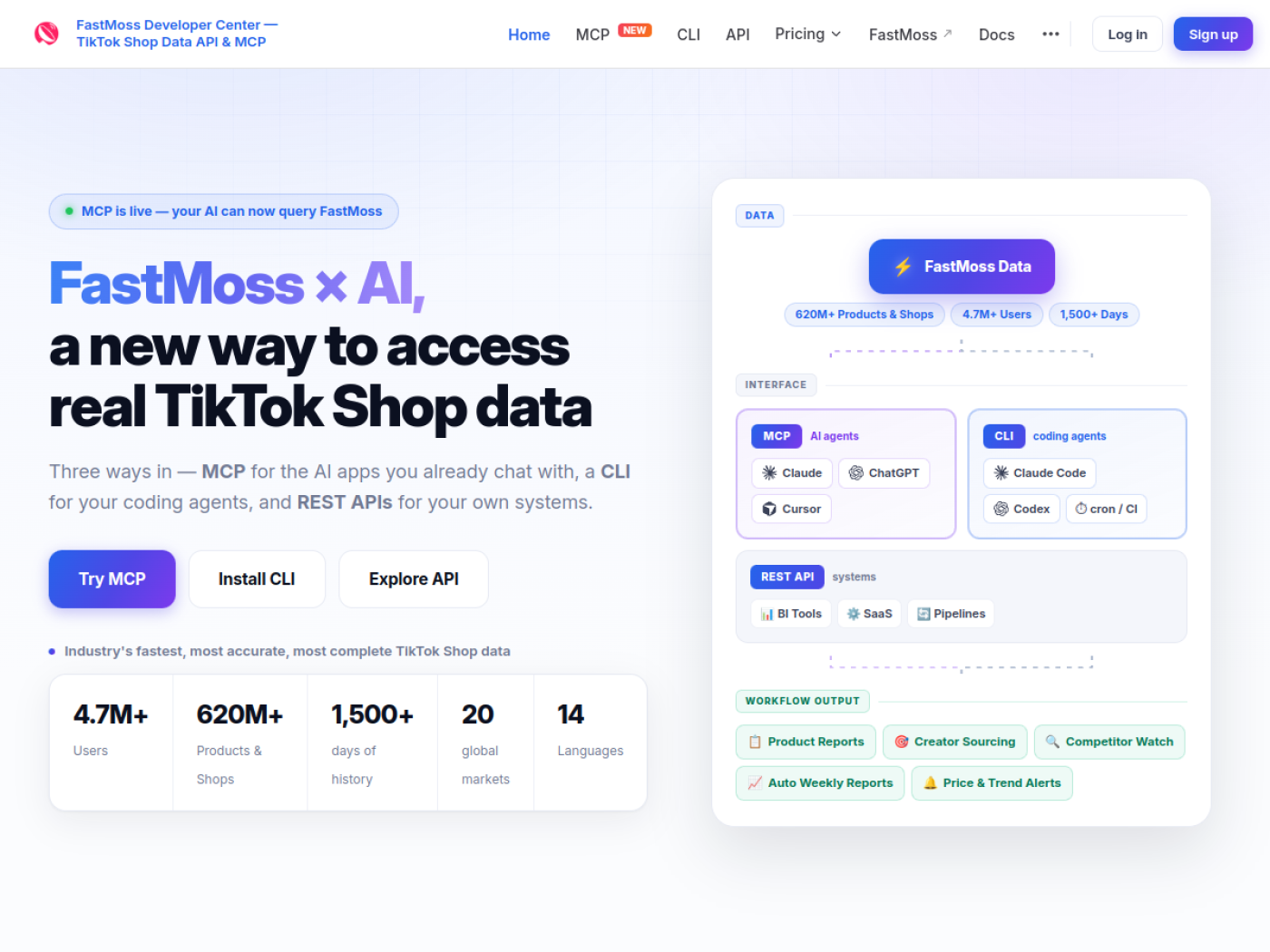
| MCP | Claude, ChatGPT, Cursor, Windsurf, Cline, Gemini | Sellers and analysts who want answers in plain English | No |
| CLI | Claude Code, Codex, Cursor, scheduled jobs | Bulk pulls and automated reports | A little |
| REST API | BI tools, data pipelines, SaaS apps | Engineering teams | Yes |
What data you get
The developer tools sit on top of the same database as the dashboard: 620M+ products and shops, 1,500+ days of history and 20 global markets, available in 14 languages. The MCP and CLI use the same set of 55 tools, and the REST API exposes 45+ endpoints on the same data.
The tools fall into five groups:
- Products: search, top-selling and fast-growing rankings, product details and sales trends.
- Creators: creator search, growth, ecommerce and trending creator rankings, and the products each creator promotes.
- Shops: shop search, shop rankings and what each shop sells.
- Videos: top product videos and their sales impact.
- LIVE: LIVE stream rankings and performance.
FastMoss MCP: ask your AI about TikTok Shop
MCP (Model Context Protocol) is the standard way AI assistants connect to outside tools. Once you connect FastMoss, your AI can call its product, creator, shop and video tools on its own while it answers you.
In practice it looks like a normal chat. You type something like:
“Find the fastest-growing US kitchen products this week, under $30, with at least 15% commission.”
The AI calls FastMoss’s product search, reads the results, and replies with a short list and its reasoning. You can follow up with “who are the top creators selling the second one?” and it keeps going.
How to set up the FastMoss MCP in Claude
It takes about 60 seconds and no code. FastMoss is a remote MCP server, so there is nothing to install.
- Create a key in the FastMoss Developer Center. New accounts get a 3-day free trial.
- Build your server URL by adding your key to the end of this address:
https://mcp.fastmoss.com/mcp?api_key=YOUR_KEY - Open Claude (web or desktop), start a new chat, click + and go to Connectors, then Add custom connector.
- Name it FastMoss MCP and paste your URL into the Remote MCP server URL field. Leave the advanced settings empty.
- Click Add. In Manage connectors, set the FastMoss tool permissions to Always allow so it doesn’t ask on every call.
Test it. Paste this into a new chat. If you get live numbers back, you’re connected:
“Use FastMoss to show today’s top 3 selling products in the US beauty category. Return product name, price, sales, GMV, and trend.”
No numbers? Check that the FastMoss connector is switched on for that chat and that your key is pasted in full at the end of the URL.
ChatGPT, Cursor and other apps
The same server URL works in every app that supports remote MCP. In ChatGPT and Codex, add it as a custom connector. In Cursor, Windsurf and Cline, add it as a remote server in the app’s MCP settings. Cherry Studio and Gemini are supported too. FastMoss keeps click-by-click guides for each app on its MCP setup page.
Good uses for the MCP
Weekly product reports. Ask for this week’s risers in your category every Monday.
Creator shortlists. “Top 10 creators by GMV in pet supplies who promoted a product under $25.”
Competitor checks. “What did [shop] launch in the last 30 days and how is it selling?”
Price and trend alerts. Pair the MCP with a scheduled AI task and get a summary when something moves.
FastMoss CLI: for coding agents and automation
The CLI lets coding agents like Claude Code, Codex or Cursor run the same 55 tools locally. A nice detail FastMoss highlights: raw rows don’t flood the conversation. The agent pulls the data, works with it on your machine, and only shows you what matters.
Install it. You need Node.js (check with npm -v). Then run:
npm install -g @fastmoss/cli@latestDon’t want to install anything? npx -y @fastmoss/cli@latest runs it once with nothing left behind.
Connect your key and run a query. Save your key once, then type fastmoss to open the prompt:
fastmoss set api-key YOUR_KEY
fastmoss
fastmoss > creator_search --args '{"region":"US"}'
The full walkthrough is in the FastMoss CLI install guide. The CLI is the right choice for bulk pulls and anything you want to run on a schedule, like a weekly export dropped into a spreadsheet or a nightly job that flags products crossing a growth threshold.
FastMoss REST API: for your own systems
The REST API exposes 45+ endpoints for data pipelines, BI dashboards and SaaS products, with stable schemas and predictable metering.
- Base URL:
https://openapi.fastmoss.com - Auth: create a
client_secretin your FastMoss console and send it asAuthorization: Bearer YOUR_CLIENT_SECRET - Format: JSON requests and responses
A first request looks like this:
curl 'https://openapi.fastmoss.com/creator/v1/search' \
  --header 'Content-Type: application/json' \
  --header 'Authorization: Bearer YOUR_CLIENT_SECRET' \
  --data '{"region":"US"}'
Full endpoint docs are in the FastMoss API quick start. Large teams can also ask for the Enterprise API Service, which adds custom integrations and data report exports and is quoted by sales.
FastMoss API pricing
Developer access is billed separately from the normal dashboard plans, and there are two price lists. MCP and CLI share one credit pool with monthly plans (see the MCP & CLI pricing page). The REST API is pay per request (see the API pricing page). In both cases, calls that return zero results are free.
MCP and CLI plans
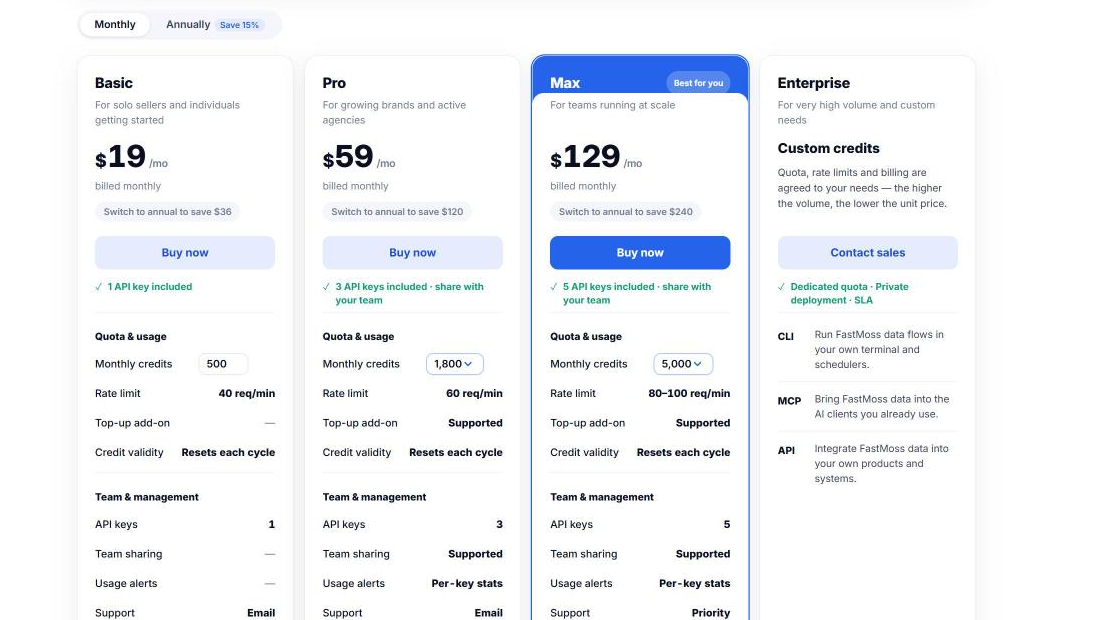
MCP and CLI come with a 3-day free trial. After that you pick a plan by how many credits you need each month. Paying yearly saves about 15%.
| Plan | Monthly | Billed yearly | Credits / month | Rate limit | API keys |
|---|---|---|---|---|---|
| Basic | $19 | $16/mo | 500 | 40 req/min | 1 |
| Pro | from $59 | from $49/mo | 1,800 or 3,000 | 60 req/min | 3 |
| Max | from $129 | from $109/mo | 5,000 to 20,000 | 80 to 100 req/min | 5 |
| Enterprise | Custom quote | Custom | Custom | Custom | Custom |
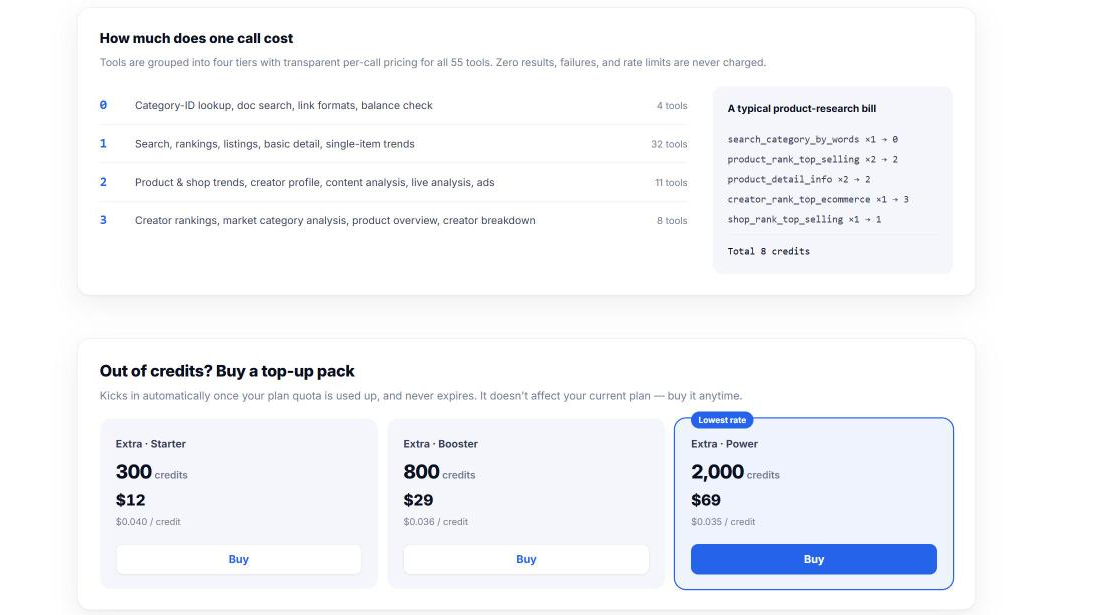
Not every call costs the same. FastMoss groups its 55 tools into four tiers that cost 0 to 3 credits per call. Simple lookups (category IDs, doc search, balance check) are free. Search, rankings and basic details cost 1 credit. Trends, creator profiles, content, live and ads analysis cost 2. Creator rankings and market category analysis cost 3. A typical product research session (a category lookup, two rankings, two product details, a creator ranking and a shop ranking) uses about 8 credits. Failed calls and rate-limited calls are not charged.
Credits reset on the first day of each billing cycle and don’t roll over. If you run out, Pro and Max can add top-up packs that never expire: 300 credits for $12, 800 for $29, or 2,000 for $69.
REST API pricing
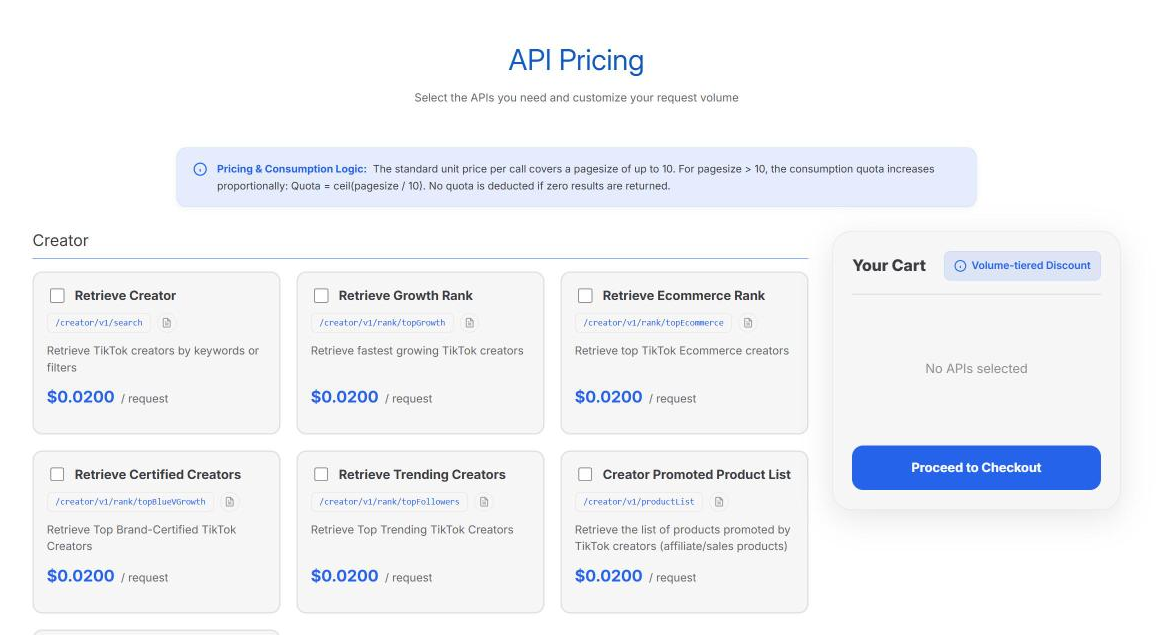
The REST API is pay per request: $0.01 or $0.02 per call, depending on the endpoint (about 30 endpoints across creators, shops, products, videos, live streams and agencies). One call covers up to 10 results. Bigger pages cost more in steps of 10, so a page of 50 results counts as 5 calls. No quota is used when a call returns zero results.
High volume gets cheaper automatically: 10% off from 50,000 requests, 20% off from 100,000, and 30% off above 500,000, counted across all the APIs you buy. Pick your endpoints and volume on the API pricing page.
Prices checked October 2026. Dashboard plan prices are in FastMoss pricing.
Which one should you choose?
You’re a seller and don’t code. Use the MCP. Ask, get answers, done.
You like automating things. Use the CLI with a scheduled job for weekly reports.
You run an agency or a SaaS product. Use the REST API, or talk to sales about Enterprise.
You just want to click around. Use the normal dashboard. Start with the free trial.
Many people end up using two: the dashboard for exploring, and the MCP or CLI for the repetitive weekly questions.
Dashboard vs MCP: what’s the difference in daily use?
The dashboard is better when you don’t know what you’re looking for yet. You browse, filter, open charts and follow your curiosity.
The MCP is better when you know the question. “Top 5 rising products in X” is faster to type than to click. It’s also great for combining steps the dashboard keeps separate, like finding products and then finding the creators behind them in one conversation.
A few honest limits
It’s still estimated data. The numbers are the same estimates as in the dashboard, so treat them as direction, not exact revenue.
AI can misread. When an AI summarizes data, it can occasionally pick the wrong column or round loosely. For anything you’ll spend real money on, double-check in the dashboard.
Costs scale with usage. Heavy automated pulls use more of your credits. Start small and watch your usage before scheduling big jobs.
10 example prompts for the FastMoss MCP
Once FastMoss is connected to your AI app, these are the kinds of questions that work well. Adjust the country, category and numbers to fit you.
- “What are the 10 fastest-growing products in US Home and Kitchen this week, under $30?”
- “Show me products in Beauty with more than 20% commission and positive 7-day order growth.”
- “Who are the top 10 creators by GMV in pet supplies over the last 30 days?”
- “For this product, which creators drove most of the sales, and what kind of videos did they post?”
- “Compare these two shops: best sellers, price range and number of affiliates.”
- “Which LIVE streams in the UK had the highest GPM last week?”
- “List TikTok Shop ads that have been running for more than 30 days in fitness.”
- “Summarize what buyers complain about in the reviews of this product.”
- “What categories grew the most in Southeast Asia over the last 28 days?”
- “Build me a weekly report: top 5 rising products, top 5 creators and one competitor shop to watch.”
The best results come from specific questions. “What’s trending?” gets a vague answer. “Rising products in X, under $Y, with at least Z% commission” gets a list you can act on.
A simple weekly automation
Here’s a setup that saves a lot of clicking, even for non-developers.
Monday morning: your AI assistant runs a saved prompt through the MCP: rising products in your two categories, top creators behind them, and any competitor shop that changed prices.
You get one summary in your inbox or chat with the five things worth your attention.
You open the dashboard only for the items that look promising, to check sales curves and details.
With the CLI, the same idea can run as a scheduled job that writes results to a spreadsheet, so you build a history of your own over time.
Keep your API key safe
Your key spends your credits, so treat it like a password. Remember that the MCP server URL contains your key, so don’t paste that URL into shared documents, screenshots or public code either. If you share access with a team, give each person or system its own key (Pro and Max include several), and remove keys you no longer use. If a key leaks, replace it in the Developer Center right away.
Who should skip the developer tools
If you log in once a week, browse a few categories and export a list now and then, you don’t need the MCP, CLI or API. The dashboard is faster to learn and covered by your plan. The developer tools pay off when you ask the same questions repeatedly, want answers inside the AI tools you already use, or need FastMoss data inside another system.
FAQ
Does FastMoss have an official API?
Yes. The FastMoss Developer Center at developers.fastmoss.com offers a REST API with 45+ endpoints at openapi.fastmoss.com, plus an MCP and a CLI.
Can I use FastMoss inside Claude or ChatGPT?
Yes, through the FastMoss MCP. Add https://mcp.fastmoss.com/mcp?api_key=YOUR_KEY as a custom connector. It also works with Cursor, Windsurf, Cline and Gemini, and needs no code.
How much does the FastMoss API cost?
MCP and CLI plans start at $19 a month for 500 credits ($16 a month billed yearly). The REST API costs $0.01 or $0.02 per request. MCP and CLI have a 3-day free trial, and empty results are free.
Is the FastMoss API included in the normal plans?
No. Developer access is billed separately through the Developer Center. MCP and CLI share one credit pool, and the REST API is billed per request.
How do I install the FastMoss CLI?
Install Node.js, run npm install -g @fastmoss/cli@latest, save your key with fastmoss set api-key YOUR_KEY, then type fastmoss to start.
Related: What is FastMoss and the FastMoss product research workflow.