
TL;DR
- The FastMoss Chrome extension is free and shows creator and video data right on tiktok.com.
- Install it from the official Chrome Web Store listing, then log in with your FastMoss account.
- Video views, likes, comments and shares work right away. Creator sales data and GMV need an account (7-day free trial, then a paid plan).
- Desktop only. It works in Chrome, Edge and Brave, not in the TikTok mobile app.
- Upgrading? Use code FAST50 to save on your plan.
The FastMoss Chrome extension puts FastMoss data right on top of TikTok. While you scroll tiktok.com, it shows creator stats and video engagement numbers without you having to open the full dashboard in another tab. It’s free to install.
It’s a small tool, but it changes how you browse. Instead of watching a video and wondering “is this creator any good?”, you get the answer on the same screen. Below is what it shows, how to install the right one (there’s more than one listing, which confuses people), how it fits with a paid plan, and what to check on privacy.
| Price | Free to install |
| Works on | Chrome, and usually other Chromium browsers like Edge and Brave |
| Needs | A FastMoss account for full analytics |
| Shows | Creator analytics, live video metrics, shortcuts into FastMoss |
| Official link | FastMoss TikTok Extension on the Chrome Web Store |
| Mobile | No. Desktop browser only, not the TikTok app |
The Chrome button opens the official listing, the same one linked from the fastmoss.com footer.
What the FastMoss extension shows
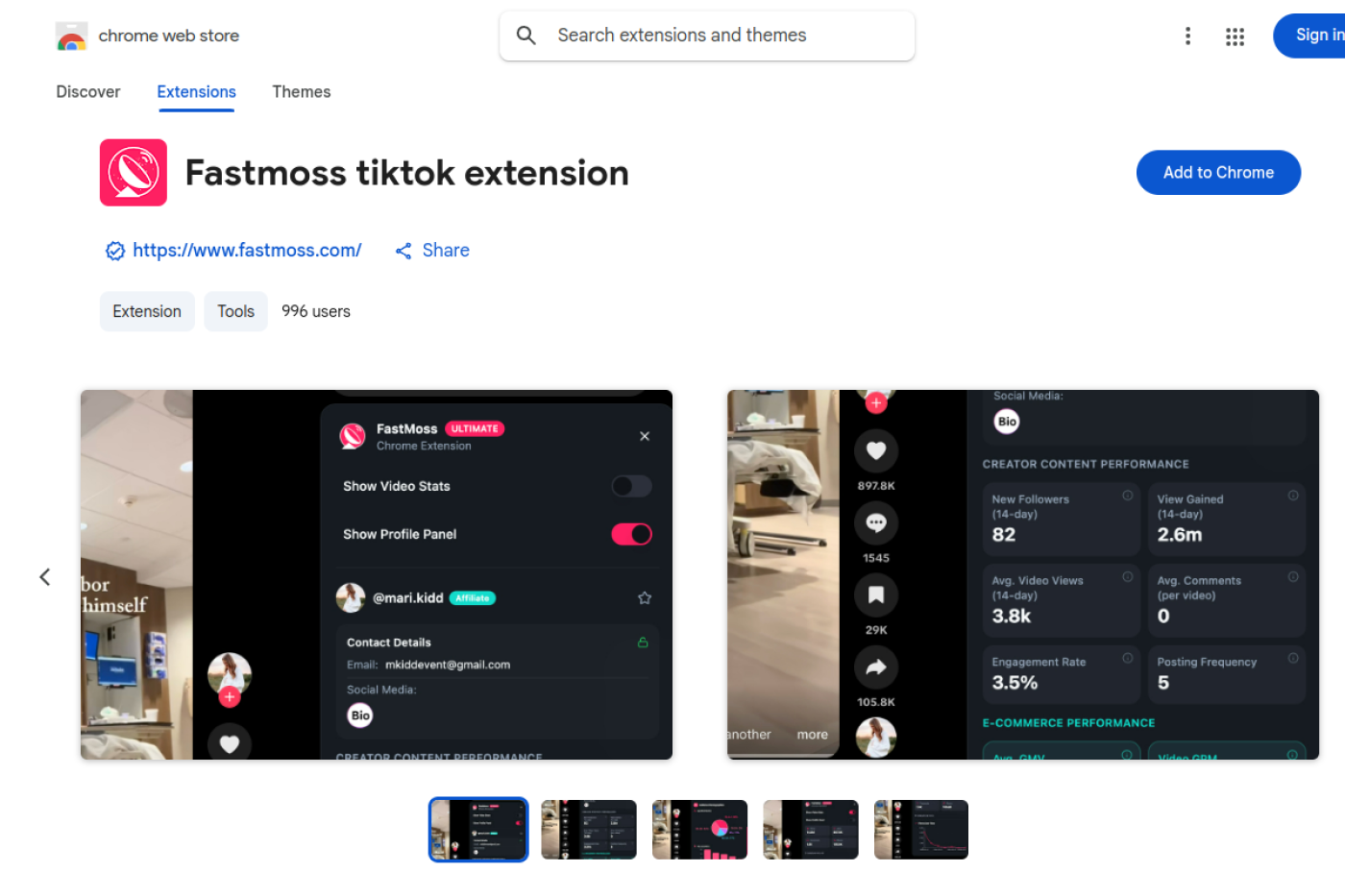
Creator analytics. When you open a creator’s profile, the extension picks up the creator ID and pulls their profile and performance data from FastMoss. You see whether this person actually drives sales, not just how many followers they have.
Real-time video metrics. Views, likes, comments and shares appear right on the TikTok video page. Handy for judging whether a video is genuinely performing or just has one big number.
Shortcuts into FastMoss. One click takes you from what you’re watching into the full FastMoss pages for market insight, competitor analysis and product selection.
FastMoss extension data: where it shows and what it needs
| Data | Where it shows | What you need |
|---|---|---|
| Views, likes, comments, shares | TikTok video page | Extension installed |
| Creator performance and sales data | TikTok creator profile | FastMoss account (free trial or paid plan) |
| Products a creator promotes, GMV per product | FastMoss dashboard (one click from TikTok) | FastMoss account, depth follows your plan |
| Sales history, trends, competitor data | FastMoss dashboard | Paid plan for full history |
How to install the FastMoss Chrome extension
Search “FastMoss” on the Chrome Web Store and you may see more than one listing. To avoid copies or outdated versions, install from the link FastMoss itself gives you.
- Open the official FastMoss TikTok Extension listing (or click Get our free extension in the fastmoss.com footer, same page).
- On the Chrome Web Store page, click Add to Chrome.
- Pin it to your toolbar so you can see when it’s active.
- Log in with your FastMoss account. If you get stuck, see the FastMoss login guide.
- Open any TikTok creator profile or video page. The data appears on the page.
At the time of writing, the listing linked from the FastMoss footer was a newer release (version 1.0.0, updated June 2026, around 1,000 users and no ratings yet). That’s normal for a new listing, but it’s another reason to use the official link rather than whichever result Chrome shows first.
FastMoss extension free vs paid: what you really get
Installing is free, and the video metrics are useful even on their own. But FastMoss is clear that an account is needed to unlock the full analytics, and the depth you see follows your plan limits.
Think of it like this: the extension is a window. What you see through it depends on which FastMoss plan you have. On the free trial you see everything for 7 days. After that, Basic, Pro and Ultimate each show more history, more searches and more detail views.
New users can test the whole thing with the 7-day free trial. After that, see FastMoss pricing and the FAST50 promo code.
FastMoss extension privacy: read this before you install
Any browser extension that reads pages deserves a quick check. FastMoss says the extension only reads public creator and video data on tiktok.com and processes engagement metrics locally in your browser, and that it doesn’t sell data.
At the same time, the Chrome Web Store listing’s data disclosure section lists categories like authentication information, user activity, web history and website content. Those disclosures are often broad by design, but they don’t fully match the “no personal data” wording, so it’s worth reading the developer’s privacy policy linked on the store page before you install. That’s good practice for every extension, not just this one.
A simple habit that helps: install it in a Chrome profile you use for work and research, not the one where you do your banking.
Best ways to use the FastMoss extension
Vet a creator before you send a collab offer. Open their profile, check their sales data, and decide in seconds whether they’re worth a message.
Check if a viral video is really performing. Big views with weak engagement or no product sales is a common pattern. The extension makes it visible.
Jump from inspiration to research. See a product in a video you like, click through to FastMoss, and check its sales curve. The full method is in how to find winning products with FastMoss.
Build creator lists while you scroll. If you browse TikTok for ideas anyway, the extension turns that time into research.
FastMoss extension vs dashboard: when to use which
The extension is for quick checks while you’re already on TikTok. The dashboard is for real research: filtering whole categories, comparing products side by side, exporting lists and looking at months of history.
Most people use both. The extension catches ideas in the moment, and the dashboard tells you whether those ideas hold up.
FastMoss extension not working? Troubleshooting
Nothing shows on TikTok pages. Make sure you’re logged in to FastMoss in the extension, and refresh the TikTok tab.
Data looks limited. You may have hit your plan’s daily limits, or your trial has ended.
It stopped working after a Chrome update. Remove it and reinstall from the official Chrome Web Store listing.
How to uninstall it. Click the puzzle icon in Chrome’s toolbar, find FastMoss, click the three dots and choose Remove from Chrome. You can also go to chrome://extensions and remove it there.
A 10-minute creator vetting routine with FastMoss
If you work with creators, this routine saves a lot of bad collabs. Do it with the extension open on TikTok.
Minute 1 to 2: check the profile. Open the creator’s page and look at what the extension shows about their performance. Do they actually sell, or do they just get views?
Minute 3 to 5: open their last 5 videos. Look at views, likes, comments and shares on each. A creator whose numbers are steady across videos is more reliable than one with a single huge hit and nothing else.
Minute 6 to 8: click through to FastMoss. Check which products they promote and how much GMV each one drove. Are they selling things like yours?
Minute 9 to 10: decide. If they sell in your category, at your price point, with steady numbers, send the offer. If not, move on. You’ll vet five creators in under an hour this way.
What to look for on a TikTok video page with FastMoss
Engagement compared with views. High views with very few comments or shares can mean the video was pushed broadly but didn’t connect.
Shares in particular. Shares often signal that people found something worth showing a friend, which tends to line up with buying intent.
Consistency. One viral video is luck. Several solid videos is skill. Creators with skill are the ones worth paying.
Who gets the most out of the FastMoss extension
Brands and agencies recruiting creators. It turns browsing into vetting.
Affiliates who want to see what kind of videos sell in their niche before they film their own.
Sellers who spend time on TikTok anyway and want quick competitor checks without opening the dashboard.
If you rarely browse TikTok directly, you’ll get more value from the main dashboard than from the extension.
Common questions about FastMoss extension data
Is it the same data as the dashboard? Yes. The extension pulls from FastMoss, so the creator and product numbers match what you’d see in the main tool, within your plan’s limits.
Why are some numbers missing? Usually because you’re not logged in, your plan doesn’t include that detail, or the creator or video is too new for FastMoss to have much history on it yet.
Does it slow down TikTok? It adds a small amount of extra loading on TikTok pages. If browsing feels slow, you can turn the extension off in Chrome when you’re not researching and turn it back on when you are.
FastMoss extension vs other TikTok Shop extensions
Other TikTok Shop analytics tools, like Kalodata and EchoTik, also have browser extensions that add data to TikTok pages. The extension itself is rarely the deciding factor. What matters is the database behind it, because that is what you see through the window.
If you already use FastMoss for product and creator research, its extension is the natural pick: same account, same numbers, one click into the dashboard. If you are still choosing a tool, compare the dashboards first, then install the matching extension.
FastMoss Chrome extension FAQ
Is the FastMoss Chrome extension free?
Yes, it is free to install. Full analytics need a FastMoss account, and the depth of data follows your plan.
Does the FastMoss extension work on Firefox or Safari?
It is published for Chrome. Chromium browsers such as Edge or Brave can usually install Chrome Web Store extensions.
Where do I download the official FastMoss extension?
Install it from the official Chrome Web Store listing, FastMoss TikTok Extension. It is the same page the Get our free extension link in the fastmoss.com footer opens.
Is the FastMoss extension safe?
FastMoss says it reads only public TikTok data and processes metrics locally. Review the permissions and privacy policy on the Chrome Web Store before installing, as with any extension.
Does the FastMoss extension work on the TikTok mobile app?
No. Chrome extensions only run in a desktop browser, so it works on tiktok.com on your computer, not in the TikTok app on your phone.
Do I need a paid plan to use the extension?
No. You can install it for free and start with the 7-day free trial. After the trial, how much data you see depends on your FastMoss plan.